
If your Instagram hiring posts are not tied to applications, interview pipeline, and cost per hire, you are just posting, not hiring.
I’d sum it up like this: Instagram can support recruitment, but only when you use it with a clear job to do. That means matching each Story or Reel to a live hiring goal, sending people to a direct application path, and tracking clicks, applications, and sourced hires. For hiring as you scale in SaaS, technology, fintech, engineering, security, insurance, and professional services, that can mean lower spend, less recruiter admin, and better-fit applicants.
Here’s the short version:
- Plan content around hiring demand, not brand filler
- Make your profile work like a careers front door
- Use Stories for urgency and Reels for reach and role context
- Keep content simple, people-led, and easy to act on
- Track business metrics, not just views and likes
- Run it as a process, so output stays tied to live roles
A few numbers make the case. Pew reports that 50% of U.S. adults use Instagram, with strong usage among 18 to 29-year-olds. LinkedIn reports companies with a strong talent brand spend 43% less per hire and get 2.5 times more applicants per job post. The point is simple: reach matters less than whether that reach turns into hiring outcomes.
For most hiring leaders, the fix is not more content. It is better structure. If you need tighter alignment between social activity and open roles, embedded recruitment can help keep hiring content, recruiter input, and pipeline demand in step.
Below, I’ll break down what good Instagram hiring content looks like, where it saves time, and how to make it easier to measure.
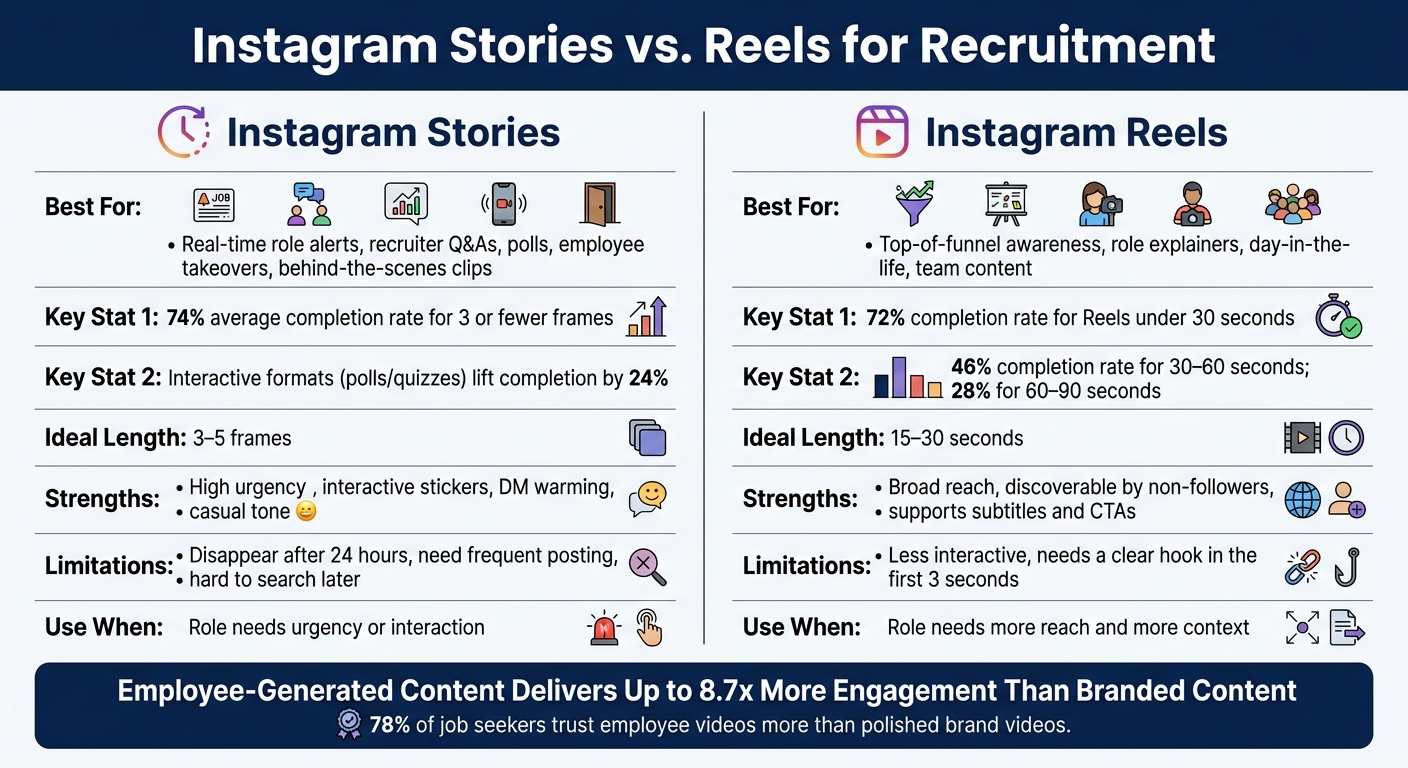
Instagram Stories vs. Reels for Recruitment: Which Format Wins?
1. Align Instagram Content With Hiring Goals Before You Post
Treat each Story or Reel as a hiring asset, not filler for your brand feed. Instagram hiring content often falls flat for one simple reason: it is not tied to a clear hiring goal. When each post links to a specific recruitment result, filling a hard-to-fill role, lifting applications before a closing date, or building trust in your employer brand, you can track what worked and change what did not.
Social-sourced hires can deliver 30 to 40% lower cost per hire and about 25% higher retention than more common sources[1][2]. But those gains do not come from posting for the sake of posting. They come from content built around a hiring result.
Define the Role, Audience, and Hiring Outcome First
Before you post, get clear on three things: the role, the audience, and the action you want people to take. Those answers should shape the message, tone, and visuals.
Content for engineering recruitment should lead with the tech stack and salary range in USD. Early-career content should show what the first 90 days look like. Sales and account management content should spell out commission structure and performance expectations from the start.
For U.S. roles, put the location up front, on-site in Columbus, OH or remote, U.S. only. That helps filter out poor-fit clicks and saves recruiter time later in the process. Addressing these challenges in recruitment early ensures a smoother candidate journey.
Match Content Types to Recruitment Goals
Different Story and Reel formats do different jobs. If you mix goals, you muddy the result. Once the goal is clear, choose the format that fits.
| Content Type | Recruitment Goal | Key Elements to Include |
|---|---|---|
| Job spotlight Reel (30 to 60 sec) | Drive qualified applications | Role title, location, salary range in USD, key requirements, CTA to apply |
| Employee clip (Story or Reel) | Build employer brand trust | Why they joined, what their day looks like, how performance is measured |
| Recruiter explainer (Reel) | Clarify the hiring process | Interview steps, timeline, how to prepare, what to expect |
| Urgent Story sequence (5 to 7 days) | Support time-sensitive hiring pushes | Deadline, number of open roles, simple application steps, link sticker |
Each format should answer the same questions your recruiter gets asked every week.
A good recruiter explainer Reel is a simple example. If it covers interview stages, timelines, and what people should expect, it can cut down repeat process questions in early screening calls. Your team can point people to the post instead of repeating the same answer over and over. That is time saved per candidate, not just a nice-looking social post.
Once the post has a clear hiring job, make the profile path just as clear.
sbb-itb-a23bd6a
2. Build a Careers-Focused Instagram Presence That Reduces Friction
Once a Story or Reel gets attention, your profile needs to make the next step obvious. Think of it as the handoff from content to application. People should land on your profile and immediately see that you’re hiring, what roles you need, and where to apply.
Set Up Your Bio, Link, and Highlights for Hiring
Your bio should say, in plain English, that you’re hiring. Name the role groups you’re recruiting for and list the locations. For example: "Hiring across the U.S. in engineering, product, and customer success." Keep it short. Keep it direct.
Your link in bio should send people straight to your careers page, not your homepage. If you’re hiring across several teams, a link-in-bio menu can work well. Options like Open Roles, How We Hire, and Benefits make sense, but the first option should always be the clearest route to apply. Add UTM parameters to each link so your recruiting team can track how many applications and hires come from Instagram, or use AI-powered recruitment tools to streamline the data.
Story Highlights can work like a mini careers site that stays live on your profile. Highlights such as Open Roles, Day in the Life, Benefits, and How We Hire let people browse on their own time, not only when a post is live. A How We Hire Highlight also gives candidates one place to review stages, timelines, and expectations.
Then your job is simple: make every post send people to the same application path.
Create a Clear Path From Instagram to Your Hiring Process
Each Story and Reel should push one action. Don’t split attention between DMs and applications. Pick one action for each piece of content, then repeat it clearly in the on-screen text, the caption, and either a link sticker for Stories or a bio reference for Reels.
Do not take applications in DMs. Send candidates to your careers page instead, so recruiters can review profiles in the ATS and keep the process visible. That matters for speed, reporting, and handoffs across the hiring team.
You should also tag Instagram applicants by source and role in your ATS. That way, your social content feeds straight into the hiring pipeline, and you can see what’s driving applications, interviews, and hires.
3. Use Stories and Reels Formats That Match How Candidates Watch Content
Once your profile is set up and your application path is clear, the content has to do the heavy lifting. Format matters. Stories and Reels do different jobs, and if you pick the wrong one, even a solid hiring message can fall flat.
With the profile path in place, your choice of format should match two things: how fast the role needs to move and how much explanation the role needs.
Instagram Stories: Real-Time Hiring Content for Urgency and Interaction
Stories work best when you need speed, interaction, and a more casual tone. If you’re hiring for a role that needs attention now, Stories are often the better fit.
A simple sequence works well: hook, role context, employee proof, next step. In the first frame, lead with something clear and urgent, such as a live work clip paired with a role opening. Use vertical 9:16 framing, decent lighting, and text that is easy to read. Keep text away from the edges, and keep overlays under 15 to 20 words per frame.[6]
The Story formats that most often lead to profile visits and qualified messages include role alerts, recruiter Q&As, polls, employee takeovers, and behind-the-scenes clips.[3][4] Interactive Story formats like polls and quick quizzes lift completion by 24% compared with non-interactive Stories.[9] They also make it easier for people to show interest before they commit to an application.
Keep the sequence short. Three to five frames is enough. Stories with three or fewer frames average about a 74% completion rate.[8]
| Format | Hiring Use Case | Strengths | Limits |
|---|---|---|---|
| Stories | Real-time role alerts, Q&As, polls, takeovers | High urgency, interactive stickers, DM warming, casual tone | Disappear after 24 hours; need frequent posting; hard to search later |
| Reels | Top-of-funnel awareness, role explainers, team content | Broad reach, discoverable by non-followers, supports subtitles and CTAs | Less interactive; needs a clear hook in the first three seconds |
Use Stories when the role needs urgency or interaction. Use Reels when the role needs more reach and more context.
Instagram Reels: Short-Form Video That Explains the Role and Shows the Team
Reels are a better fit for hiring awareness because they can reach people who do not follow you yet. That makes them useful when you need to widen the top of the funnel, especially for roles in SaaS, IT, engineering, or other hard-to-fill areas where reach matters.
The first three seconds do most of the work. Start with movement and a clear point, something that shows the role or team in action straight away. A live work moment usually does more than a static intro.
For most hiring Reels, stay in the 15 to 30 second range. Reels under 30 seconds average about a 72% completion rate, compared with 46% for 30 to 60 seconds and 28% for 60 to 90 seconds.[10] Add captions or subtitles too. A lot of viewers watch on mute, so the role title, location, and CTA need to land without sound.[5][6]
The Reel formats that connect most directly to hiring outcomes are below.
| Reel Format | Core Message | Expected Hiring Outcome |
|---|---|---|
| Day-in-the-life | Here’s what this role actually looks like day to day. | Better self-selection, fewer mismatched applicants |
| Meet-the-team | These are the people you’ll work with and what they care about. | Increased trust and culture fit interest |
| Role explainer | What this job involves, who succeeds, and how to apply. | Higher-quality applications, fewer basic questions |
| Employee testimonial | Why I joined, what’s kept me here, and how I’ve grown. | Stronger brand trust, more motivated applicants |
Every Reel should end with a CTA that fits the goal. If the aim is awareness, ask people to follow for more day-in-the-life content. If the aim is application intent, send them to the bio link while the role is still open.[7]
What tends to work best is not polished brand video. It is footage that feels believable.
Prioritize Real Content Over High Production Value
Simple footage usually beats studio-style content for hiring. That’s the part many teams miss.
Effective hiring content on Instagram often comes from real employee footage. Employee-shot content delivers up to 8.7x more engagement than standard branded content,[11] and 78% of job seekers say employee-generated videos are more trustworthy than polished brand-made videos.[12]
A team member filming a short clip at their desk or during a team stand-up can answer the biggest unspoken hiring question fast: does this workplace feel real? That kind of content helps people self-select before they apply, which can cut wasted screening time and improve applicant fit.
4. Run Instagram Hiring Content as a Repeatable Recruitment Process
Once your Stories and Reels feel natural, the next step is consistency. If posting is hit and miss, trust drops and reporting gets messy. The fix is simple: turn Instagram into a repeatable hiring process your team can keep running, even during hiring spikes.
Set a Posting Cadence and Content Mix Your Team Can Maintain
For lean teams, a practical starting point is 1 to 2 Reels per week and 3 to 5 Stories per week.
Across each month, aim to publish:
- role content linked to live openings
- one team-focused post
- one process explainer
Then look at the output. Is that cadence driving profile visits, clicks, and applications? If not, the issue usually is not effort alone. It is often the mix, timing, or fit with live hiring demand.
Track Metrics That Matter to Hiring Leaders
The numbers that matter tie back to candidate action and pipeline movement: Story completion rate, Reel watch time, profile visits after a post goes live, link clicks to your careers page, and applications sourced directly from Instagram.
Use UTM-tagged links in your bio and Story link stickers to track Instagram-sourced applications in your applicant tracking system, or even in a simple spreadsheet. Add a "How did you hear about this role?" field to your application form, and you get a second source of data.
Over time, you can also track whether process explainer Reels cut down on repeated candidate questions. That gives you a useful proxy for recruiter time saved. For hiring leaders, that matters far more than surface-level engagement.
When performance drops, the cause is usually one of three things: timing, relevance, or ownership.
Use Embedded Recruitment Support to Keep Content Aligned to Hiring Demand
One of the most common failure points with Instagram hiring content is the gap between what gets posted and what is happening in the hiring pipeline. A role gets promoted after it has already been filled. A high-priority vacancy gets little or no coverage because the team is stretched. Embedded recruitment support closes that gap.
When an experienced recruiter works inside your team, they can flag priority roles, share accurate details before anything goes live, and track candidate response in real time. That feedback loop keeps content tied to real hiring demand instead of running on autopilot.
Rent a Recruiter places experienced recruiters directly into scaling teams to keep hiring content aligned with live demand and support a more structured, predictable process.
Conclusion: Keep Instagram Hiring Content Simple, Consistent, and Tied to Hiring Outcomes
Instagram hiring content works when your strategy, profile setup, content format, and posting rhythm all point to the same hiring goal.
The formula is simple. Match content to the role. Remove friction from the application path. Keep posting steady. Then use the format that fits the hiring job in front of you.
This matters more than many teams think. Around 65% of candidates check a company’s Instagram before applying[1], and roughly 18% have dropped out of applying after seeing a company’s Instagram account[13]. That means your Instagram presence is shaping hiring decisions right now, whether you’re managing it with intent or just letting it tick along.
The teams that get the best hiring return from Instagram stay focused on three things: purpose, consistency, and a clear route to apply. And when you review performance, keep it tied to business impact. Measure essential recruitment metrics that move hiring forward: link clicks, applications sourced from Instagram, and whether people from that channel progress to interview. Vanity metrics might look nice in a report, but they tell you very little about hiring value.
If keeping Instagram content lined up with live hiring demand feels like one more thing on an already full plate, Rent a Recruiter can place experienced recruiters into your hiring process. Companies often cut hiring costs by up to 70% while saving more than 80 hours per month in internal hiring and admin time. Book a call to see how it could support your hiring goals.
FAQs
How do I know if Instagram is actually driving hires?
Look past likes and views. Track source properly with UTM links in your bio or content, then connect each post to clicks, completed applications, and qualified hires inside your ATS or CRM.
From there, compare application volume, interview-to-offer ratios, and time-to-fill for candidates sourced through social. If those candidates move through the funnel well and become 90-day hires, Instagram is doing more than driving attention. It’s helping you fill roles.
What should I put in an Instagram job post?
Put real people and real work ahead of polished brand content. Reels and Stories work well here because they show what the job actually feels like, what the team is like to work with, and what the day-to-day setting looks like.
Keep the content simple. Themes like "Why I joined" or "What my team actually does" are easy to make and easy to watch. They also give people a clearer picture of the role before they apply, which can save your team time and lead to better-fit applicants.
Make sure each post includes a clear, role-specific call to action. For example: "See our Graphic Designer opening" or "link in bio."
Should I use Stories or Reels for hiring?
Yes. Instagram can be a strong hiring channel, especially if you want to show what it’s like to work at your company and build a sense of connection through visual content.
Stories and Reels tend to work best. You can use them to share day-in-the-life clips, behind-the-scenes moments, and team events. That gives people a clearer view of your workplace before they ever apply.
For hiring leaders, that matters. A better first impression can lift application quality, cut drop-off, and save time later in the process. It can also help build trust with Millennial and Gen Z talent, who often want to see the people, pace, and working style behind the employer brand.


