We treat AI in tech hiring as a business investment: it should save time without lowering your hiring bar. Start with clear role criteria, named decision owners, and a small pilot targeting 20% less manual screening time and at least 90% agreement with an expert-reviewed shortlist. These are test targets, not promised results.
Our checklist helps you:
- Set hiring baselines and define where people retain control.
- Test tools, data access, ATS connections, and manual fallback.
- Check recommendations for errors and barriers before launch.
- Measure total costs, recruiter time, and hiring outcomes before expanding.
Time saved is not automatically money saved. We count setup, training, and human review too, so you can decide whether to <u>launch, pause, or expand</u> based on results.
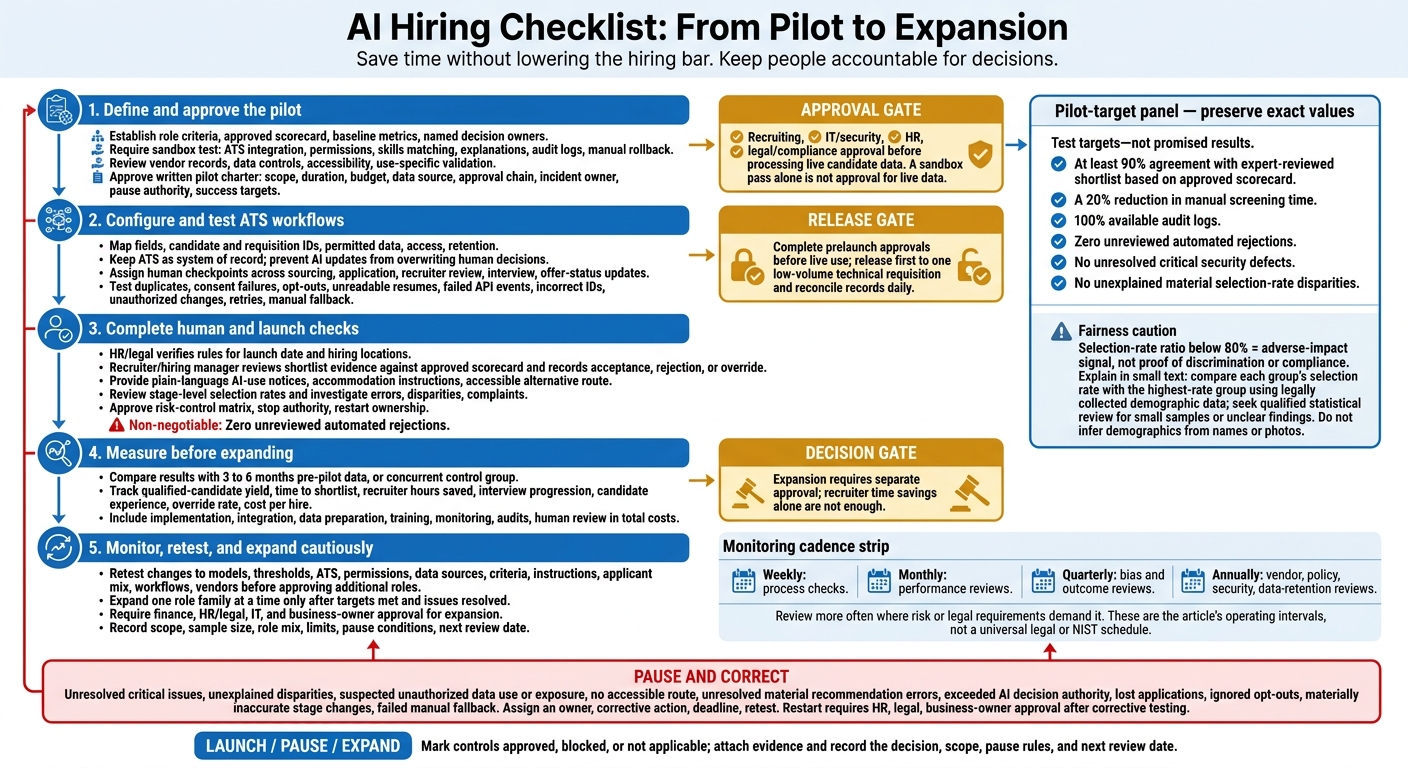
AI Hiring Checklist: From Pilot to Expansion
Check Tool Fit and Plan the Pilot
Use your approved scorecard and baseline metrics to decide whether the tool is ready for a pilot.
Test ATS Connections and Skills Matching
Require a sandbox test before purchase. Test the full workflow and keep dated results, defects, and approvals. Your recruiting lead approves workflow fit; IT/security approves technical readiness.
| Required capability | Acceptance test | Evidence | Owner | Status |
|---|---|---|---|---|
| ATS integration and API access | Create, update, and move a candidate; confirm synchronized stages and duplicate handling | API logs, field map, screenshots | IT/security | Not started |
| Permissions and formats | Test role-based access, revoke access, and process resumes, profiles, attachments, and structured fields without truncation | Access results, input/output comparison | IT/security | Not started |
| Skills matching | Compare equivalent terminology, transferable skills, and negative cases against expert labels | Matching results, reviewer decisions | Recruiting lead | Not started |
| Explanations and reporting | Trace recommendations to resume evidence; reconcile stage counts with the ATS | Explanation samples, reconciliation report | Recruiting lead | Not started |
| Audit logs and rollback | Export inputs, versions, recommendations, overrides, and timestamps; disable AI and continue manually | Audit export, rollback record | IT/security | Not started |
Test semantic matching, not just keywords. Include Go and Golang, plus PostgreSQL optimization and relational database performance. Record precision, recall, and false negatives across repeated runs. Check the context: related terms alone do not prove equivalent experience.
A passing sandbox test is not approval to use live candidate data. Complete the data-controls and vendor review first.
Review Data Controls and Vendor Records
Get written data controls for your specific hiring use case. Request a data-flow diagram showing collection, hosting, sharing, subprocessors, transfers, model-training use, and human access. Document access controls, retention, verified deletion, backups, encryption, and incident notification.
Request model versions, intended use, limitations, validation populations, update and change-notification policies, explanation features, and accommodation support. Ask for accuracy, consistency, reliability, and bias-testing records that apply to your hiring use and population, not a generic marketing summary. Keep IT/security review separate from HR and legal review.
If the vendor claims bias testing, request selection rates, comparison groups, sample sizes, dates, methods, limitations, and remediation results.
If the vendor claims accessibility, test keyboard navigation, screen-reader compatibility, captions, alternative assessment methods, and accommodation workflows. You remain responsible for evaluating selection tools. Vendor assurances do not transfer that responsibility.
Set Pilot Limits and Success Targets
Use the vendor review to set a narrow pilot with clear pass/fail thresholds.
Approve a written pilot charter before testing. Define the scope, duration, budget, data source, approval chain, incident owner, pause authority, and success targets before using live candidate data.
Start with approved synthetic or suitably de-identified historical records. Require recruiting, IT/security, HR, and legal/compliance approval before processing live candidate data. Restrict access to approved pilot staff or on demand recruitment partners.
Set these targets before results are known:
- At least 90% agreement with an expert-reviewed shortlist based on the approved scorecard.
- A 20% reduction in manual screening time.
- 100% available audit logs.
- Zero unreviewed automated rejections.
- No unresolved critical security defects.
- No unexplained material selection-rate disparities.
sbb-itb-a23bd6a
Set Up Sourcing and ATS Connections
Once the pilot is approved, connect only the data and ATS events needed for live use.
Organize Candidate Data and Limit Access
Create a field map before enabling synchronization. Keep required skills, preferred skills, certifications, supporting evidence, and lawful, job-related disqualifiers separate. Define each field’s owner, source, permitted values, and retention rule. Store AI recommendations, recruiter decisions, and monitoring data in separate datasets.
Write only to approved fields and prevent AI updates from overwriting human decisions. Keep the ATS as the system of record for status and disposition. Store override reasons with recruiter decisions, and keep monitoring data out of selection logic.
Use stable candidate and requisition IDs, not email alone, so updates reach the right record.
Add Human Checks to ATS Stages
Map every ATS event and apply approved sourcing rules. Document allowed sources and job-related filters. Exclude age-coded language, name-based inferences, and geographic restrictions that the role does not require. Require recruiter approval before outreach.
For candidate creation, application receipt, stage changes, interviews, withdrawals, and offer updates, document the triggers, transferred fields, destinations, owners, and expected results. Assign a human checkpoint to every event before release.
| ATS stage | AI action | Data passed | Human checkpoint | System output | Manual fallback |
|---|---|---|---|---|---|
| Sourced | Suggest potential matches and draft outreach | Public or consented profile data, approved skills criteria | Recruiter approves search logic and outreach list | Ranked prospects and evidence | Manual search and recruiter-led outreach |
| Applied | Extract resume information | Resume, application fields, job ID | Recruiter verifies required-skill extraction | Structured candidate profile | Manual resume review |
| Recruiter review | Compare evidence with criteria | Required skills, preferred skills, supporting evidence | Recruiter confirms advance or reject decision | Recommendation and explanation | ATS review without AI score |
| Interview | Summarize approved notes | Interview rubric and notes approved for use | Interviewer verifies summary and rating | Structured interview record | Enter rubric manually |
| Offer status updated | Update hiring record | Candidate ID, requisition ID, offer status | Recruiting operations confirms match and permission to update | ATS status update | Manual status correction and reconciliation |
Before going live, test error handling as rigorously as normal workflows.
Test Failure Scenarios Before Release
Test failures, retries, and recovery, not just successful transfers. In the sandbox, test duplicate candidate profiles, missing or expired consent, opt-outs, unreadable resumes, failed or duplicate API events, incorrect requisition IDs, and stage changes made without permission.
Confirm that retries cannot create duplicate applications. Verify that opt-outs stop future AI processing and route candidates to manual review without deleting their applications.
Release first to one low-volume technical requisition. Reconcile candidate IDs, application counts, stage changes, consent statuses, and AI outputs daily.
Pause the release if applications are lost, restricted data is exposed, stage changes are materially inaccurate, opt-outs are ignored, or manual fallback fails.
The recruiting operations lead and IT owner should retain the approved data dictionary, field map, access-control register, configuration versions, test scripts, sandbox results, error logs, incident records, override reasons, release approvals, and daily synchronization checks.
Complete Human Review and Launch Checks
After setup, integration, and pilot testing, complete these checks before using AI on live requisitions.
Make legal review a launch requirement. Have HR and legal verify the federal, state, and local rules in effect for your launch date and hiring locations. Check notices, audits, assessments, and limits on automated decisions. For covered tools, New York City Local Law 144 requires an independent bias audit within the preceding year and publication of its summary.[6] Vendor assurances do not replace these checks.
Review Shortlists and Notify Candidates
☐ Keep human review as the final gate for shortlist decisions. A recruiter or hiring manager must check the evidence behind each recommendation against the approved scorecard. Record whether each recommendation was accepted, rejected, or overridden.
Prepare plain-language AI-use notices, accommodation instructions, and an accessible alternative route. Provide a non-voice option for candidates with speech or hearing disabilities. Retain notices, delivery records, review notes, and accommodation procedures.[1][4][5]
Check for Bias and Investigate Problems
Check whether the tool performs consistently across candidate groups before expanding its use, considering the broader impact of AI on recruitment.
☐ Compare selection rates at each stage using legally collected demographic data. Calculate each group’s selection-rate ratio against the group with the highest rate. A result below 80% is an adverse-impact signal, not proof of discrimination or compliance. Get qualified statistical review when samples are small or findings are unclear.[1][2]
Investigate repeated skills-matching errors, unexplained exclusions of people with less conventional backgrounds, and discrimination or accessibility complaints before expanding. Re-review affected applications, record the cause and correction, and retest. Do not infer demographic characteristics from names or photos.
Approve Risk Controls and Pause Rules
☐ Approve a prelaunch risk-control matrix. Name the launch approvers, who can stop use, and who owns the restart. Require HR, legal, and business owners to approve any restart after corrective testing.
| Risk | Trigger | Preventive control | Owner | Evidence | Escalation deadline | Pause condition |
|---|---|---|---|---|---|---|
| Bias | Selection-rate warning or discrimination complaint | Stage-level adverse-impact analysis and qualified review | HR compliance | Methodology, results, investigation | Within five business days | Unexplained disparity |
| Privacy | Unapproved data use or disclosure | Data-use terms and retention limits | Privacy lead | Terms and incident findings | Immediately | Suspected disclosure or reuse without permission |
| Security | Access without permission | Restricted permissions and security checks | Security lead | Access review and incident findings | Immediately | Candidate data may be exposed |
| Accessibility | Candidate cannot complete assessment | Accessibility testing and usable alternative | HR lead | Test and accommodation results | Immediately | No accessible route |
| Inaccurate recommendations | Repeated false negatives or unsupported matches | Evidence-based human review | Recruiting lead | Re-review findings | Before further affected decisions | Unresolved material errors |
| Automated decision overreach | AI makes a decision reserved for humans | Explicit decision boundaries | Recruiting operations lead | Decision audit trail | Immediately | Decision authority exceeded |
Use the matrix to assess whether the pilot can move into full monitoring.
Measure Results Before Expanding
After the pilot, compare results with your baselines before approving a broader rollout.
Expansion needs a separate approval decision after the pilot review. Use the review to decide whether AI should expand. The recruiting lead coordinates it, finance validates total costs, HR/legal checks fairness and compliance, and IT checks security and integration stability. Recruiter time savings alone are not enough.
Compare Pilot Results With Baselines
Compare results with 3 to 6 months of comparable pre-pilot data, or a concurrent control group when volume allows. Match role family, seniority, location, applicant source, and recruiter team. Use the pilot charter’s scorecard and enter actual figures before approving expansion.
| Metric | Definition or formula | Baseline | Pilot result | Target | Source / review frequency | Corrective action |
|---|---|---|---|---|---|---|
| Qualified-candidate yield | Qualified candidates ÷ applicants reviewed | Pre-pilot % | Pilot % | No material decline | ATS and human-verified scorecards / weekly | Check rejected applications and criteria |
| Time to shortlist | Median days from application receipt to approved shortlist | Pre-pilot days | Pilot days | Preset reduction | ATS timestamps / weekly | Identify delays and sync errors |
| Recruiter hours saved | Comparable baseline hours − pilot hours, including human review | Baseline hours | Pilot hours; report difference | Preset hours saved | Time logs / monthly | Check whether work shifted to other staff |
| Interview progression | Candidates interviewed ÷ shortlisted candidates | Pre-pilot % | Pilot % | No material decline | ATS / weekly | Review ranking against interview evidence |
| Candidate experience | Average survey rating on the same scale | Pre-pilot score | Pilot score | No material decline | Candidate surveys / each cohort | Investigate feedback and abandonment |
| Override rate | Human overrides ÷ AI recommendations | Not applicable before AI | Pilot % | Below investigation threshold | Decision logs / weekly | Check causes; do not discourage justified overrides |
| Cost per hire | Total recruiting costs ÷ hires | Pre-pilot $/hire | Pilot $/hire | At or below target | Invoices and internal labor records / monthly | Review setup, license, and review costs |
Record each metric’s owner, reporting period, and sample size alongside the table. Break results down by role difficulty and volume, and account for changes in pay, staffing, and the labor market.
Finance should count implementation, integration, data preparation, training, monitoring, audits, and human review, not just license fees. Freed-up recruiter capacity is not automatically cash savings.
Schedule Reviews and Retest Changes
Schedule weekly process checks, monthly performance reviews, quarterly bias and outcome reviews, and annual vendor, policy, security, and data-retention reviews. Review more often where risk or legal requirements demand it. Train recruiters and hiring managers to use AI scores as inputs, not hiring decisions. NIST recommends periodic reassessment but sets no single review interval.[3][7][8]
Retest before approving additional roles after any change to the model, thresholds, ATS, permissions, data sources, criteria, recruiter instructions, applicant mix, workflow, or vendor. Keep the same approval, access, and human-review controls during retesting.
Use representative test records to check ranking consistency, missed qualified candidates, access controls, error rates, overrides, and human-review steps. Pause affected workflows if material issues appear.
Expand one role family at a time, only after targets are met, issues are resolved, and finance, HR/legal, IT, and the business owner approve. Record the approved scope, sample size, role mix, limits, pause conditions, and next review date.
Conclusion: Confirm Readiness and Next Steps
Use this final review to decide whether your pilot is ready to launch, pause, or expand.
☐ Ask each owner to mark every control as approved, blocked, or not applicable, with evidence attached. Store all sign-offs in the completed launch packet.
☐ For every blocked control, assign an owner, corrective action, deadline, and retest before launch. Do not launch or expand while critical issues remain unresolved.
If reviewer capacity is holding you back, Rent a Recruiter embeds experienced recruiters into your team to manage hiring end to end and keep the process visible.
☐ Record the decision, scope, pause rules, and next review date in one log. Share it with recruiters, hiring managers, and relevant privacy or legal stakeholders. Ensure your AI policy for ethical recruitment is updated to reflect these decisions.
FAQs
Which hiring tasks should we automate first?
Start with one repetitive admin task that takes up your team’s time. Choose something with clear rules, low decision risk, and human oversight, such as interview scheduling, candidate status updates, feedback reminders, or reporting.
Don’t automate hiring decisions or resume ranking at this stage. Run a small pilot and measure time saved, turnaround speed, and hiring quality. Keep a person accountable for screening, assessment, and final selection so decisions remain accurate and candidates receive fair treatment.
How can we validate AI with few applicants?
Track results at each hiring stage over a longer period, rather than relying on total counts. Set a baseline using data from a similar number of roles so you can make a like-for-like comparison.
Use structured, skills-based scorecards and trained reviewers who assess candidates independently. Compare their scores with AI recommendations, then review and resolve any differences.
Keep manual screening alongside AI to catch candidates the system may miss. Retain human oversight of final hiring decisions.
What if AI saves time but increases costs?
If AI cuts admin time but increases total costs, count the hours saved as added team capacity, not financial savings. Your business case rests on using that time to handle more hiring or improve engagement. Don’t assume it means lower payroll.
Compare total first-year costs in U.S. dollars against your baseline metrics. Include software, setup, integration, training, monitoring, and human review time.