We recommend choosing AI recruitment tools by your hiring bottleneck, not the longest feature list. Before buying, identify where your team loses time: sourcing, screening, scheduling, or managing the hiring process.
We compare 11 tools across sourcing, candidate evaluation, workflows, integrations, governance, and total cost. For your shortlist, the question is simple: will this reduce recruiter admin, improve qualified interviews, or lower cost per hire?
- ATS and CRM tools: Manage candidate records, hiring stages, and reporting.
- Sourcing tools: Find specialist talent and reconnect with past applicants.
- Skills-matching platforms: Match existing candidate data to open roles.
- Assessment tools: Support consistent screening and work-sample reviews.
- Scheduling tools: Cut calendar coordination.
- Conversational tools: Handle high-volume applications and screening questions.
Quick Comparison
| Tool category | Hiring problem it addresses | Business measure to track |
|---|---|---|
| ATS and CRM | Scattered records and manual updates | Admin hours per hire |
| Sourcing | Too few qualified candidates | Cost per qualified interview |
| Skills matching | Past applicants are hard to search | Hires from existing records |
| Assessment | Inconsistent screening | Review time and interview conversion |
| Scheduling | Delays arranging interviews | Scheduling time and no-show rate |
| Conversational hiring | High-volume intake | Application completion and recruiter time |
Our starting point: test one technical team for 30 to 60 days (such as an engineering department). Compare results with your current process, keep people responsible for hiring decisions, and check that systems exchange data correctly.
<u>Compare the full cost, not just the subscription.</u> Include setup, integrations, training, usage fees, and recruiter time. The comparison below helps you decide which category deserves a place in your hiring budget.
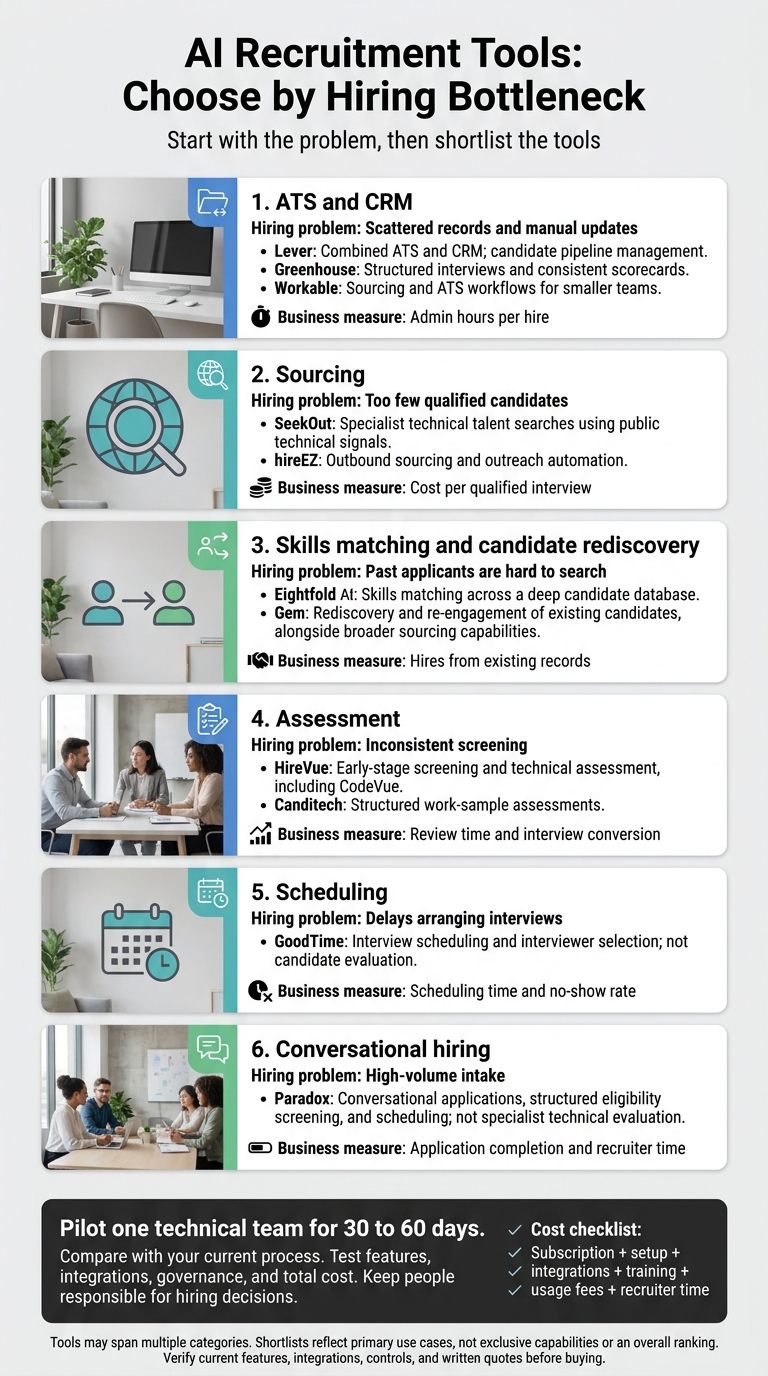
AI Recruitment Tools: Choose by Hiring Bottleneck
3 Best Hiring Software for Small Business (2026)
sbb-itb-a23bd6a
1. Lever
Lever combines ATS and CRM functions in one system. It suits teams that want one pipeline for sourcing, tracking, and nurturing candidates, rather than a tool built mainly for sourcing or assessments.[4][5]
AI Sourcing and Candidate Evaluation
Lever’s Talent Fit uses AI matching to suggest candidates who fit a role and displays matching signals in their profiles.[4][2] For engineering, product, and infrastructure hiring, compare recommendations with role-specific requirements and recruiter assessments. Check for false positives, missed candidates, and possible bias before relying on the results.
Recruiting Workflows and Integrations
Matching only helps if your hiring process works. Lever supports configurable hiring stages, scorecards, nurture campaigns, and pipeline reporting. It also reports more than 400 integrations.[5][6]
During your pilot, test the full process from job approval to offer: posting, resume collection, scheduling, feedback, approvals, and offer management. Check HRIS, payroll, assessment, background-check, calendar, and collaboration integrations, including how they handle duplicate profiles and data syncing. Use separate scorecard criteria for coding, system design, and collaboration so your team can assess each skill clearly.
Governance and Setup
Check access, data handling, and migration before rolling out the system. Request documentation on access controls, audit logs, data retention, deletion workflows, encryption, candidate consent, and AI explainability.
Start with one or two technical roles. Test migration, communication history, and access rights before expanding usage. If you recruit internationally, review data-residency rules.[7]
Pricing and Total Cost
Once setup and compliance checks pass, compare the total cost with your hiring volume. Pricing is custom. Market estimates range from about $6,000 per year for smaller teams to $63,000 to $144,000+ per year for larger organizations. These are estimates, not list prices.[5][3]
Confirm which AI features, integrations, migration services, and support are included. Budget separately for implementation, training, and system administration.
2. Greenhouse
AI Sourcing and Candidate Evaluation
Greenhouse works best as an evaluation-first ATS, rather than a sourcing or coding-test engine. Interview Kits give interviewers questions, instructions, and time limits. Attribute-based scorecards help them assess the same skills consistently.
Native AI drafts job descriptions, summarizes resumes, and suggests interview questions. Sourcing and coding tests require integrations. For tech teams, Greenhouse is a better fit when consistent interviews matter more than AI sourcing depth.
Recruiting Workflows and Integrations
Focus Attributes divide skills across interviewers to reduce repeated questions and gaps in assessment. Define them during job setup so they feed into scorecards.
Greenhouse supports more than 450 prebuilt integrations. Set up assessment-stage triggers to send tests automatically and cut manual admin.
Governance and Setup
Interview kits need upfront configuration and interviewer training. Agree on what each rating means, and ask interviewers to support scores with evidence rather than impressions.
Structured scorecards support consistency, but they do not eliminate bias. Use AI resume summaries to help with reviews, not to replace checks of the original resume.
Pricing and Total Cost
Greenhouse uses custom pricing based on company size. Alongside checking workflow fit, confirm which AI features, assessment add-ons, and implementation costs are included in your quote.
3. Eightfold AI
AI Sourcing and Candidate Evaluation
Eightfold AI’s Talent Intelligence Platform uses large-scale career-path data to match skills through adjacency and density. It assesses fit beyond keywords, helping your hiring team spot matches that keyword searches may miss.
Recruiting Workflows and Integrations
Eightfold adds talent intelligence to your ATS, indexing past applicants and bringing overlooked matches back into view, including silver-medalist candidates. It’s most useful when you have a deep candidate database, helping your team find potential hires among people who have already applied.
4. SeekOut
SeekOut searches public technical signals rather than matching internal talent data. Its focus is finding specialist talent outside your business.
AI Sourcing and Candidate Evaluation
SeekOut’s Deep Search indexes GitHub, Stack Overflow, patents, and research papers to find specialist technical talent. Recruiters can search by programming language, expertise, and public work samples. The platform also offers diversity filters. This aligns with the broader impact of AI on recruitment and how it reshapes sourcing strategies.
This makes it better suited to niche technical sourcing than managing the full recruitment cycle.
Recruiting Workflows and Integrations
Use a live pilot to confirm ATS sync, outreach automation, and data flow. Check how these fit your team’s hiring process before committing.
Governance and Setup
Before rollout, check how current profiles are, how corrections work, and what deletion rights and access controls are available.
Pricing and Total Cost
Get a vendor-specific quote, then assess total cost against sourcing volume, seat count, and implementation.
5. hireEZ
AI Sourcing and Candidate Evaluation
hireEZ searches more than 40 open-web sources and surfaces existing candidates in your ATS. Its strongest use is outbound sourcing and outreach automation, rather than full-cycle recruiting.[8] For companies needing broader support, outsourcing recruitment and talent acquisition can manage the entire process.
Test it against technical requirements such as Python, React, Kubernetes, and ML. Check how well it matches equivalent skills, related experience, seniority, location, work authorization, and industry fit.[8][9]
The business test is simple: less recruiter review time and more qualified replies. Use the results only if your team can reliably track outreach, replies, and ATS activity.
Recruiting Workflows and Integrations
Automated email, SMS, and InMail follow-up sequences can speed up outreach, keep it consistent, and cut manual work.[8] Before rollout, check ATS syncing, duplicate handling, and activity logging in your setup.[8][10]
Set clear outreach approval rules, follow-up limits, and opt-out processes. Reliable logging should be part of that setup, not an afterthought.[8]
Governance and Setup
Start with one or two active searches before expanding. Check employer history, dates, contact accuracy, and duplicate records. Request written details on data licensing, retention, deletion, access controls, and U.S. privacy rules.[8]
Measure qualified replies and interview conversion, rather than email opens alone, to see whether outreach is moving hiring forward.[8]
Pricing and Total Cost
Pricing is quote-based. Request an itemized breakdown covering seats, contact allowances, integrations, onboarding, and messaging.[8][11]
hireEZ suits teams with repeated outbound hiring needs. If you hire only occasionally, the setup and oversight may not justify the cost.[8][11] If outbound sourcing is not your bottleneck, the next tools address workflow, evaluation, and scheduling.
6. Gem
AI Sourcing and Candidate Evaluation
Gem helps you put your existing candidate database to work. Beyond candidate engagement, it focuses on finding past applicants, reconnecting with them, and moving them through your hiring funnel.
Its AI Sourcing Agent searches 800M+ profiles alongside ATS and CRM data to match past candidates to role criteria. Application review, fit scoring, and fraud detection support screening. Treat scores as prioritization signals, not hiring decisions. Check the criteria and review strong applicants who appear lower in the rankings. [12][13][15]
Gem reports that Scale made more than 12 engineering hires in three weeks, with 70% of those roles filled by candidates already in its pipeline. These results are vendor-reported, not guaranteed. [20]
Gem is best suited to teams with an existing candidate database they can draw on to fill roles.
Recruiting Workflows and Integrations
Gem’s value depends on how well candidate rediscovery connects with your ATS workflow. It advertises connections to Greenhouse, Workday, Lever, iCIMS, and SAP SuccessFactors. Check supported fields, sync behavior, duplicate handling, and two-way data flow. Confirm whether each integration is bidirectional, real-time, or one-way. [14][16][17]
Personalized email, SMS, and InMail sequences automate outreach, while campaign reporting helps you track results. Gem ATS also provides core ATS workflows and job posting. Confirm what’s included and what costs extra. Test whether the setup cuts manual work rather than leaving your team maintaining duplicate systems. [14][15]
Governance and Setup
Clean and segment candidate records before switching on rediscovery. Require documented permissions, audit logs, data provenance, consent and opt-out handling, retention and deletion rules, and clarity on how data is used for model training.
Audit rankings for disparate impact, and reconcile funnel dashboards with ATS records before using them for forecasts. With data quality and controls checked, assess whether the time saved justifies the rollout cost. [12][15][20]
Pricing and Total Cost
Pricing is custom. Use staffing-plan rates only as a reference. Your budget should cover migration, integrations, data cleanup, messaging, training, compliance review, and optional AI modules.
For recurring technical hiring, use a pilot to measure recruiter time saved and hiring results against the full cost before expanding licenses. [18][19][20]
7. Workable
AI Sourcing and Candidate Evaluation
Workable combines sourcing and ATS workflows, sitting between specialist sourcing tools and workflow-only platforms. Its AI Recruiting Agent searches 400M+ profiles, scores inbound applicants against 14 criteria, explains each match, and automates outreach. Searchable talent pools also help your team find past applicants again.
Set must-haves, such as language, location, and seniority, before switching on automated outreach. The main value for your team is moving qualified candidates directly into the hiring pipeline. [23][25]
Recruiting Workflows and Integrations
For smaller tech teams, Workable brings sourcing, screening, and ATS workflow automation into one system that can support hiring growth. It distributes jobs to 200+ job boards, including LinkedIn and Indeed, helping recruiters spend less time coordinating work rather than simply posting jobs faster.
Use source-performance and stage-conversion reports to see which channels deliver qualified candidates, not just more applications. Workable lists 270+ integrations, though published counts vary. Check that your plan includes the connectors your team needs. [21][22][23][25]
Governance and Setup
Set screening criteria and approval permissions before enabling automation. Test recommendations on one recurring technical role, and require human approval for advancement, rejection, and final selection decisions.
During the trial, check retention settings, API access, and data exports. Confirm whether reports can separate engineering roles by seniority and location. These controls help keep hiring decisions consistent as volume grows.
Pricing and Total Cost
Workable’s mix of tools suits small teams, but whether it pays off depends on hiring volume. Published pricing starts at $299 per month ($3,588 annually). Each ATS plan includes 3,000 AI credits. Get credit usage rules, fair-use limits, and billing terms confirmed in writing.
Check add-on costs for job-board fees, texting, video interviews, and assessments. Include migration and training in your budget, too. If you hire only occasionally, the subscription and setup costs may be hard to justify. [24]
8. HireVue
HireVue handles early-stage screening and technical assessment, while workflow tools manage the hiring pipeline.
AI Sourcing and Candidate Evaluation
Find My Fit matches candidates’ skills and interests to internal roles. On-demand video interviews collect responses to preset questions, while game-based assessments measure memory, attention, and problem-solving.
For technical hiring, CodeVue provides live coding environments, technical multiple-choice questions, and asynchronous coding challenges that reviewers can play back. Use these tools for early screening. Keep architecture discussions and senior-level technical judgment in human interviews.
Recruiting Workflows and Integrations
HireVue works alongside your ATS. Integrations with Workday, SAP SuccessFactors, Oracle Taleo, and Greenhouse sync assessment scores and interview recordings into candidate profiles.
ATS stage changes can trigger assessments automatically. Scheduling tools coordinate calendar availability through SMS and email, while HireVue Live supports follow-up interviews for deeper technical discussion.
This setup helps you move through screening faster while keeping final technical judgment in the interview process.
Governance and Setup
HireVue provides AI Explainability Statements that explain model recommendations. Industrial-organizational psychologists build its assessments, which are audited for adverse impact.
Check the requirements that apply to your hiring process, including NYC Local Law 144. Use these assessments to support early screening, not as a proxy for technical skill.
Pricing and Total Cost
HireVue uses quote-based pricing. Annual costs vary by employee count, hiring volume, and selected modules, including whether you need CodeVue, game-based assessments, or the full suite.
9. GoodTime
Once screening is complete, interview scheduling can become your next bottleneck.
AI Sourcing and Candidate Evaluation
GoodTime automates interview scheduling and interviewer selection. It does not source or assess candidates, so its AI use case centres on scheduling rather than candidate evaluation.
Recruiting Workflows and Integrations
GoodTime matches interviewers to candidates based on skills, seniority, and availability. Calendar sync then supports scheduling for multi-stage and panel interviews, reducing manual coordination.
Governance and Setup
Before automating scheduling, define interviewer skills, seniority rules, and panel templates. These settings guide interviewer selection and how panels are assembled.
Pricing and Total Cost
Pricing is quote-based. Request the total price, implementation fees, and any integration charges in writing so you can assess the full cost before committing.
10. Paradox
AI Sourcing and Candidate Evaluation
Paradox supports the intake stage of high-volume hiring, automating screening before recruiter review. Its assistant, Olivia, handles applications and structured screening through SMS, WhatsApp, Messenger, and web chat.[27][28]
It checks predefined requirements such as availability, location, work authorization, certifications, experience, and shift preferences.[29][31] Its best fit is high-volume, standardized hiring, not technical assessment or sourcing scarce specialist talent.[32]
Recruiting Workflows and Integrations
Qualified applicants can move straight into interview scheduling, reducing manual coordination.[26][28] Paradox connects with Workday, SAP SuccessFactors, and ADP Workforce Now. Before rollout, test whether screening outcomes, interview bookings, withdrawals, and status changes sync correctly with your ATS.[27][28][30][32]
Keep its role clear: front-end workflow automation, not technical evaluation.
Governance and Setup
For an intake tool, oversight starts with screening rules and candidate communications. Approve job-related rules, messaging consent, and retention periods before launch.
Pilot a limited set of roles to check screening accuracy, accessibility, drop-off, and rejection rates. Define when a recruiter should step in, and keep technical skills assessments separate from eligibility checks.
Pricing and Total Cost
Pricing is quote-based; no reliable public list price was identified. Request a quote that covers implementation, ATS integrations, messaging volume, support, and recurring administration.
Compare the full cost with measured scheduling time saved, application completion, and interview no-show rates, rather than relying on automation claims alone.
11. Canditech
AI Sourcing and Work-Sample Assessment
Canditech adds structured pre-hire assessments, not more sourcing capacity. Its job simulations cover coding, product, data, and IT tasks. AI-assisted scoring of written responses helps your team review results consistently.
Recruiting Workflows and Integrations
Before committing, confirm that test results sync with your ATS. Check stage syncing, score exports, and candidate status updates in Greenhouse, Lever, Workable, or Ashby to avoid manual updates.
Governance and Setup
Before launch, check human review, accessibility, anti-cheating flags, and data privacy controls. These checks help your team assess applicants fairly and protect test integrity.
Pricing and Total Cost
Pricing is not publicly listed. Request a written quote and confirm what’s included. Budget for hiring-manager review time, not just the platform fee.
Features, Integrations, Governance, and Costs
Use the tables below to compare tool fit, workflow risk, and total cost for technical hiring. They summarize reported capabilities and pricing, so verify current scope, integrations, and costs before you buy.
AI Sourcing and Candidate Evaluation
AI can rank or summarize candidates, but people still make the hiring decision. For technical roles, check recommendations against code, portfolios, work samples, and structured interview feedback.
| Tool | Evaluation check |
|---|---|
| Lever | Evidence view and override controls |
| Greenhouse | Scorecard access and decision history |
| Eightfold AI | Explanations for inferred-skill matches |
| SeekOut | Source-profile accuracy and ranking criteria |
| hireEZ | Agent-generated shortlist quality |
| Gem | Application-review criteria and overrides |
| Workable | Recruiter review before rejection |
| HireVue | Assessment validity for each technical role |
| GoodTime | Separation of scheduling from selection decisions |
| Paradox | Recruiter escalation for screening exceptions |
| Canditech | Reviewer access to underlying responses |
Check which features are native and which need integrations. Missing evidence does not mean a capability is absent.
Recruiting Workflows and Integrations
An integration list does not prove reliable sync. Test the same technical requisitions across tools. Track duplicate records, failed updates, and sync delays to see where your team may face extra admin.
| Tool | Integration or workflow gap to test |
|---|---|
| Lever | Assessment-result and calendar-update sync |
| Greenhouse | Feedback, consent, and disposition sync |
| Eightfold AI | ATS ownership of records and stages |
| SeekOut | Export duplicates and status updates |
| hireEZ | Agent actions logged in the ATS |
| Gem | Duplicate CRM records and conflicting reports |
| Workable | Plan-specific API and connector access |
| HireVue | Score, recording, and feedback transfer |
| GoodTime | Rescheduling conflicts and interviewer changes |
| Paradox | Conversation records at recruiter handoff |
| Canditech | Failed result transfers and access permissions |
Check two-way sync for the records and fields your team uses.
Once you have checked feature fit and integrations, review the controls that could affect rollout.
Governance and Setup
These materials do not establish vendor compliance. Before using a tool for engineering, product, data, or IT hiring, verify accessibility, auditability, and candidate review controls.
Get legal advice on applicable federal, state, and local requirements. These include Colorado AI obligations and, for covered NYC tools, annual independent bias audits, published audit summaries, and candidate notices.[33][34][35][36]
| Tool | Priority governance check |
|---|---|
| Lever | Permission-controlled decision history |
| Greenhouse | Auditable scorecard access |
| Eightfold AI | Explanations for inferred skills |
| SeekOut | Profile-data provenance |
| hireEZ | Logged agent actions and approval boundaries |
| Gem | Contact-data permissions |
| Workable | Screening-rule approval controls |
| HireVue | Role-specific assessment validity and accommodations |
| GoodTime | Least-privilege calendar access |
| Paradox | Accessible recruiter handoffs |
| Canditech | Scoring criteria tied to job requirements |
These are requests for evidence, not verified controls.
Use the same hiring volume and usage assumptions when you move from governance checks to pricing.
Pricing and Total Cost
Compare quotes against the same workload so differences in seats, usage, and setup fees do not distort your budget.
For example: 50 technical hires annually, two recruiters, and 200 applicants per role.
| Tool | Reported pricing | Total-cost items to confirm |
|---|---|---|
| Lever | Quote required | Organization-size basis, ATS/CRM scope, migration, administration |
| Greenhouse | Quote required | Package, modules, implementation, migration |
| Eightfold AI | Quote required | Enterprise scope, data preparation, deployment support |
| SeekOut | Approximately $149 per seat per month, billed annually[6][3][1] | Trial terms, contact limits, screening, ATS connection |
| hireEZ | Estimated $169 per user per month[6][3][1] | Seats, agent scope, outreach limits, integration |
| Gem | $135 per month for Self-Service, up to 30 full-time employees; Growth pricing is custom[2] | Included seats, trial terms, sourcing, ATS modules, messaging |
| Workable | Approximately $299 per month[3][1] | Company-size basis, plan terms, add-ons, usage limits |
| HireVue | No official price supplied | Interview volume, assessments, implementation |
| GoodTime | Quote required | Seats, usage, calendar setup, integrations, support |
| Paradox | Quote required | Modules, messaging volume, configuration, integration |
| Canditech | No official price supplied | Assessment volume, integrations, administration |
The supplied prices are not currently verified official rates. Compare dated quotes that include fees and contractual limits.
Pros, Cons, and Team Fit
Choose tools by your hiring bottleneck, not the longest feature list. An ATS manages the hiring process. Sourcing, assessment, and scheduling tools address narrower gaps. Judge each product by the job you need it to do.
For tech hiring automation, group tools into four areas: sourcing, evaluation, scheduling, or end-to-end ATS control. The comparison below brings the earlier reviews together by team fit, scale, and workflow trade-offs.
| Tool | Fit | Better fit elsewhere |
|---|---|---|
| Lever | Combined ATS/CRM ownership; more than sourcing-only needs require | Sourcing tools when qualified engineering candidates are the gap |
| Greenhouse | Structured hiring; custom pricing | Scheduling or sourcing tools when those are the bottlenecks |
| Eightfold AI | Enterprise skills matching; may be more than smaller teams need | Specialist sourcing for focused technical hiring campaigns |
| SeekOut | Hard-to-find technical talent searches alongside an existing ATS | An ATS when workflow ownership and candidate records are the gap |
| hireEZ | Recurring outbound hiring; check data coverage and ATS sync | Pipeline analytics when campaign visibility matters more |
| Gem | Repeatable outbound campaigns with clear team ownership | Assessments when applicant evaluation is the gap |
| Workable | Smaller teams setting up hiring workflows | Enterprise intelligence for workforce-wide skills matching |
| HireVue | Screening and interviews; check assessment fit for each role | Sourcing when too few qualified candidates enter the funnel |
| GoodTime | Frequent technical panels; coordination rather than evaluation | An ATS when process ownership, not scheduling, is the gap |
| Paradox | High-volume, standardised intake rather than specialist evaluation | Technical assessments for engineering work samples |
| Canditech | Work-sample evaluation rather than broader workflow control | Scheduling tools when coordination is the bottleneck |
For a small startup hiring a few roles per quarter, start with one ATS your team can run without added complexity. A funded startup scaling engineering should add sourcing only when its qualified pipeline falls short.
A mid-market team building internal recruitment needs clear workflow ownership before adding outbound campaigns. High-volume employers should prioritise candidate communication and screening throughput.
For large enterprises, an intelligence layer makes sense only when internal mobility and fragmented skills data justify the implementation work. A modular stack adds capability, but each extra tool also brings sync, training, and vendor-management work that takes team time.
Compare these ratings by specialisation, not as a ranking of one overall winner. Ratings are editorial judgements: 1 = limited, 5 = leading; N/E = insufficient evidence.
| Tool | Workflow coverage | Technical sourcing | Automation | Scale | Pricing clarity | Internal recruiting |
|---|---|---|---|---|---|---|
| Lever | 4 | 3 | 3 | 4 | 1 | 4 |
| Greenhouse | 4 | N/E | 3 | 4 | 1 | 4 |
| Eightfold AI | 3 | 4 | 4 | 5 | 1 | 5 |
| SeekOut | 2 | 5 | 3 | N/E | 2 | 4 |
| hireEZ | 2 | 4 | 4 | N/E | 1 | 4 |
| Gem | 3 | 3 | 4 | N/E | 3 | 4 |
| Workable | 4 | 3 | 3 | 3 | 2 | 4 |
| HireVue | 2 | N/E | 4 | 4 | N/E | 3 |
| GoodTime | 2 | N/E | 5 | 4 | 1 | 3 |
| Paradox | 3 | N/E | 5 | 4 | 1 | 4 |
| Canditech | 2 | N/E | 3 | N/E | N/E | 3 |
Use the fit profiles to narrow your shortlist before checking features, integrations, governance, and cost.
Conclusion: Choose Tools for Your Hiring Needs
No single tool is best for every hiring team. Your choice depends on whether you need sourcing, evaluation, scheduling, or end-to-end workflow control. Solve your hiring bottleneck, rather than buying the longest feature list.
Run a 30 to 60-day pilot with one technical team before committing. Check sync quality, compare AI rankings with recruiter judgment, and track drop-off during screening and scheduling. Review audit logs and privacy controls, too.
Get the total cost in writing, including licenses, implementation, integrations, usage, and overages. Test all four areas before rollout: features, integrations, governance, and cost.
Human judgement still matters because software still needs recruiter ownership. If you need embedded recruiter capacity alongside your tools, Rent a Recruiter can manage hiring end to end.
FAQs
How do I calculate ROI for AI recruitment tools?
Calculate total first-year costs in U.S. dollars, including license fees, setup, integration, training, monitoring, internal administration, human review, and exit costs.
Subtract that total from the dollar value of recruiter time saved to find net value. Then calculate:
ROI (%) = (Net value ÷ Total costs) × 100
Treat freed-up recruiter time as added capacity, not cash savings, unless spending actually falls. Compare pilot results against 3 to 6 months of pre-pilot baseline data.
How can I detect bias in AI candidate rankings?
Don’t rely on vendor assurances alone. Use legally collected demographic data to calculate selection-rate ratios across candidate groups. A ratio below 80% signals potential adverse impact and calls for investigation.
Regularly audit screening rules and rankings for unexplained exclusions, including those tied to proxies such as schools or employment gaps. Keep human reviewers involved with an objective, skills-based scorecard, and periodically check for bias using consistent test profiles.
What candidate data should I exclude from AI tools?
Exclude sensitive, irrelevant, or non-job-related information to support compliance and reduce bias in hiring decisions. Leave out age-coded language, assumptions based on names, and geographic restrictions unless the role strictly requires them.
Keep sensitive candidate records out of general-purpose AI tools. Collect only hiring-relevant data, and keep your core applicant tracking system strictly separate from AI processors to protect candidate data ownership and privacy.