I recommend starting recruitment automation with one admin bottleneck, not with hiring decisions. Assign an owner, measure the time spent, and automate tasks such as scheduling or feedback reminders. Keep people responsible for assessing technical skills and approving hires.
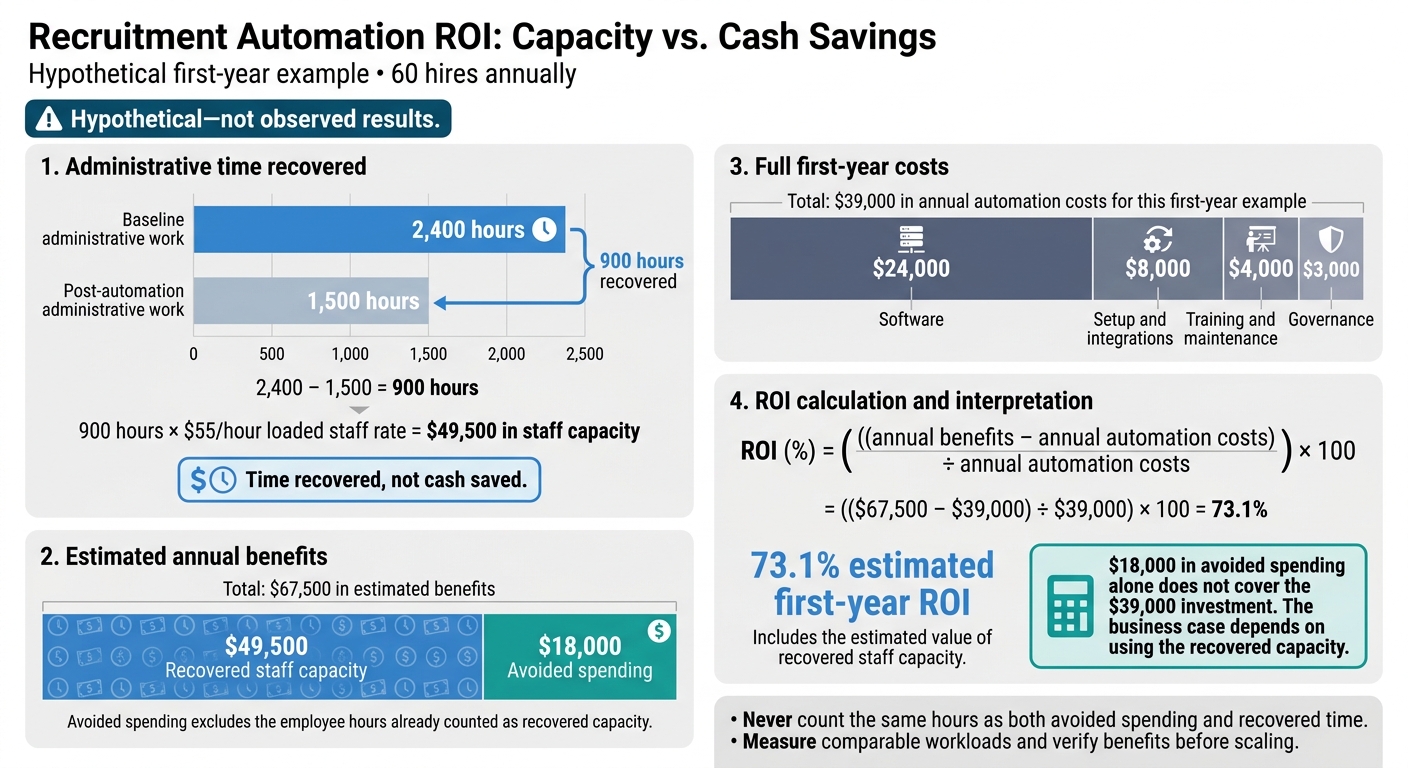
The business case needs more than fewer clicks. In this guide’s hypothetical example, cutting admin work by 900 hours releases $49,500 in staff capacity at $55 per hour. <u>That is time recovered, not cash saved.</u>
I cover how to:
- Map hiring stages, owners, and deadlines before choosing tools.
- Connect your systems, protect hiring data, and prepare manual backups.
- Keep human review in screening, assessments, and decisions.
- Measure total costs, hiring speed, and hire quality before expanding.
Start with a small pilot. Scale only when the results show less admin without weaker hiring outcomes.
Prepare Your Tech Hiring Process for Automation
Before automating tech hiring, measure where work slows down. Record volume, median and maximum wait time, conversion rate, rework, and owner at each stage. Set requirements and deadlines, then document the stages, owners, and service-level agreements (SLAs) your automation will support.[4][5]
Set Hiring Stages, Owners, and Deadlines
Map the process from requisition approval to onboarding handoff, including rejection and withdrawal paths. For each stage, document the accountable owner, SLA, approval authority, exit criteria, and escalation path. This gives your team clear responsibility for moving hiring forward.
Set deadlines your team has the capacity to meet:
Examples: three business days for application review, 24 hours for feedback, and one business day after the final interview for a recommendation.
Escalate overdue work to the hiring manager, then the recruiting lead. Define business-day rules and apply U.S. time zones consistently. Keep headcount changes, compensation exceptions, and final decisions behind approval gates so automation cannot bypass spending or hiring controls.
Next, standardize the scorecards and records that will drive the workflow.
Standardize Technical Scorecards and Candidate Records
Separate required capabilities from preferred qualifications before setting screening rules. Create role-specific scorecards for engineers, security roles, and engineering managers. Include observable evidence and behavioral anchors so screening stays consistent and auditable.
Record “not evaluated” separately from poor performance. Apply the same criteria to comparable candidates, and have interviewers assess only their assigned competencies. Avoid unnecessary filters based on degrees, brand names, or employment gaps.
In your ATS, standardize these fields: requisition ID, role/level, source, location/work arrangement, stage, owner, scorecard summary, disposition reason, compensation range, and consent/preferences.
Agree on message templates, role-based permissions, and reporting definitions before enabling triggers. That includes deciding exactly when the time-to-hire clock starts, so your reports measure hiring speed consistently.[4][5]
Use this data model to guide tool selection and integration requirements.
Choose Tools and Test Integrations
Choose tools to remove a specific delay, rather than adding software without a clear purpose. Keep the ATS as your system of record and verify write-backs. Your budget should cover licensing, setup, migration, integrations, training, support, and admin time, not just the subscription price.
| Tool category and use case | Key integrations | Limits to check | Security and control checks | Total-cost items |
|---|---|---|---|---|
| ATS and requisition workflow | HRIS, careers site, email, identity provider | Configuration complexity; inconsistent legacy data | Role-based access, audit logs, retention, export and deletion controls | License tiers, implementation, migration, support, added users |
| Recruiting CRM and sourcing | ATS, email, professional networks, consent records | Duplicate profiles; outreach fatigue; channel restrictions | Consent tracking, unsubscribe controls, vendor access, data provenance | Seats, contact volume, messaging fees, enrichment costs |
| Scheduling and interview coordination | ATS, calendars, video conferencing, interviewer directory | Calendar conflicts; time-zone errors; rescheduling edge cases | Least-privilege calendar access, meeting privacy, audit logs | Per-user fees, coordinator seats, premium routing features |
| Technical assessments | ATS, coding environment, identity verification, reporting | Drop-off; accessibility; assessment validity | Data retention, proctoring safeguards, accommodation process | Per-assessment charges, integrations, reviewer time, retakes |
| Reporting and analytics | ATS, HRIS, CRM, assessment and finance data | Metric inconsistency; delayed or failed data syncs | Granular access controls, data lineage, export controls | Connector fees, data warehouse costs, dashboard maintenance |
Before launch, run a test requisition through duplicate candidate records, assessment invitations, rescheduling, feedback, rejection, offer approval, and onboarding handoff.
Flag possible duplicates for review. Preserve activity history and a reversible audit trail. Check that failed syncs alert a named owner and that retries cannot send duplicate messages or invitations. These checks help prevent errors that create extra admin work.
Test permission boundaries, daylight-saving changes, withdrawn candidates, bounced email, and missing fields. During the pilot, review logs daily and document how staff should correct records manually if an integration fails.
Once the workflow and integrations are stable, start with low-risk hiring tasks.
sbb-itb-a23bd6a
Automate Hiring Tasks With Human Review
With your workflow mapped and integrations tested, start with the handoffs that cause the longest delays. Automate approvals, scheduling, and status updates. Keep hiring decisions with people.
Use human review wherever judgment, context, or compliance matters.
| Stage | Trigger | Owner | Automated action | Human decision | Risk control | Success metric |
|---|---|---|---|---|---|---|
| Job approval | Requisition submitted | Recruiting operations | Route approval to budget owner and hiring manager | Confirm headcount, level, salary range, and requirements | Required fields and approval audit trail | Approval turnaround time |
| Sourcing | Approved role published | Recruiter | Search talent pools, apply tags, and draft outreach | Review target profiles and message relevance | Sample-check recommendations; suppress duplicates | Qualified replies per 100 contacts |
| Application intake | Application received | Recruiter | Parse resume, record answers, and send acknowledgment | Review context, not keywords alone | Validate parsing; allow corrections | First-review time |
| Assessment | Candidate reaches assessment stage | Hiring manager | Send role-relevant test with deadline and reminders | Confirm assessment is appropriate and review results | Rubric, time limit, accommodations, and anomaly review | Completion rate |
| Interview | Interview panel confirmed | Recruiting coordinator | Offer time slots, manage time zones, send reminders, and collect feedback | Conduct interview and rate competencies | Backup interviewer and independent feedback | Scheduling time |
| Decision | Feedback deadline passes | Recruiter | Send reminders and flag stalled decisions | Reconcile evidence and select outcome | No automated rejection; documented rationale | Decision turnaround time |
| Offer | Approval conditions met | HR or recruiter | Route approvals, generate documents, and collect signatures | Approve terms and communicate offer | Compensation checks and human review | Offer cycle time |
| Closeout | Candidate disposition recorded | Recruiter | Send approved update and transfer new-hire data to the HR system | Review sensitive or rejection messages | Contact channel for questions or corrections | Candidate update timeliness |
Automate Job Approvals, Sourcing, and Application Intake
Draft requisitions from approved job templates to cut repeat work. Use talent pool searches, candidate tags, and outreach sequences to bring profiles to recruiters for review, not to create automatic shortlists or rejections.
Resume parsing and application answers help organize evidence. Keywords alone, though, cannot establish technical ability. Recruiters need to review scope, architecture choices, and production ownership.
Track response rates alongside qualified-candidate conversion. More replies do not improve hiring outcomes if fewer respondents meet the role’s requirements.
Once candidates clear intake, move them into scheduling and assessment without manual back-and-forth.
Schedule Assessments and Interviews
Let candidates select approved interview slots in their time zone and reschedule through the same link. Keep backup interviewers ready to avoid delays.
Assessments need job-relevant tasks, clear rubrics, time limits, and accommodation options. Track completion and abandonment separately so your team can see where the process loses candidates.
Require independent interviewer feedback before debriefs. Interviewers must review AI-generated notes rather than accept them as evidence. Record or transcribe only where permitted, with the required notice and consent.
Once feedback is collected, automation should flag stalled steps, not decide outcomes.
Manage Decisions, Offers, and Candidate Updates
Use feedback reminders and stalled-decision alerts to prompt action, never to trigger rejection. Trained staff must own advancement, rejection, and selection.
Route offer approvals before generating documents for electronic signature. Then verify that new-hire data reaches the HR system.
Have people review sensitive updates, including final-round rejections and disputed assessment outcomes. Explain in plain language how the assessment affected the decision, and provide a recruiter or HR contact for questions or corrections.
Set Data, Bias, and Reliability Controls
Once scheduling and candidate updates run automatically, set controls based on risk. Scheduling and data transfers need accuracy, access controls, and failure monitoring. AI-supported ranking, coding-test scoring, and interview analysis also need validation, accessibility testing, and outcome checks.
Document each AI-powered recruitment tool’s purpose, inputs, outputs, owner, decision authority, and override path. Human review alone does not prevent bias or ensure compliance.[6][7]
Protect Candidate Data and Review Vendors
Assign owners for access, retention, and deletion. Use role-based permissions and multifactor authentication, and restrict access to accommodation records.
Before connecting a vendor, review its data-processing agreement, subprocessors, breach notifications, deletion process, and model-training terms. Collect only hiring-relevant data and keep sensitive candidate records out of general-purpose AI tools. Name the people responsible for stopping work and managing incident response if exposure is suspected.[6][8]
Check US Hiring Laws and Accessibility
With data controls in place, check the rules governing candidate screening and evaluation. Have qualified counsel review federal, state, and local requirements before launch and after any jurisdiction or workflow change.
That review should cover discrimination, accessibility, automated employment decision tools, privacy, and recording consent as they apply to automated screening, coding-test scoring, and interview analysis. Give candidates an accessible accommodation channel and an equivalent assessment path that measures the same job-related skills without unnecessary barriers.[1][2][3]
Use lawfully collected demographic data to check selection outcomes by stage and job family. Investigate unexplained gaps, including candidates wrongly screened out and patterns tied to schools, employment gaps, or resume formatting.
The EEOC’s four-fifths rule flags selection-rate ratios below 80% for further analysis. Passing that threshold does not prove your process is unbiased or compliant. Sample size, job-relatedness, and other statistical evidence still matter.[9][10]
Test Automation and Plan Manual Backups
After compliance checks, define how your team will catch and reverse incorrect automation output. Use synthetic or de-identified records to test scoring logic, missing results, and failure handling. Route errors to review, not exclusion, so a system failure does not remove someone from consideration.
Name a manual backup owner, document override permissions, and require approval for configuration changes. Keep a last-known-good version ready for rollback.
For inaccurate summaries or mismatched records, preserve inputs, outputs, versions, and downstream actions. Review the original records, correct affected decisions, and pause recurring failures until they are fixed.
Measure ROI and Roll Out in Phases
Recruitment Automation ROI: Capacity vs. Cash Savings
Once the workflow is stable, check whether automation cuts effort without reducing quality, a core goal of embedded recruitment.
Use at least three months of baseline data where available. Track hiring-stage dates, recruiter and hiring manager hours, vendor spending, withdrawals, and hires. Compare like-for-like roles, levels, locations, sources, managers, and calendar periods.
With fewer than 10 to 15 hires, report counts and ranges, extend the measurement window, and focus on stage-level results. Log changes in compensation, staffing, the labor market, and interview processes. Automation should not get credit for gains caused by something else.
Calculate Costs, Savings, and Staff Time Recovered
Count the full investment: subscriptions, usage fees, setup, integrations, data migration, training, maintenance, security and accessibility reviews, governance, and change-management time.
Use these calculations to assess ROI and hiring costs:
- ROI (%) = ((annual benefits − annual automation costs) ÷ annual automation costs) × 100.
- Cost per hire = recruiting costs ÷ hires.[12][14]
- Time saved = baseline manual hours − post-automation hours, measured against comparable workloads.
Keep actual spending reductions separate from the estimated value of recovered employee time. Never count the same hours twice.
Hypothetical first-year calculation: Assume 60 hires annually and administrative work falling from 2,400 to 1,500 hours. At a loaded rate of $55 per hour, 900 recovered hours represent $49,500 in capacity, not cash savings. Add $18,000 in avoided spending, without counting those same employee hours again, for $67,500 in estimated benefits. Costs total $39,000: $24,000 for software, $8,000 for setup and integrations, $4,000 for training and maintenance, and $3,000 for governance. Estimated ROI is 73.1%: (($67,500 − $39,000) ÷ $39,000) × 100. Cash savings alone do not cover the investment; the business case depends on using the recovered capacity. Never count the same hours as both avoided spending and recovered time.
Track Hiring Speed, Conversion, and Quality
Define time-to-fill as approved requisition to accepted offer. Define time-to-hire as application, or first sourcing contact, to accepted offer. Choose one starting point and use it consistently.[11][13]
Track stage duration, scheduling, feedback turnaround, funnel conversion, offer acceptance, withdrawals, and no-shows. Check quality through a consistent technical scorecard, onboarding milestones, 90-day manager assessments, and later retention. Review candidate feedback, accessibility issues, overrides, and potential group disparities alongside speed.
Use the same baseline to assess speed, quality, and adverse-impact risk. Faster hiring only helps if acceptance, retention, and fair selection hold steady. The table below is illustrative. Set your thresholds before launch.
| Metric | Baseline | Target | Pilot result | Impact | Quality safeguard | Scale trigger |
|---|---|---|---|---|---|---|
| Time to schedule technical screen | 3.0 days | 1.0 day | 1.2 days | 120 recruiter hours recovered | Accommodations and alternate times available | At or below 1.5 days for two review cycles |
| Recruiter admin hours per hire | 10.0 hours | 7.0 hours | 6.5 hours | $11,550 annual capacity at $55/hour for 60 hires | Audit records and overrides | Savings without reduced review quality |
| Offer acceptance rate | 78% | At least 80% | 81% | Fewer replacement searches; value separately estimated | Track withdrawals and counteroffers | No decline in acceptance by group |
| Candidate withdrawal rate | 14% | 12% or lower | 11% | Fewer restarted processes | Review withdrawal reasons and surveys | Pause for unexplained increases |
| 90-day quality pass rate | 85% | At least 85% | 86% | Protects against false efficiency gains | Manager calibration and consistent scorecards | Quality maintained |
| Selection-rate ratio by monitored group | Baseline established | No unexplained deterioration | Review required | Potential compliance and rework avoidance | Human review, adverse-impact analysis, vendor documentation | Pause for unexplained disparities |
Pilot Administrative Tasks Before Expanding
Assign one rollout owner to coordinate recruiting, engineering managers, HR, IT security, legal, and the vendor. Allow two weeks for setup, then run a four- to eight-week pilot covering scheduling, reminders, candidate updates, and feedback in selected technical roles.
Set success criteria and review dates before launch, including later checks for 90-day outcomes. At each checkpoint, decide whether to expand one workflow at a time, revise, or stop. Expand only when targets are met. Pause if errors, withdrawals, or unexplained screening gaps increase.
Conclusion: Choose a Bottleneck and Assign an Owner
Automate a stable process, not a broken one. Put clear workflows, ownership, and controls in place first. Keep human review for decisions and exceptions.[4] Measure speed, quality, and retention, not speed alone. Test one workflow before expanding.[16]
Start with one repetitive bottleneck that has a measurable business impact and low decision risk. Assign one accountable owner and define the pilot:
- Baseline: Record how the bottleneck performs today.
- Success criteria: Set measurable targets.
- Stop conditions: Agree when to pause or revise the pilot.
- Metrics: Track turnaround time, candidate drop-off, and errors.
If internal hiring capacity is the constraint, Rent a Recruiter places recruiters inside your team to manage hiring end-to-end. You get hands-on hiring support, not automation software.[15]
Choose one bottleneck, assign one owner, and run the pilot. Measure the results before deciding whether to scale.
FAQs
Is recruitment automation worth it for low-volume tech hiring?
Manual processes can work for small teams with short candidate pipelines. Automation starts to make sense when hiring is recurring, spans multiple roles, or requires a shared view of progress.
When candidate notes are hard to find or roles stall in your inbox, manual work can cost you time and money. An applicant tracking system helps you track candidates, cut admin, and scale hiring without adding headcount.
How can I spot qualified engineers automation might miss?
Use automation to filter applications, not make final hiring decisions. Replace rigid keyword matching with synonym mapping so equivalent skills and experience aren’t missed because applicants have different job titles, use different tools, or follow different career paths.
Keep human review of rejections and final shortlists to spot transferable skills and less common backgrounds. Audit screening rules regularly so outdated data or changes in how those rules work don’t skew results and cause you to miss suitable hires.
How can I put recovered recruiter time to better use?
Put time saved through recruitment automation into work that needs human judgment and strong relationships. Share your company’s mission and culture, conduct meaningful interviews, assess how candidates fit your culture, negotiate salaries, and close hires.
Use that time to align with hiring managers and source and nurture talent pipelines. Less admin means more time for better hiring decisions, improving the candidate experience and quality of hire while reducing future hiring pressure and keeping growth on track.