We recommend automating hiring admin first, not hiring decisions. Start with one bottleneck, such as interview scheduling, and measure hours saved, costs, and hiring outcomes before expanding.
Our approach is simple: rate your recruitment process to map the delays, check your existing tools, and pilot one workflow with 30 to 50 candidates. Keep people responsible for selection and exceptions. Treat time freed up as added capacity, <u>not cash savings</u>, unless spending actually falls.
This guide shows you how to choose tools, test results, and decide when embedded recruitment support makes more sense than another software subscription.
Find Hiring Bottlenecks Before Choosing Tools
Audit the last 4 to 8 weeks of hiring activity, using the task split above. Follow each role from approved job request to accepted offer. Your goal is fewer handoffs, less admin, and faster hiring, not more automation.
Record each step’s owner, system, handoff, duplicate entry, rework, and candidate communication. Separate time spent doing the work from time spent waiting. Measure each stage, not just total time-to-fill.[1][3]
Standardize Job Requests, Posts, and Candidate Records
Use one template for approvals, naming, qualifications, pipeline stages, rejection reasons, status labels, and reporting fields. Separate required qualifications from preferred ones, and standardize screening questions.
Have the hiring manager, recruiter, and HR review job-description drafts before publishing the approved version. Bring sourced candidates and applications into one candidate record, including source, stage, interview feedback, and disposition reason.
Track request-to-post time, the percentage of postings needing correction, duplicate-record rate, missing required data, and resume-review hours per applicant. These measures show where standardization can cut work. Consistent fields also make workflow mapping and tool comparison easier.
Map the Workflow From Screening to Reporting
For each stage, define the repetitive task, automation action, accountable human owner, inputs, and success metric. Use the map below to connect automation with results you can measure.
Keep auto-reject rules off until you have tested them against job-related criteria. Route missing answers and parsing errors to a person for review, rather than automatic rejection. Keep automatic ranking and rejection decisions under human review.[2]
| Stage | Repetitive task | Automation action | Human owner | Inputs | Success metric |
|---|---|---|---|---|---|
| Screening | Asking standard eligibility questions | Send a consistent questionnaire and flag responses | Recruiter | Job-related criteria and candidate answers | Screening time and qualified-candidate rate |
| Scheduling | Exchanging emails to find interview times | Offer approved calendar slots and send confirmations | Recruiter or coordinator | Interviewers, time zones, availability | Scheduling lag and reschedule rate |
| Reminders | Sending interview instructions and reminders | Trigger confirmation and reminder messages | Recruiting coordinator | Candidate contact details and event information | No-show rate and candidate response time |
| Feedback | Chasing interviewers for evaluations | Send structured scorecards and reminders | Hiring manager | Competencies, ratings, comments | Feedback completion time |
| Candidate updates | Sending stage or rejection messages | Trigger approved, personalized communications | Recruiter | Stage, disposition reason, approved message | Update timeliness and complaint rate |
| Offer approval | Routing compensation and offer approvals | Send approval requests with an audit trail | Hiring manager and HR | Compensation, level, approvals | Offer-approval cycle time |
| Onboarding handoff | Re-entering accepted-candidate information | Transfer approved data to HR or onboarding systems | HR or people operations | Accepted offer and start-date data | Handoff accuracy and completion time |
| Reporting | Combining spreadsheets for status reports | Update a dashboard from defined fields | Recruiting leader | Stage dates, source, outcome, owner | Reporting preparation time and data completeness |
Use the stage with the longest delay to decide what to automate first.
Start With High-Impact, Low-Risk Tasks
Rank tasks by volume, savings, setup effort, and risk. Start with clear rules, clean inputs, and low compliance risk.
Defer resume ranking, automated outreach personalization, and conversational screening until review controls have been tested. Keep nuanced qualification decisions, accommodations, compensation exceptions, and final selection human-led.
For every proposed change, specify the administrative hours it should save, the wait it should shorten, or the reporting it should clarify. More features alone do not justify the spend.
sbb-itb-a23bd6a
Choose Recruitment Tools and Team Support
Use your bottleneck map to invest in the slowest hiring stage, not the software with the longest feature list.
Match Software Features to Hiring Tasks
Audit your current ATS before buying more software. Tie each feature to a hiring metric you already track: ATS records to data completeness, CRM talent pools to qualified applicants per opening, and analytics to funnel-report time.
Ask vendors to demonstrate the full workflow live, including the accepted-offer transfer to your HR information system (HRIS). If your team still needs another spreadsheet, you’ve moved the work rather than removed it.
Once the workflow fits, check whether the tool can connect to your systems, meet your control requirements, and support higher hiring volumes without hidden costs.
Check Integrations, Controls, and Total Cost
Use this contract-review checklist:
- Integrations: Confirm support for the APIs and webhooks your team already uses, synced fields, sync frequency, duplicate handling, and failure alerts.
- Security and governance controls: Check permissions, audit logs, approvals, human overrides, encryption, backups, and incident notification.
- Data management: Verify usable exports, retention rules, and deletion processes.
- Accessibility and support: Confirm accommodation procedures, support commitments, and who owns errors and integration failures.
For AI features, request the validation method, test population, subgroup results, limits, version-change logs, and evidence of human review.
Build a 12- to 36-month total-cost estimate in U.S. dollars, based on current written vendor quotes. Include licenses, usage charges, setup, configuration, migration, integrations, maintenance, training, support, security review, internal administration, and exit costs.
Price the tool at low, expected, and peak hiring volumes. Ask how extra users, open jobs, messaging volume, and API usage change your bill. The starting subscription is only part of the cost.
Match Internal Teams, Software, and Embedded Recruiters to Your Needs
If software cannot close your capacity gap, compare staffing models using the same hiring volume and ownership requirements.
| Approach | Best-fit need | Readiness and ownership | Setup effort | Cost structure | Scalability |
|---|---|---|---|---|---|
| Internal recruitment capability | Stable, recurring hiring | Internal owner, trained recruiters, and hiring-manager participation | Hiring, process design, training, and management | Salaries, benefits, tools, and overhead | Grows through hiring and process maturity |
| Workflow software | Repetitive coordination, recordkeeping, scheduling, approvals, and reporting | Documented processes, clean data, an administrator, and user adoption | Configuration, integration, migration, testing, and training | Subscription, implementation, usage, support, and maintenance | Scales with reliable workflows and integrations |
| Embedded recruiters | Capacity gaps, rapid growth, specialized hiring, or end-to-end support | Internal decision-maker and access to managers, systems, and approvals | Define scope, access, and success measures; typically faster than building a team | Typically fixed monthly; obtain written pricing and scope | Supports hiring surges or longer-term recruitment development |
Keep accountability clear. Internal leaders own hiring decisions. Software maintains records and routes work. Recruiters manage execution and exceptions. If hiring managers cannot agree on requirements or make timely decisions, another software purchase will not remove that delay.
Rent a Recruiter provides embedded hiring capacity at a fixed monthly cost, while process ownership stays internal. It reports up to 70% lower hiring costs and more than 80 hours saved per month. Confirm scope, pricing, access, and success measures in writing. These reported results are not guarantees.
Test and Roll Out Recruitment Automation
Once you’ve selected a tool, run a controlled pilot before rolling it out across your hiring process.
Prepare Data, Assign Owners, and Set Approvals
Reduce hiring admin without losing human oversight by utilizing Recruitment as a Service. Before syncing candidate data, map your current workflow from job intake to reporting. Clean candidate records, standardize key fields, confirm consent and communication preferences, and set retention and deletion rules.
Use scorecards tied to job-related criteria, not subjective language about fit. Assign named owners for workflow configuration, data quality, integrations, recruiting decisions, HR compliance, legal review, and vendor management.
Define role-based access, approval points, and escalation rules before importing or syncing data. Have these controls in place before the first test case.
Pilot One Role Family or Hiring Stage
Start with one workflow, such as interview scheduling, or one role family with a repeatable process. Set a pilot period or use a sample of 30 to 50 candidates, with enough variation to reflect normal working conditions. Compare automated output against manual checks, tracking processing time, errors, overrides, and candidate response times.
Test duplicate profiles, calendar conflicts, time-zone differences, failed integrations, incorrect statuses, missing approvals, and mistaken rejection rules. Send missing information, accommodation requests, and alternate application paths for human review before any decision.
Before launch, require:
- 100% of test cases to follow the correct approval and escalation paths.
- Zero unexplained status changes.
- No unresolved duplicate-record defects.
Keep a tested manual fallback for scheduling, candidate messages, application review, and status updates. Document who can stop the automation and how to recover records before restarting.
Unexplained rejections, lost candidate data, incorrect messages, accessibility failures, or repeated integration errors should trigger a return to manual handling.
Train Teams Before Expanding
Use the exceptions found during the pilot to shape training. Have recruiters and hiring managers practice those workflows and escalation paths before go-live. Cover accessibility routes, required approvals, and recovery procedures.
Give the team a short playbook, launch-week office hours, and a named responder. Keep a change log covering configuration updates, defects, overrides, and approvals.
Review pilot results weekly, fix defects, and get owner sign-off before expanding. Time saved alone is not enough. Communication, accommodations, privacy, and hiring controls must remain intact.
Manage AI Risks, Compliance, and Candidate Experience
After a pilot, review any tool that affects selection for risk and compliance before rolling it out more broadly. A tool that scores, ranks, recommends, or rejects candidates is a selection system, not an admin tool. Record its inputs, outputs, decision stage, jurisdictions, vendor, and owner.
Check Selection Criteria, Bias, and Human Review
Require evidence that assessments measure job-related skills. Monitor selection rates across protected groups where legally permitted.
The four-fifths rule is a review trigger, not proof of compliance. Reviewers must check outputs, challenge recommendations, and document overrides. Human review and a vendor’s bias audit do not, on their own, establish compliance.[4][2]
Verify Federal, State, and Local Hiring Rules
Before launch, have employment counsel check current federal, state, and local requirements against official sources. Federal nondiscrimination and disability-accommodation duties apply, and selection tools can screen out applicants with disabilities.[7]
Requirements vary by jurisdiction. Check which controls apply before expanding use.
- Illinois: For covered AI-analyzed video interviews, give advance notice and an explanation, obtain written consent, restrict sharing, and delete recordings on request. Apply provisions effective January 1, 2026, addressing discriminatory AI use and ZIP-code proxies in employment decisions.[5][6]
- New York City: For covered automated employment decision tools, obtain an independent bias audit before use and at least every 12 months. Check and meet the 10-business-day advance-notice requirement and applicable requirements for alternative application options.[6][8]
- California: Apply employment-discrimination regulations covering automated systems, effective October 1, 2025. Retain relevant records for four years, and confirm which records and uses fall within scope.[6]
Protect Candidate Data and Offer Accessible Options
Collect only the data you need. Require role-based access, multifactor authentication, encryption, retention and deletion controls, documented subprocessors, and incident response. Contracts should prohibit training unrelated models unless expressly approved and legally permitted.
Tell candidates what automation evaluates. Provide a human contact, an accommodation process, and an accessible route that does not reduce their consideration. Track abandonment, unresolved accommodation requests, and complaints as risk signals.
Assign an owner to each control, retain evidence, and define when issues need escalation.
| Risk | Preventive control | Owner | Retained evidence | Escalation trigger |
|---|---|---|---|---|
| Bias | Validate criteria; monitor selection rates and proxy variables | HR compliance lead | Validation results; disparity analysis | Unexplained disparity or complaint |
| Privacy | Limit collection; enforce retention and deletion | Privacy lead | Data map; deletion confirmations | Unapproved collection or missed deletion |
| Inaccurate recommendations | Sample results; review negative recommendations | Recruiting lead | Error analysis; decision and override logs | Repeated false negatives |
| Poor explainability | Require clear notices and decision reasons | HR operations lead | Notice versions; reviewer rationale | Outcome cannot be explained or challenged |
| Accessibility | Test assistive-technology access; offer accommodations | Accessibility owner | Test results; accommodation records | Applicant cannot complete a stage |
| Security | Check vendor controls; restrict access; test incident response | Security lead | Security assessments; access logs | Suspicious access, export, or breach |
| Vendor dependency | Require exportable records, change notices, and an exit plan | Procurement lead | Contract; exports; continuity plan | Outage, material model change, or blocked export |
Measure Hiring Results and Automation ROI
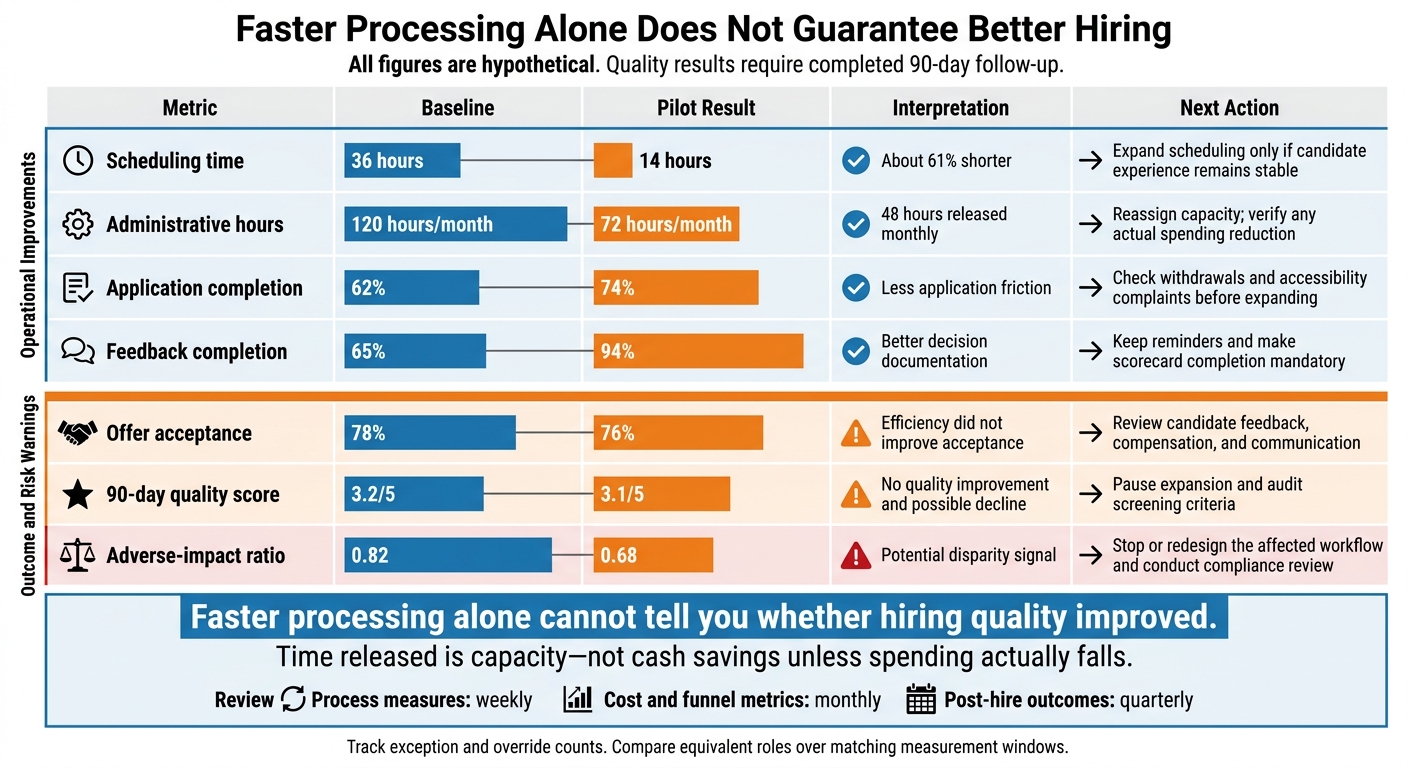
Recruitment Automation Pilot: Speed vs. Hiring Outcomes
Set Baselines and Track Hiring Metrics
Start with the previous 3 to 6 months, split by role family, location, source, and stage. Give each metric an owner so someone is accountable for data quality and follow-up.
Before launch, agree on timestamp rules, calendar-day or business-day counting, cost categories, duplicate handling, pauses, and holidays. Define how you will treat internal candidates, canceled roles, and agency submissions. All baselines and targets below are hypothetical.
| Metric | Definition | Baseline | Target | Data source | Review cadence |
|---|---|---|---|---|---|
| First response | Median hours from application submission or recruiter outreach to the first meaningful employer response | 48 hours | 24 hours | ATS timestamps and messaging logs | Weekly |
| Stage duration | Median calendar days spent in each hiring stage | 7 days in screening | 4 days | ATS stage history | Weekly |
| Scheduling time | Median hours from interview request to confirmed meeting | 36 hours | 12 hours | Scheduling platform and ATS | Weekly |
| Time to hire | Calendar days from pipeline entry to offer acceptance, not requisition opening | 42 days | 30 days | ATS | Monthly |
| Administrative hours | Staff time on scheduling, data entry, reminders, and reporting | 120 hours/month | 70 hours/month | Time study and workflow logs | Monthly |
| Application completion | Completed applications ÷ started applications | 62% | 75% | Application analytics | Weekly |
| Candidate withdrawal | Withdrawals ÷ candidates entering the measured stage | 18% | 12% | ATS disposition records | Monthly |
| Feedback completion | On-time evaluations ÷ interviews requiring evaluations | 65% | 95% | Interview scorecards | Weekly |
| Source conversion | Hires ÷ applicants from each source | 3% | 4% | ATS source records | Monthly |
| Offer acceptance | Accepted offers ÷ offers made | 78% | 88% | ATS offer records | Monthly |
| Cost per hire | Internal and external recruiting costs ÷ hires | $6,000 | $4,500 | Finance, payroll, and ATS | Monthly or quarterly |
| Quality of hire | Composite of 90-day performance, retention, ramp time, and manager ratings | 3.2/5 | 3.8/5 | HRIS, performance tools, and surveys | Quarterly by hire cohort |
| Adverse impact | Selection rate for each group ÷ the highest rate at that stage | 0.82 | Investigate unexplained disparities | Demographic reporting and compliance analysis | Each pilot stage; quarterly after launch |
Keep counts beside percentages. Check for missing timestamps, duplicate records, and overrides. A pilot with 12 applicants and two hires gives you an early signal, not a firm answer.
Set minimum sample thresholds with HR or legal, and wait at least 90 days for relevant post-hire measures. Compare matched cohorts and record differences in recruiter, market, compensation, seasonality, and candidate volume. Each can affect results independently of automation. Use the same cost categories in every cost-per-hire comparison.[9][10]
Calculate Net Value, ROI, and Payback
Separate process speed, staff capacity, and cash savings. Faster work does not automatically mean lower spending.
Include setup, software, training, support, and oversight in total cost. Do not count reduced cost per hire again if those savings are already included. You can use the ROI calculator to assess your figures.
Hypothetical example: $8,000 setup + $9,000 software/support = $17,000 total cost; $28,000 in avoided spend = $11,000 net cash value, 64.7% ROI, and 3.6-month payback. Treat 300 hours released ($12,000) as capacity value, not cash.
Compare Pilot Results Before Expanding
Compare equivalent roles over matching measurement windows. Review speed alongside candidate experience, quality, exceptions, and differences in selection rates between groups.
All figures below are hypothetical. Quality results require completed 90-day follow-up. Faster processing alone cannot tell you whether hiring quality improved.
Once you have enough pilot data, review it against the baseline side by side.
| Metric | Baseline | Pilot result | Interpretation | Next action |
|---|---|---|---|---|
| Scheduling time | 36 hours | 14 hours | About 61% shorter | Expand scheduling only if candidate experience remains stable |
| Administrative hours | 120 hours/month | 72 hours/month | 48 hours released monthly | Reassign capacity; verify any actual spending reduction |
| Application completion | 62% | 74% | Less application friction | Check withdrawals and accessibility complaints before expanding |
| Offer acceptance | 78% | 76% | Efficiency did not improve acceptance | Review candidate feedback, compensation, and communication |
| Feedback completion | 65% | 94% | Better decision documentation | Keep reminders and make scorecard completion mandatory |
| 90-day quality score | 3.2/5 | 3.1/5 | No quality improvement and possible decline | Pause expansion and audit screening criteria |
| Adverse-impact ratio | 0.82 | 0.68 | Potential disparity signal | Stop or redesign the affected workflow and conduct compliance review |
After launch, review process measures weekly, cost and funnel metrics monthly, and post-hire outcomes quarterly. Include exception and override counts so manual work stays visible in your scorecard.
Keep workflow versions, override logs, approval decisions, and follow-up actions as a complete evidence trail for the pilot. Use these metrics and records to complete the readiness check in the conclusion.
Conclusion: Check Readiness and Choose Your Next Step
Once you’ve measured results, check readiness with a recruitment health check before expanding automation. Standardize workflows first, then automate repetitive logistics. Keep people accountable for selection decisions, exceptions, and candidate concerns.
Complete Your Recruitment Automation Readiness Check
Before approving rollout, confirm you have:
- Documented workflows, clean data, named owners, and tested integrations.
- Security controls, a compliance review, accessible accommodations, approval and retention rules, error handling, and human review paths.
- Baseline recruitment metrics and clear pilot success criteria.
Choose one bottleneck, one accountable owner, and a defined outcome before launch. Set a review date and clear conditions for stopping the rollout. Resolve every checklist item before expanding. If anything is incomplete, pause and get support.
Review Hiring Capacity With Rent a Recruiter
If your team isn’t ready to scale hiring internally, embedded recruiting support can help close the capacity gap. Rent a Recruiter places experienced recruiters inside your team to support end-to-end hiring.
Book a Call to review your hiring needs, or use your current recruiting costs and administrative workload to estimate potential savings. Assess those estimates against your baseline. Savings are not guaranteed.
FAQs
Is recruitment automation worthwhile if we hire infrequently?
Yes, if you automate admin rather than hiring decisions. Interview scheduling, application acknowledgments, and resume screening can free your team to assess team fit and engage candidates, even when hiring volume is low.
If manual tasks delay filling roles or candidate notes sit across different tools, automation can give your team a shared view of hiring progress. Start with one repetitive task and run a 60-day pilot. Compare results with your baseline before expanding.
How can we test automation with fewer than 30 candidates?
Measure over a longer period and track results at each hiring stage, not just overall totals. Set a baseline using data from a similar number of roles. Report counts and ranges so you can judge results without reading too much into a small sample.
Keep hiring criteria and metric definitions consistent throughout the pilot. Record changes in compensation, staffing, or the labor market so automation gets credit only for the improvements it drives.
Who is responsible if hiring automation discriminates?
In the United States, you remain legally responsible for discriminatory hiring outcomes caused by automated tools, even when a third-party vendor supplies the software.
Keep people involved in hiring decisions. Monitor selection rates for bias, audit automated decisions regularly, and have a human review shortlists or rejections that could materially affect candidates.
Keep clear audit trails and use explainable tools. These steps support fair, transparent hiring and help you defend your process if it faces legal scrutiny.