AI chatbots can cut hiring admin, but faster replies alone do not mean better hires. I recommend starting with interview scheduling, using 2 to 4 weeks of baseline data to check whether you save recruiter hours without slowing qualified applicants’ progress.
Before you buy, test your ATS and calendar connections, check data protection and accessibility, and calculate the full first-year cost in US dollars, including setup, support, and human review. Keep hiring decisions with people, and expand only when the pilot meets your targets.
This guide explains what to automate, what to test, and how to measure time saved against total cost. If admin improves but hiring still stalls, I recommend checking <u>recruiter capacity</u> before adding more software.
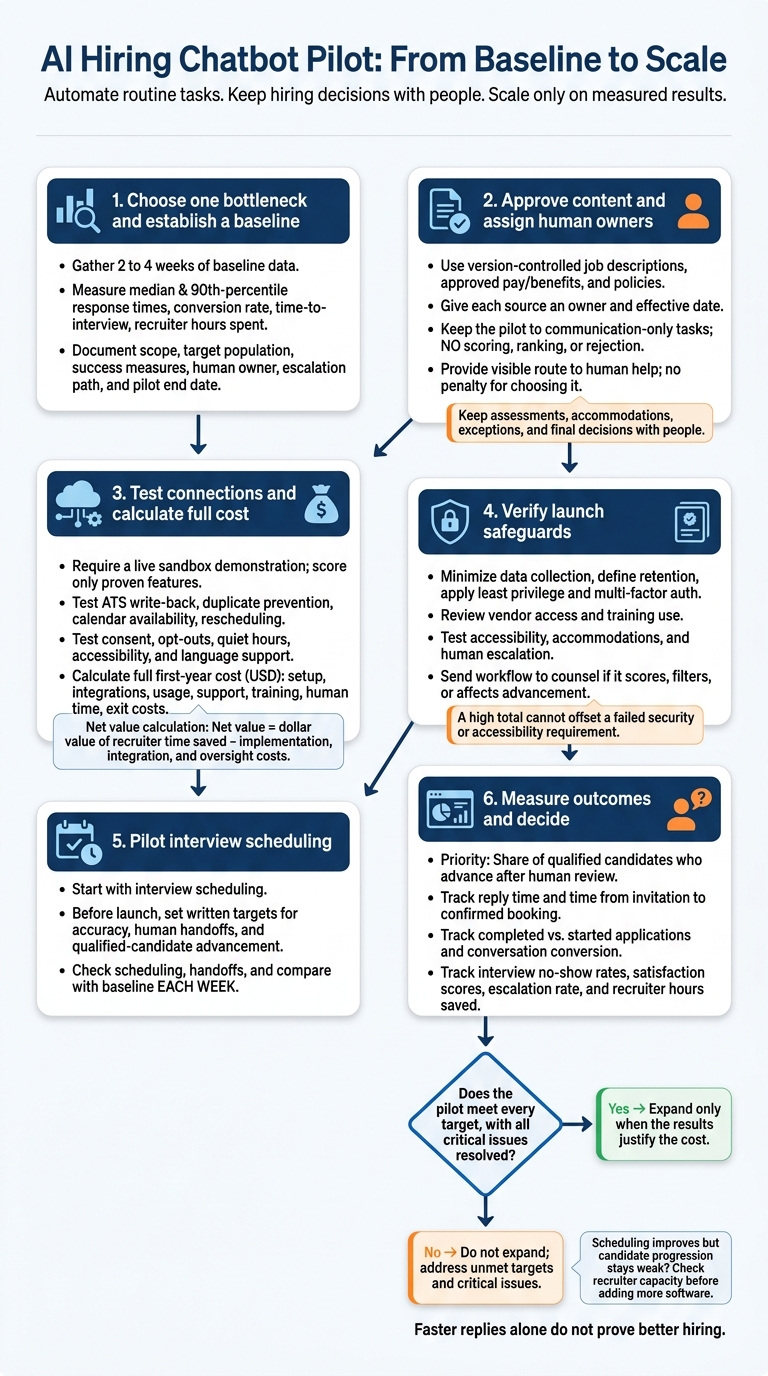
AI Hiring Chatbot Pilot: From Baseline to Scale
Where Chatbots Help Recruiters
Job Questions, Applications, and Screening
Use chatbots to handle high-volume questions and application support, not final hiring decisions. Give them approved answers about pay ranges, location, remote-work expectations, schedules, benefits, qualifications, and hiring stages.
Application support should explain fields, flag missing information, and allow candidates to correct answers before submitting. Keep must-have requirements separate from preferences. Route candidates who lack only preferred qualifications to recruiter review. Send unclear answers to a recruiter rather than letting the chatbot guess.
Scheduling, Updates, and Human Handoffs
After initial questions, use the chatbot to coordinate next steps and reduce scheduling admin. Connect it to actual calendar availability, with time zones, confirmations, reminders, cancellation options, and interview links.
Only send status updates confirmed by the application record. Never imply that a candidate has advanced without confirmation. Request missing documents through secure channels, and flag failed deliveries or bookings for follow-up.
Make human help easy to reach. Assign a named owner and a response-time target for accommodation requests, complaints, disputed screening results, complex compensation or immigration questions, privacy concerns, and technical failures.
Keep the relevant conversation so candidates do not have to repeat themselves. When accessibility barriers arise, provide another way to apply or complete an assessment.[1][2]
Chatbot Benefits and Limits
Automating routine recruiting work can save time, but each use needs clear controls.
| Area | Potential benefit | Limit or risk and control |
|---|---|---|
| Response speed | Answers outside recruiter business hours | Fast but incorrect answers damage trust. Review accuracy and escalation rates. |
| Admin | Reduces repetitive messages, data entry, reminders, and follow-up | Records can be missing or duplicated. Reconcile chatbot, applicant-tracking, and calendar data. |
| Scheduling | Offers available times and handles routine rescheduling | Time-zone or calendar errors cause confusion. Monitor calendars and handle exceptions. |
| Consistency | Uses approved questions and instructions uniformly | Flawed rules can repeat unfair treatment. Audit questions, rules, and outcomes. |
| Recruiter time | Gives recruiters more time for sourcing, relationship-building, and assessment | Cannot replace judgment, persuasion, or stakeholder management. Keep escalated cases and final decisions with people. |
| Cost | May reduce manual administrative hours | Implementation, integration, monitoring, and compliance add costs. Calculate total cost, not just the license price. |
| Accessibility | Offers text-based support and clear instructions | Interfaces may disadvantage some applicants. Test accessibility and provide accommodations or alternatives. |
| Accuracy | Retrieves answers from approved content | May hallucinate, misread free-text answers, or use outdated information. Maintain a controlled knowledge base and audit transcripts. |
| Empathy | Provides polite, immediate acknowledgment | Cannot reliably understand nuanced distress. Route sensitive concerns to people. |
| Bias | Standardized questions may reduce inconsistent recruiter behavior | Screening can create adverse effects or exclude qualified applicants. Validate job relevance, monitor selection rates, and review exceptions. |
| Security | Centralized workflows may improve control when properly configured | Weak access controls, retention policies, or vendor practices can expose data. Limit collection, define retention, and control access. |
Measure hiring outcomes alongside recruiter time saved: application completion, candidate satisfaction, progression of qualified applicants, offer acceptance, and early retention. Faster replies alone do not prove better hiring. Build these checks into your workflow, with named owners and controls for each risk.
sbb-itb-a23bd6a
Plan and Evaluate Your Chatbot Workflow
Once you’ve defined what the chatbot can do, agree on the workflow, controls, and pilot metrics before launch. This gives your team a clear benchmark for hiring results, recruiter time, and cost.
Set Goals, Approve Content, and Assign Owners
Choose one hiring bottleneck and gather 2 to 4 weeks of baseline data. Measure median and 90th-percentile response times, application conversion rate, application-to-interview time, recruiter hours spent on messages, data entry, and scheduling, plus duplicate-record and scheduling-error rates.
Record the scope, target population, success measures, permitted tasks, systems involved, human owner, escalation path, and pilot end date in a one-page workflow charter. Keep the pilot to communication-only tasks, with no scoring, ranking, or rejection. Use your baseline to judge pilot performance.
Build the chatbot using version-controlled job descriptions, approved pay and benefits, recruiting policies, interview instructions, minimum qualifications, and job-related criteria. Each source needs an owner and effective date. Answers must stay within approved content, and the chatbot must acknowledge when information is unavailable.
Block promises about jobs, pay, immigration outcomes, or hiring decisions. Avoid collecting unnecessary sensitive information, inferring protected characteristics, or changing candidate answers without permission.
Name owners for recruiting, hiring management, content, operations or HRIS, privacy or security, accessibility or accommodations, and legal or compliance. Before collecting information, disclose the use and purpose of AI and explain what information you collect. Provide a visible, accessible route to human help, with a response-time target and no penalty for choosing it.
Check Integrations, Controls, and Total Cost
Require a live sandbox demonstration using representative hiring scenarios. Check the details that can waste recruiter time or disrupt the hiring process:
- Systems and scheduling: ATS write-back without overwriting recruiter notes; calendar sync covering time zones, availability, rescheduling, cancellations, reminders, and double-booking prevention; duplicate prevention.
- Messaging and controls: Consent, opt-outs, quiet hours, delivery failures, failure handling, audit logs, recruiter overrides, and accessibility and language support.
Record every result and workaround. Mark unproven claims as “not demonstrated” and score only what the vendor proves in the demo.
| Criterion | Weight | Required evidence | Score, 0–5 |
|---|---|---|---|
| Usability and accessibility | 15% | Keyboard, screen-reader, mobile, language, and accommodation tests | Not scored |
| ATS and calendar integrations | 20% | Sandbox demonstration; error, duplicate, and time-zone tests | Not scored |
| Security and privacy controls | 20% | Data flows, encryption, access controls, retention, incident process | Not scored |
| Reporting and auditability | 15% | Exportable logs, funnel reports, override history, configuration versions | Not scored |
| Support | 15% | Service levels, escalation contacts, training, implementation plan | Not scored |
| First-year cost | 15% | Written U.S.-dollar quote, usage assumptions, implementation and exit costs | Not scored |
| Weighted total | 100% | Multiply each score by its weight and add the results | Not scored |
Apply the same tests throughout: 0 means not demonstrated; 5 means fully meets the documented requirement. A high total cannot offset a failed security or accessibility requirement.
Price the full workflow, not just the license. Calculate first-year cost in U.S. dollars (USD), including setup, integrations, usage, storage, support, testing, monitoring, training, human escalation time, and exit costs.
Label candidate volume, message volume, implementation hours, integration fees, support charges, storage, compliance reviews, and internal administration as assumptions. Use written quotes rather than assumed prices.
Set U.S. Privacy, Bias, and Security Controls
If the chatbot scores, filters, recommends, rejects, or otherwise affects who advances, send the workflow to employment counsel before launch. Review job relevance and adverse-impact monitoring under EEOC selection-procedure guidance. Use DOJ guidance on AI and disability discrimination for accommodation and accessibility reviews.
Have security specialists review integrations, vendor access, training use, and cross-border data flows. The voluntary NIST AI Risk Management Framework can help structure continued oversight.
State and local rules vary and change. Verify requirements for each recruiting location before launch, then repeat the review after major changes, complaints, or incidents.
| Risk | Control | Owner | Launch evidence |
|---|---|---|---|
| Excessive collection | Collect only necessary recruiting information | Privacy | Data inventory and approved fields |
| Excessive retention | Set retention by record type; automate deletion or review | HR operations | Retention schedule and deletion tests |
| Access without permission | Apply least privilege and multifactor authentication | Security | Access review sign-off |
| Inaccurate answers | Use approved content; test high-risk questions | Content | Test results and version history |
| Vendor data use | Contractually prohibit training or reuse without permission | Procurement and privacy | Contract and vendor attestation |
| Job-unrelated screening | Use documented, job-related criteria | Recruiting and legal | Job analysis and approved criteria |
| Disability exclusion | Provide accessible alternatives and accommodations | Accessibility | Accessibility tests and accommodation process |
| Borderline-outcome errors | Require human review of adverse or borderline outcomes | Recruiting | Tested review and escalation workflow |
| Disputed results | Provide notice, review, correction, and alternative assessment paths | Recruiting and legal | Tested dispute-resolution process |
| Security or system failure | Pause automation; use a manual fallback | Operations and security | Recovery plan and drill results |
Pilot Your Chatbot and Measure Results
Test, Review, and Expand the Pilot
Start with interview scheduling. Before launch, set written targets for answer accuracy, successful human handoffs, candidate satisfaction, and qualified-candidate advancement.
Check scheduling and handoffs, then review conversations for incorrect answers. Compare results with your baseline each week to identify performance gaps. Expand only when the pilot meets every target and all critical issues are resolved.
Measure Hiring Speed, Time Saved, and Net Value
Use your pilot baseline to track weekly changes. Your scorecard should connect chatbot activity to hiring outcomes, with qualified-candidate advancement as the priority. This approach helped Unique scale their AI-driven hiring globally. Pair dashboard data with conversation reviews to check what sits behind the numbers.
| Measure | What to track |
|---|---|
| Hiring outcomes | Share of qualified candidates who advance after human review |
| Response and scheduling speed | Reply time; time from interview invitation to confirmed booking |
| Completion and conversion | Completed applications ÷ started applications; conversations that become applications |
| Candidate experience | No-show rates for scheduled interviews; candidate satisfaction scores |
| Handoffs and accuracy | Escalation rate; handoff completion time; share of reviewed answers that are correct |
| Recruiter capacity | Recruiter hours saved |
Net value = dollar value of recruiter time saved − implementation, integration, and oversight costs.
When to Add Human Recruiting Support
If scheduling improves but candidate progression stays weak, the scorecard points to a recruiter-capacity bottleneck. Rent a Recruiter embeds experienced recruiters directly into your team to run hiring end to end.
Conclusion: Automate Routine Tasks, Keep Human Oversight
After the pilot, scale based on measured results, not promises. Understanding the broader impact of AI on recruitment can help set realistic benchmarks. Automate one bottleneck using approved, repeatable tasks. Keep people responsible for assessments, accommodations, exceptions, and final decisions.
Protect applicant data, check accessibility and adverse effects, and lead with ethics and accountability by making the handoff to a person clear. U.S. employers may still be responsible for discriminatory outcomes, even when a vendor supplies the tool.[3] Expand only when the results justify the cost.
If the pilot saves admin time but hiring still slows, check whether recruiter capacity is the gap. If it is, book a call with Rent a Recruiter for embedded support.
FAQs
Is our hiring volume high enough for a chatbot?
Your hiring bottlenecks matter more than volume alone. If you make more than 20 to 30 hires per year or handle over 20 applications per role, manual processes often slow hiring and lead to missed opportunities.
If screening resumes, collecting candidate availability, or routing applicants takes up too much recruiter time, an AI chatbot can help keep hiring moving without adding permanent headcount.
How can we tell if chatbot screening is unfair?
Check for discriminatory outcomes and inconsistent results. Uneven shortlist rates across demographic groups may reflect past hiring biases. Test regularly for bias using test profiles, and track manual override rates to see where recruiters disagree with the AI.
Choose tools that explain their results, such as structured scorecards. You should be able to see why a candidate was ranked or rejected, rather than base hiring decisions on automated scores you cannot explain.
When do we need more recruiters instead of automation?
You need recruiters when hiring calls for human judgment. That includes assessing fit with your company culture, conducting final interviews, negotiating salaries, and communicating your company’s mission to candidates. Automation can handle repetitive tasks such as sourcing, resume screening, and scheduling, freeing recruiters to focus on hiring decisions.
Recruiters also fill the gaps when you lack clean data, structured intake, or consistent workflows. An embedded recruiter from Rent a Recruiter can manage these requirements and maintain hiring quality while AI handles administrative tasks.