I’d choose a CRM-ATS integration by the duplicate work it removes, not the number of features it lists. Start with shared candidate records and two-way updates, then test whether automation and reporting tools save recruiter time and give you a clear view of hiring costs and progress.
I use eight checks to assess whether a tool can support your hiring plans:
- Unified candidate records: Keep history together to reduce duplicate entry.
- Two-way sync: Keep application stages and contact details aligned.
- Workflow automation: Cut manual reminders, follow-ups, and handoffs.
- Talent pools and outreach: Revisit past applicants before paying for more sourcing.
- Funnel reporting: Track sources, delays, and hiring outcomes.
- Tool connections and APIs: Connect your stack without adding avoidable maintenance costs.
- Data quality and security: Reduce record errors and control access.
- Scaling and implementation controls: Check capacity, support, and rollout effort before committing.
Before signing, I’d run a 30-day pilot with your recruiters and representative records. <u>Measure admin time, sync failures, and reporting accuracy with a recruitment health check</u>, then use those results to decide whether the integration earns its cost.
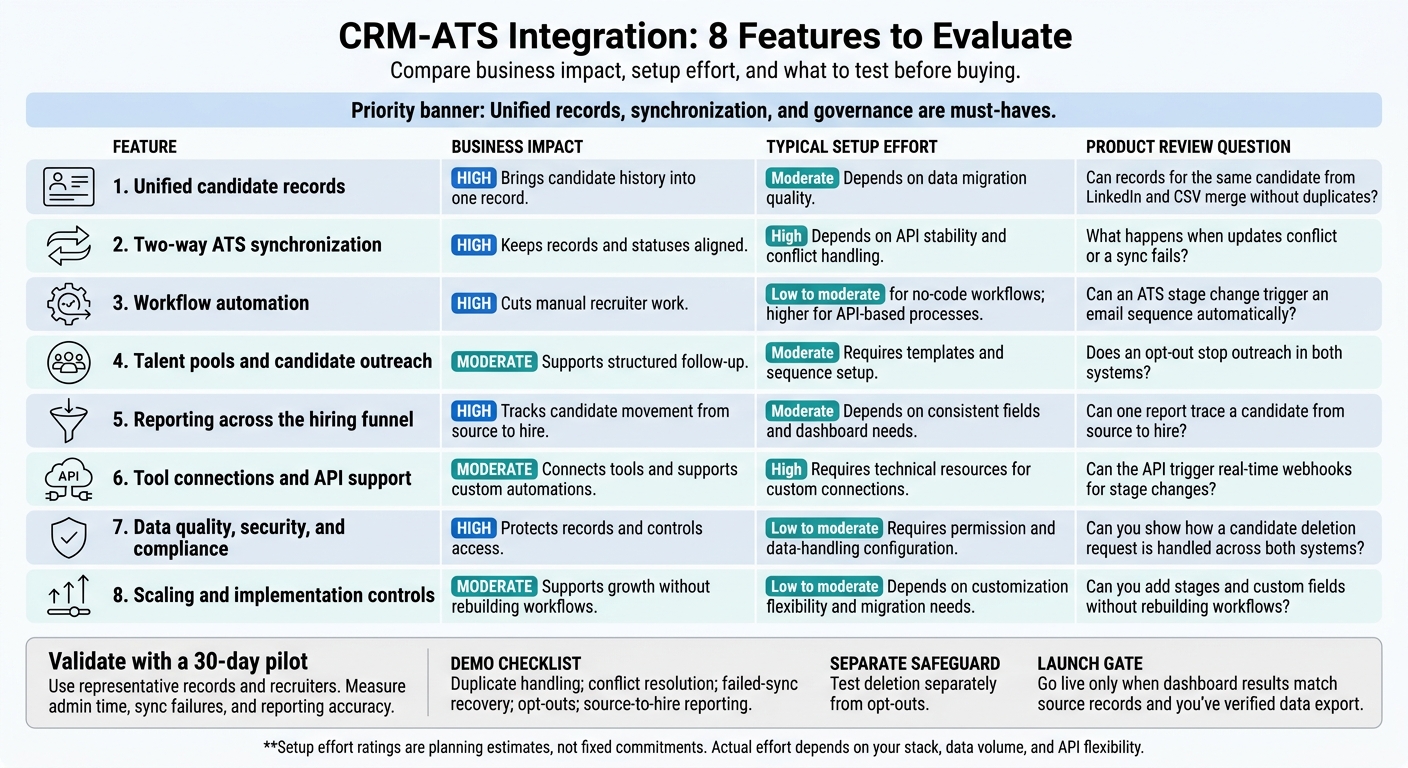
CRM-ATS Integration: 8 Features to Evaluate
What CRM-ATS Integration Should Do
Define what must sync and why before you assess an integration or rate your recruitment process to identify gaps. Specify the records, fields, and actions your team needs. A connector alone does not prove full sync.
Start with one shared candidate identity and duplicate checks for sourced candidates. Assign a system of record for each field, including contact details, skills, and hiring status. Set clear rules for who can edit each one. Resume parsing can structure incoming data, but your team still needs to decide field ownership.
Test sync behavior against your priority hiring workflows. Communication updates should reach both records, and candidate actions should trigger the correct updates. Check which features come with the standard connector and which need API-only work, so you can scope the build and its cost.
Lock stage definitions and source data before building reports. Verify that the tool preserves stage, source, and timestamp inputs, and map custom pipelines to your actual hiring process. Your reporting needs to reflect how you hire, not just the tool’s default setup.
Before go-live, check imported record matches, field values, and workflow results against your agreed rules. Use these data quality and sync checks to assess each feature below and catch errors before they create extra work for your hiring team.
sbb-itb-a23bd6a
1. Unified Candidate Records
Start with one candidate record that both systems can rely on.
Minimum Required Capabilities
Bring contact details, applications, recruiter notes, outreach, and engagement history into one record. Link each application to its job so recruiters can distinguish the overall relationship history from progress on a specific role.
Keep reapplications and updated contact details on the same profile rather than creating separate records.
Hiring Workflow Impact
ATS users should see relationship history; CRM users should see current application status, subject to permissions. This cuts duplicate updates and gives your recruiters one source of truth.
Put conversations, follow-ups, and interview reminders in one view to reduce time spent switching between systems. Updates must stay aligned across both systems for that shared view to work.
Data Ownership and Safeguards
Use role-based access to protect sensitive notes and control who can edit shared records.
During migration, review duplicates before merging them. Check that application links and communication history remain attached to the correct record.
2. Two-Way ATS Synchronization
Hiring Workflow Impact
Once records are unified, test the handoff from CRM prospect to ATS applicant as part of an embedded recruitment service. Set the exact trigger for that move, and check that the person lands in the correct requisition and stage. Rejected or inactive candidates should return to searchable talent pools with their application history intact.[1][2]
Minimum Required Capabilities
Confirm that requisitions, candidate records, stage changes, notes, and status updates sync both ways.[1]
Data Ownership and Safeguards
Before rollout, map custom stages and pipelines, test each path in a sandbox, and run a data quality audit.[1]
Product Review Questions
Ask the provider to demonstrate the full workflow: move a prospect into a requisition, change their stage, then return a rejected candidate to a talent pool. Check that the original application history stays attached at every step.[1][2] Then test whether those sync events trigger the correct follow-up actions.
3. Workflow Automation
Once sync is stable, automate handoffs between your CRM and ATS to cut manual recruiter work.
Hiring Workflow Impact
ATS events should trigger CRM actions automatically, using synced status, stage, and contact fields to move hiring forward without manual updates.
An interview booking can send reminders, candidate inactivity can trigger re-engagement, and a stage change can trigger the next workflow step.
Minimum Required Capabilities
Look for editable, no-code rules that match your hiring stages and email flows. Email sync should make outreach and follow-ups visible in both systems, while API automations update records and stages without recruiter input.
Data Ownership and Safeguards
Protect candidate data with role-based access and encryption, both in transit and at rest. Opt-outs should block outreach across both systems, and automated messaging should prevent duplicate follow-ups.
Product Review Questions
Ask the provider to demonstrate three tests:
An interview reminder, an inactivity alert, and a retry after a failed update.
Include opted-out candidates to check that outreach stays blocked. Confirm CRM follow-ups appear in the ATS, retries do not send duplicate messages, and recruiters can edit the workflow.
Those same triggers should also feed funnel reporting.
4. Talent Pools and Candidate Outreach
Hiring Workflow Impact
Once sync and automation are stable, talent pools use synced candidate data and consent controls to organise passive candidates for future outreach.
Talent pools should be searchable, not just tagged. Use source and skills filters to group passive candidates, past applicants, referrals, event contacts, and silver medalists. Keep strong finalists who weren’t hired in a dedicated silver medalist pool so your team can find them for future roles. [1]
Minimum Required Capabilities
Look for dynamic segments and automated nurture sequences that enrol the right candidates at the right time. Your system should support automatic silver medalist tagging, personalised nurture messages, and two-way email sync, keeping replies attached to each candidate’s record. [1]
Data Ownership and Safeguards
Pool membership is not permission to contact someone. Store consent and unsubscribe preferences on the candidate record, and ensure opt-outs sync across both systems. [1]
Test saved skills searches, automatic silver medalist tagging, and sequence enrolment. Then confirm that replies and outreach history stay synced as candidates move from nurture to active hiring, giving your team the context they need without piecing together past messages. [1]
5. Reporting Across the Hiring Funnel
Hiring Workflow Impact
For more insights on optimizing your talent acquisition strategy, explore The Talent Fix Recruitment Blog.
Once outreach is running, track CRM sourcing, outreach, and ATS outcomes as one hiring funnel: sourcing, applications, interviews, hires, and drop-offs. Filter by role, department, recruiter, source, campaign, and period to see where hiring stalls and where your team spends time.
Minimum Required Capabilities
Use these checks to compare performance across the hiring funnel.
| Reporting capability | Required data |
|---|---|
| Pipeline health | Stage changes, conversion rates, drop-off reasons, status timestamps |
| Source performance | Source tags, applications, interviews, hires |
| Campaign engagement | Outreach history, open/click rates, response rates, nurture-to-application rate |
| Pipeline velocity | Time-to-fill, time-in-stage, job open date and placement date |
| Recruiter productivity | Placements per recruiter, activity logs, time spent on administration |
Standardize metric definitions before comparing dashboards. Teams need to use the same definitions for conversion rates, time-to-fill, and source attribution so you can compare results without misreading performance.
Data Ownership and Safeguards
Reporting needs complete, deduplicated, synced records. Protect candidate records with recruiter/admin access controls. Check totals against duplicate flags, mandatory field completion, and last-updated timestamps to avoid basing hiring decisions on incomplete or duplicated data.
Product Review Questions
Test live stage updates, duplicate handling, permissions, scheduled delivery, drop-off alerts, and sync delay visibility. Check that the integration supplies accurate funnel data and that dashboards match recruiters’ day-to-day workflows.
6. Tool Connections and API Support
Once reporting and automation are in place, connect the systems that send and receive hiring data.
Hiring Workflow Impact
Start with email and calendar connections so your team can manage outreach and interview scheduling in one place. Add job board, sourcing, and HRIS connections only where they cut manual updates. This is especially critical when managing engineering recruitment solutions that require high-volume technical sourcing.[1][2]
Match each connection type to the workflow it needs to support.
Minimum Required Capabilities
Check which fields each connection can read and update, and whether data moves one way or both ways. Choose the simplest connection that supports the required data flow.
| Approach | Advantages | Limitations |
|---|---|---|
| Native integrations | Built-in connections for standard hiring workflows.[1][2] | Limited tools, fields, and actions. |
| Configurable connectors | Prebuilt syncs with editable field mapping.[1][2] | May struggle with complex rules or changes to vendor fields or interfaces. |
| API-based approaches | Custom automations for complex or changing hiring workflows.[1] | Need technical ownership, maintenance, and testing of rate limits and retries. |
Use APIs for custom automation and webhooks to trigger actions when events occur.[1]
Data Ownership and Safeguards
Test third-party field mapping before rollout, including imported resume data. Confirm data export permissions and integration admin access so your teams can protect records and retain ownership of their data.[1][3] Assign one owner to each connector, API key, and webhook.
Product Review Questions
Have recruiters and IT test field mapping, permissions, and a CRM-to-ATS stage change in a sandbox.[1][3] Check that imported data is reviewed at deployment and that the workflow still works after changes to stages or custom fields.[1][3]
7. Data Quality, Security, and Compliance
Hiring Workflow Impact
Once data is flowing, check that the integration keeps it accurate, private, and compliant. Poor data creates extra work for your hiring team.
Validate incoming fields and remove duplicates before records merge. Keep source attribution and consent synced across systems.
Minimum Required Capabilities
Set clear conflict rules so unverified enrichment data cannot automatically overwrite recruiter-entered information. Define who owns each field and flag conflicts for review.
Require SSO, audit logs, encryption in transit and at rest, and scheduled security reviews.
Data Ownership and Safeguards
Assign an internal owner for candidate-data policies and access approvals. Have legal counsel review applicable privacy requirements. Vendor compliance claims are not enough.
Document retention periods and deletion workflows. Sync consent withdrawals and deletions across systems, with safeguards that prevent deleted records from being re-imported.
Test these controls before go-live.
Product Review Questions
During testing, submit conflicting candidate details, withdraw outreach consent, and request deletion. Check that verified fields stay intact, outreach stops where required, and deletion reaches connected systems unless retention rules apply.
Review audit logs and confirm that users with restricted access cannot edit sensitive records.
8. Scaling and Implementation Controls
Hiring Workflow Impact
Once you’ve mapped sync and reporting, test the integration at higher hiring volumes. Check capacity for candidate records, open requisitions, users, sync volume, stage updates, and report latency. This helps you spot limits before they slow hiring.
Keep custom fields, stages, pipelines, dashboards, alerts, and scheduled reports configurable as volume grows. [1][3]
Minimum Required Capabilities
Confirm automation and API support. Your monitoring should show sync failures, retry counts, and sync delays, not just hiring metrics. That gives your team visibility into issues as usage increases. [1]
Data Ownership and Safeguards
Plan migration around data discovery, secure importing, and a deployment and review phase. [1] Assign rollout owners for migration approval, permissions, training, and maintenance so each task has a clear owner.
Before rollout, confirm implementation support, named escalation contacts, and support coverage. [1]
Product Review Questions
Run a pilot at your expected workload. Test stage changes, automation, reports, permissions, imported records, and recovery from failed syncs. Confirm support escalation and retesting steps before go-live.
Use the pilot results to score scalability, support, and rollout risk in the table below.
CRM-ATS Feature Evaluation Table
Unified records, synchronization, and governance are must-haves. Treat setup effort ratings as planning estimates, not fixed commitments. Actual effort depends on your stack, data volume, and API flexibility. [1][2]
Score each feature using your pilot results. Check how candidate data moves from sourcing to hire, and where manual work or data gaps could slow hiring.
| Feature | Business impact | Typical setup effort | Product review question |
|---|---|---|---|
| Unified candidate records | High: Brings candidate history into one record. | Moderate: Depends on data migration quality. | Can records for the same candidate from LinkedIn and CSV merge without duplicates? |
| Two-way ATS synchronization | High: Keeps records and statuses aligned. | High: Depends on API stability and conflict handling. | What happens when updates conflict or a sync fails? |
| Workflow automation | High: Cuts manual recruiter work. | Low to moderate for no-code workflows; higher for API-based processes. | Can an ATS stage change trigger an email sequence automatically? |
| Talent pools and candidate outreach | Moderate: Supports structured follow-up. | Moderate: Requires templates and sequence setup. | Does an opt-out stop outreach in both systems? |
| Reporting across the hiring funnel | High: Tracks candidate movement from source to hire. | Moderate: Depends on consistent fields and dashboard needs. | Can one report trace a candidate from source to hire? |
| Tool connections and API support | Moderate: Connects tools and supports custom automations. | High: Requires technical resources for custom connections. | Can the API trigger real-time webhooks for stage changes? |
| Data quality, security, and compliance | High: Protects records and controls access. | Low to moderate: Requires permission and data-handling configuration. | Can you show how a candidate deletion request is handled across both systems? |
| Scaling and implementation controls | Moderate: Supports growth without rebuilding workflows. | Low to moderate: Depends on customization flexibility and migration needs. | Can you add stages and custom fields without rebuilding workflows? |
Require live demos, not just feature claims, for duplicate handling, conflict resolution, failed-sync recovery, opt-outs, and source-to-hire reporting.
Test deletion separately from opt-outs. Use the results to assign rollout ownership, set workflow rules, and plan recruiter training.
Recruiter Training and Process Ownership
After pilot testing, define who owns each step before go-live. Document what recruiters handle and what automation takes care of, including candidate sourcing through browser extensions, resume parsing, automated follow-up sequences, and custom hiring-stage pipelines. [1][2]
Recruiters should own stage rules and pipeline changes, while vendor support handles sync issues. Assign one person to review parsed fields and data conflicts, even when AI extracts the data. Clear ownership helps prevent errors from slowing down hiring. [1][3]
Keep training hands-on. Have recruiters practise sourcing a candidate, checking parsed fields, starting a follow-up sequence, and updating a hiring stage. Ask them to explain what happens automatically and what needs review. Use the provider’s implementation support to set up workflows around how your team actually hires. [1][2]
Once the workflow is live, track usage, stage updates, and admin time to spot training gaps and check whether automation is reducing manual work. Whenever pipelines or automation rules change, update the instructions and retrain the team on those changes. [1][2]
Conclusion: Test Data and Workflows First
Before rollout, check candidate history, field ownership, sync, automation, security, compliance, and reporting, not just the core features. [1][3]
Run a 30-day pilot using representative records and recruiters. Test the workflows your team uses, not just the connector. This is especially critical when transitioning to on-demand recruitment models. Get recruiter sign-off on imported history, custom fields, two-way email sync, and role-based access before full rollout. [1][3]
Go live only when dashboard results match source records and you’ve verified data export. Records, workflows, permissions, and reports must work reliably together. If they don’t, fix the workflow before launch. [1]
FAQs
How do I calculate CRM-ATS integration ROI?
Compare cost savings and efficiency gains against a 30- to 60-day baseline. Track cost-per-hire in USD, time-to-fill, and recruiter administrative hours before and after integration.
Include recruiter time, advertising, and software fees in your hiring costs. Measure hours saved on manual data entry, follow-ups, and reconciliation between systems to see where integration reduces admin work.
Track conversion rates and pipeline velocity to pinpoint hiring bottlenecks and assess whether you can increase hiring volume with more predictable results.
What hidden integration costs should I budget for?
Budget for security requirements, staff training, data migration, and API access fees when connecting your recruitment CRM and ATS. These costs affect how fast you can roll out the integration and how much internal work it takes to maintain both systems [1].
Get your data export terms in writing, too. If candidate records and history are difficult to transfer, switching to a new platform can add costs and disrupt your hiring process [2].
How can I migrate without disrupting hiring?
Migrate in phases, rather than moving everything at once. Map your data sources and touchpoints so you know how native integrations, real-time syncs, and third-party connectors move data between systems. Fully validate key connections, including ATS-to-HRIS and background checks, before adding others.
Use a dedicated test environment with actual data to check that workflows run reliably and produce repeatable results, from job creation through to reporting. Before committing to a new provider, get written confirmation of its data export policies.