If hiring is missing plan, running over budget, or taking too long, predictive analytics gives you a clearer way to fix it.
I’d boil the article down to this: clean hiring data plus simple forecasting helps you cut time to fill, spot offer risk earlier, plan recruiter capacity, and link hiring to headcount and revenue goals. For scaling companies in SaaS, technology, fintech, engineering, security, insurance, and professional services, that means fewer delays, lower agency spend, and less wasted recruiter time.
Here’s the short version:
- Track the right recruitment metrics first, job titles, stages, source, salary range, offer outcome, start date, and 90-day retention
- Clean and standardise the data, or your forecast will be wrong
- Start with one role family and one hiring problem
- Use simple models, like logistic regression, decision trees, or demand forecasting
- Measure business impact, including days saved, early attrition reduced, and agency dollars saved
- Review results each quarter before scaling the approach
A few numbers make the case plain:
- 55.5% of small business owners said filling roles got harder
- Teams using predictive analytics report a 25% drop in time to fill
- They also report a 20% lift in quality of hire
- Recruiters lose 17.7 hours per vacancy to admin
- 45% of talent leaders spend over half their time on work that could be automated
The point is simple. You do not need a more complex hiring function. You need a more predictable one. You can rate your recruitment health to identify where your data or processes are falling short. If your internal team is stretched, embedded recruitment or support from Rent a Recruiter can help you put the structure in place and keep the data clean enough to use.
Data-Driven Recruitment: How to predict the success of your hires
sbb-itb-a23bd6a
What to Measure Before You Predict
Predictive analytics starts with reliable hiring data. Before you build any forecast or scoring model, you need clean, standardised hiring records. That does not mean you need expensive software. Most SMEs can get started with a well-set-up ATS, a connected HRIS, or even a disciplined spreadsheet. Once data is captured the same way every time, you can rate your recruitment process to identify gaps, then decide which fields matter most.
Core Recruitment Data SMEs Should Track
The aim is to track a small set of fields, consistently, for every role and every candidate.
At the requisition level, you need standardised job title, department, location, work model, and state or city where needed, seniority level, salary range in USD with minimum, midpoint, and maximum, employment type, and the date the role opened.
At the candidate level, you need source channel, application date, stage progression, number of interviews, stage duration, offer outcome, and start date.
After hire, track two more fields:
- 90-day retention, meaning whether the person is still employed on day 90
- A 6- or 12-month performance rating, where available
Each field should earn its place. Stage duration shows where your process slows down. Source channel shows which channels turn into hires. Offer outcome shows whether your pay is competitive. And 90-day retention ties hiring decisions back to business results, not just speed.
How to Clean and Standardize Hiring Data
Raw hiring data is almost always messier than it first appears. The most common issues SMEs face are duplicate candidate records, inconsistent job titles, inconsistent stage names, missing salary ranges, and free-text source entries that split the same channel across multiple labels.
Start with a job title taxonomy. Map every variation, like "AE", "Account Executive", and "Sales Rep", to one standard label, then lock it into your ATS as a picklist. Do the same for stage names. Agree one funnel structure across teams, for example: Applied → Screened → Hiring Manager Interview → Final Interview → Offer → Hired/Rejected. Then make sure every role follows it.
For compensation, require salary range in USD at the point of requisition creation, not later when memory gets patchy. Replace free-text source fields with a controlled list so source analysis is usable. If one recruiter writes "LinkedIn" and another writes "LI", your reporting breaks fast.
Once the structure is in place, run a monthly data audit to flag records missing offer outcomes, start dates, or retention status. Assign clear ownership:
- Recruiters own stage and source data
- HR owns start dates and retention
- Hiring managers own performance ratings
Clean definitions matter more than more data. If the labels are messy, the forecast will be messy too.
How Embedded Recruitment Support Can Help
When internal teams are stretched, embedded recruitment support can bring structure, visibility, and consistency to hiring data. Rent a Recruiter embeds experienced recruiters into your team and manages hiring end-to-end, which makes it easier to keep data clean enough for planning.
With clean data in place, you can start forecasting demand, cycle times, offer outcomes, and retention risk.
How Predictive Analytics Improves Recruitment Outcomes
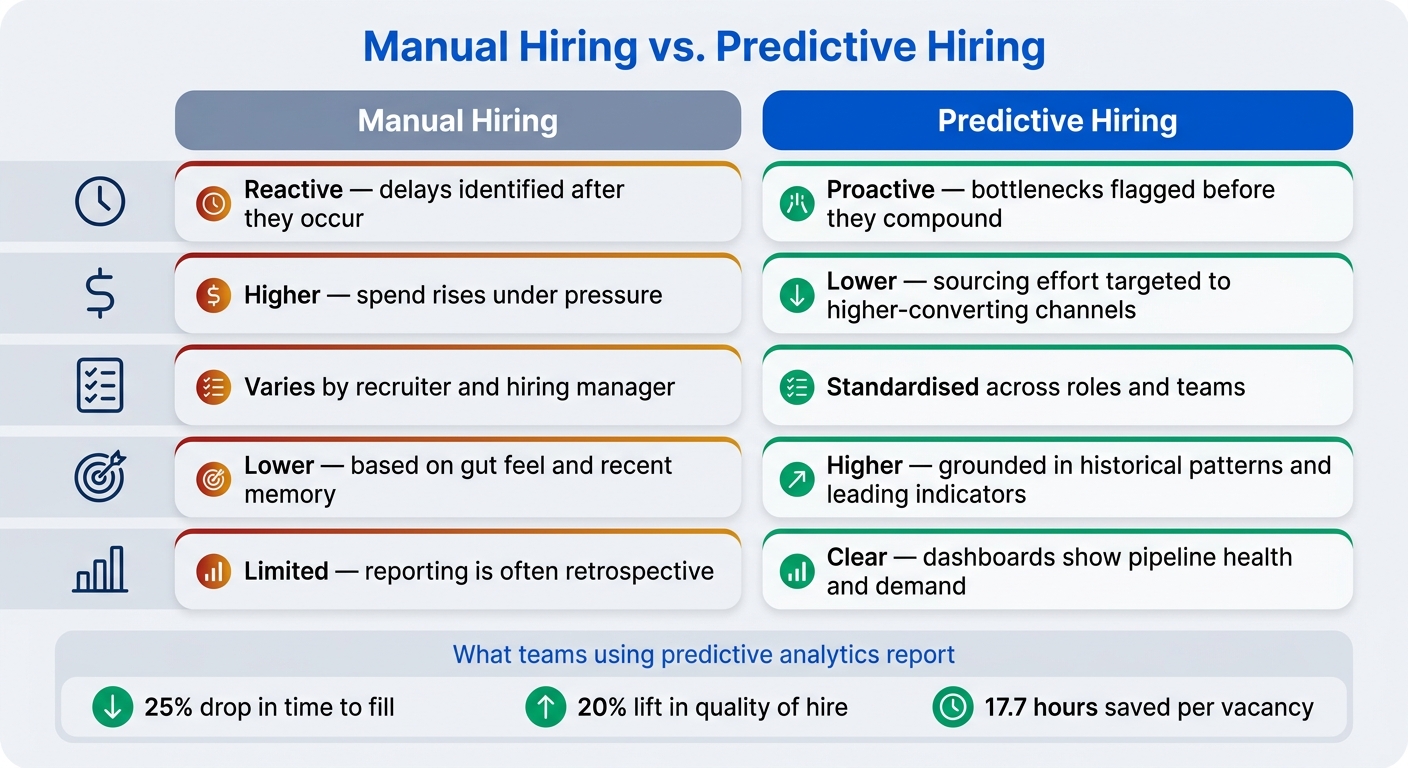
Manual Hiring vs. Predictive Hiring: Key Differences at a Glance
Forecasting Hiring Demand and Recruiter Capacity
Once your data is clean, you can start using it to plan hiring with far more control.
Historical growth, attrition, and revenue targets help you forecast quarterly hiring demand. When you combine headcount growth, attrition, and revenue goals, you get a clearer view of hiring needs, recruiter workload, and when budget needs to be in place.
Here’s a simple example. If a SaaS company loses about 8% of its account managers each year and wants to grow revenue by 25%, a basic model can show that customer success hiring needs to increase before service gaps appear. That matters because it lets you open roles earlier and secure budget before hiring turns into a fire drill.
Recruiter capacity follows the same logic. If you track active reqs per recruiter, average pipeline size, and offer-stage bottlenecks, you can see whether your current team can handle the next hiring push or whether you need more support before the backlog builds. In plain terms, the forecast tells you when to open roles and how much recruiting capacity you need.
Predicting Time to Fill, Offer Outcomes, and Retention
The three predictions that tend to matter most are time to fill, offer acceptance probability, and early retention risk.
On time to fill, Employ‘s 2024 Recruiter Nation Report found that the average U.S. time to fill fell from 48 days in 2023 to 41 days in 2024.[3] That kind of benchmark is useful, but the bigger win comes from your own stage-by-stage data. Teams that track conversion rates through each step can spot delays fast, whether that’s a slow hiring manager review or an interview stage that adds cost without helping decision quality.
Offer acceptance tells a similar story. NACE‘s 2024 data shows that employers extended offers to about 54% of their Class of 2023 candidates, and 75% of those offers were accepted.[4] If your acceptance rate sits below that mark, there’s often a process issue behind it. One common example is offer delay. Candidates who wait more than five business days for an offer often accept at a lower rate. That’s not a market problem. It’s a workflow problem, and once you can see it, you can fix it.
Retention risk is just as important, especially if you want hiring to drive revenue instead of rework. Tracking 90-day outcomes by source, manager, and pay band helps you see which hiring decisions stick after day one. That gives you a clearer picture of where your process is working and where early churn is eating into time and budget.
Manual Hiring vs. Predictive Hiring: A Direct Comparison
Manual hiring can work at low volume. The trouble starts when the business scales. That’s when inconsistency, delay, and poor cost control start to show up.
| Dimension | Manual Hiring | Predictive Hiring |
|---|---|---|
| Time to hire | Reactive; delays are identified after they occur | Proactive; bottlenecks flagged before they compound |
| Cost per hire | Higher; spend rises under pressure | Lower; sourcing effort is targeted to higher-converting channels |
| Process consistency | Varies by recruiter and hiring manager | Standardised across roles and teams |
| Accuracy | Lower; based on gut feel and recent memory | Higher; grounded in historical patterns and leading indicators |
| Visibility | Limited; reporting is often retrospective | Clear; dashboards show pipeline health and demand more clearly |
The difference is simple. Manual hiring tells you what went wrong after the fact. Predictive hiring gives you the chance to act before missed targets, slow fills, or recruiter overload start costing you money.
Next, turn these signals into a simple implementation plan.
A Step-by-Step Implementation Plan for SMEs
Once the signals are clear, turn them into a tight pilot.
Start with One Role Family and One Hiring Problem
Focus on one high-volume, business-critical role family linked to revenue or customer results. That could be sales reps, software engineers, or customer success agents. Pick the role family where hiring risk is highest.
Then choose one measurable problem you can improve within 30 to 90 days. Look back at the last 6 to 12 months of hiring data and find the target with the biggest business payoff.
Keep the pilot simple and run it in three phases:
- Days 1 to 30: clean the data
- Days 31 to 60: build the model
- Days 61 to 90: compare results against the baseline
Once the scope is set, use the simplest model that answers the question.
Choose Simple Models and Track Business Impact
Stick with simple, explainable models. Use logistic regression for binary outcomes, decision trees for rule-based scoring, and basic time-series or regression forecasting for demand.
Logistic regression helps you see which inputs matter most, such as source channel, years of experience, or interview rating, when predicting offer acceptance or 90-day retention. Decision trees turn those inputs into plain if-then rules. For demand forecasting, regression-based methods that use past hiring volumes and business drivers, like revenue targets or product release schedules, can often be built and managed in a spreadsheet or a lightweight BI tool.[1][2][6]
| Model Type | Interpretability | Data Requirements | Best-Fit SME Use Case |
|---|---|---|---|
| Logistic Regression | High | Moderate historical data | Offer acceptance, 90-day retention prediction |
| Decision Tree | High | Moderate historical data | Candidate scoring, early attrition risk |
| Time-Series / Regression Forecasting | Moderate | Historical hiring volumes + business drivers | Monthly headcount demand, time-to-fill forecasting |
From day one, track model output against business metrics:
- Days saved per role
- Agency dollars saved
- Lower early attrition
If the model starts helping, the next step is putting clear rules around how people use it.
Build Governance, Dashboards, and Review Cycles
Set clear score thresholds, give recruiters a playbook, and run basic fairness checks before scores shape hiring decisions. For example, candidates with a predicted retention score above 0.70 can be prioritized for interview, while lower-scoring candidates still get a human review. The recruiter playbook should show how to read scores, how to weigh them against factors like cultural fit or hard-to-find skills, and what action fits each score band. Flag any protected-group selection rate below 80% of the reference group.[5][1]
Keep dashboards lean and tied to the role. HR leaders usually need a view of average time to fill by role family, predicted versus actual hiring demand by month, and agency spend trends. Hiring managers tend to need something simpler: open roles, predicted time to fill, pipeline health, and risk alerts for roles that may miss their target start date. Use traffic-light status and plain-language labels.
Review predictions every quarter. Compare forecasted outcomes with actual results, check for any drop in accuracy, and gather recruiter feedback. Only expand once the pilot hits its target business results.
If your team is stretched, outside support can help keep the process on track.
Rent a Recruiter can handle data standardization, pilot setup, dashboard maintenance, and quarterly reviews, while keeping hiring data clean and the process consistent.
Conclusion: Build a More Predictable Hiring Function
Predictive analytics in recruitment works when you pair clean data with simple models. Get the inputs right, and hiring becomes far less hit-and-miss. You can forecast demand, cut time-to-fill, and take admin work off your team’s plate. That’s what turns the forecasts in this guide from theory into something you can use.
The time drain is hard to ignore. Recruiters lose 17.7 hours per vacancy to admin, and 45% of talent leaders spend more than half their time on work that could be automated.[8][7] Structured hiring cuts that drag. It gives recruiters more time to focus on work that moves hiring forward.
Keep the first step small. Start with one role family, one clear problem, and 6 to 12 months of historical data. Use the simplest model that answers the question in front of you. Track business impact from day one. Then scale only after the pilot hits target. In other words, prove it first, then build on what’s already working.
If your team doesn’t have the bandwidth to do that alone, Rent a Recruiter can embed experienced recruiters into your team and bring more structure, visibility, and consistency to hiring. Companies often cut hiring costs by up to 70% compared with commission-based agency models, while saving more than 80 hours per month in internal hiring and admin time. If you want to move from reactive hiring to a more predictable model, book a call with Rent a Recruiter to review your current setup, look at likely savings, and assess your hiring capacity needs.
FAQs
How much hiring data do I need to start?
You can start building simple predictive models with as few as 100 past hiring outcomes. That gives you a starting point, not a crystal ball.
The model gets better as your dataset grows. More history means better pattern spotting, better planning, and fewer hiring calls based on gut feel alone.
For insights you can act on, aim for at least 2 years or 8 quarters of hiring and departure data. Just as important, that data needs to be consistent across your HRIS and ATS. If the inputs are messy, the forecast will be too.
For smaller companies, you do not need a big system to begin. A spreadsheet is enough to start forecasting, especially if you want a clearer view of likely hiring demand, team churn, and timing.
Can small teams use predictive analytics without new software?
Yes. Small teams can use predictive analytics without buying new software.
A lot of SMEs can build a basic model by pulling together and cleaning up the data they already have in their ATS and HRIS. The main issue is data consistency, not fancy tools.
If your team is stretched, Rent a Recruiter can place an experienced recruiter inside your business to standardize processes, clean up data hygiene, and turn the information you already hold into hiring insight.
That matters because better data leads to better hiring calls, less wasted time, and tighter cost control.
What should I do if my hiring data is incomplete?
If your hiring data is incomplete, don’t run predictive models yet. Fix the inputs first.
Start with a full headcount pull from your HRIS or payroll system. Then check that your ATS and HRIS data match, and that each hire is logged in the same format. If one system says "Sales" and another says "Commercial", or timestamps are handled in different ways, your output will be off from the start.
That matters because bad inputs lead to bad forecasts. And bad forecasts cost time, money, and trust.
If key fields are missing, make them required. Standardise labels. Standardise timestamps. Keep it simple and consistent across every hire.
Then start small. Pick one part of the business, test the model against past hiring outcomes, and see how close it gets. After that, recalibrate every quarter so the model stays useful as your hiring patterns shift.