If your team is screening hundreds of applications with loose rules, AI parsing will scale the mess, not fix it.
I’d sum it up like this: AI resume parsing helps you cut admin time, move to shortlist faster, and handle hiring spikes, but only if your job criteria, data rules, and review steps are set first. In high-volume hiring, small setup mistakes can block good applicants, waste recruiter hours, and drag out time to hire.
What matters most:
- Set clear knockout criteria before roles go live
- Use the same data rules across teams and locations
- Test parser accuracy at field level inside your ATS
- Send low-confidence cases to recruiter review, not auto-reject
- Track essential recruitment metrics like parsing success, correction rate, false negatives, and time to shortlist
- Pilot on one high-volume role family first before wider rollout
For CEOs, CFOs, and talent leaders, the commercial point is simple: parsing only saves time and cost when the process behind it is controlled. If you want scale without more admin, this is where to focus.
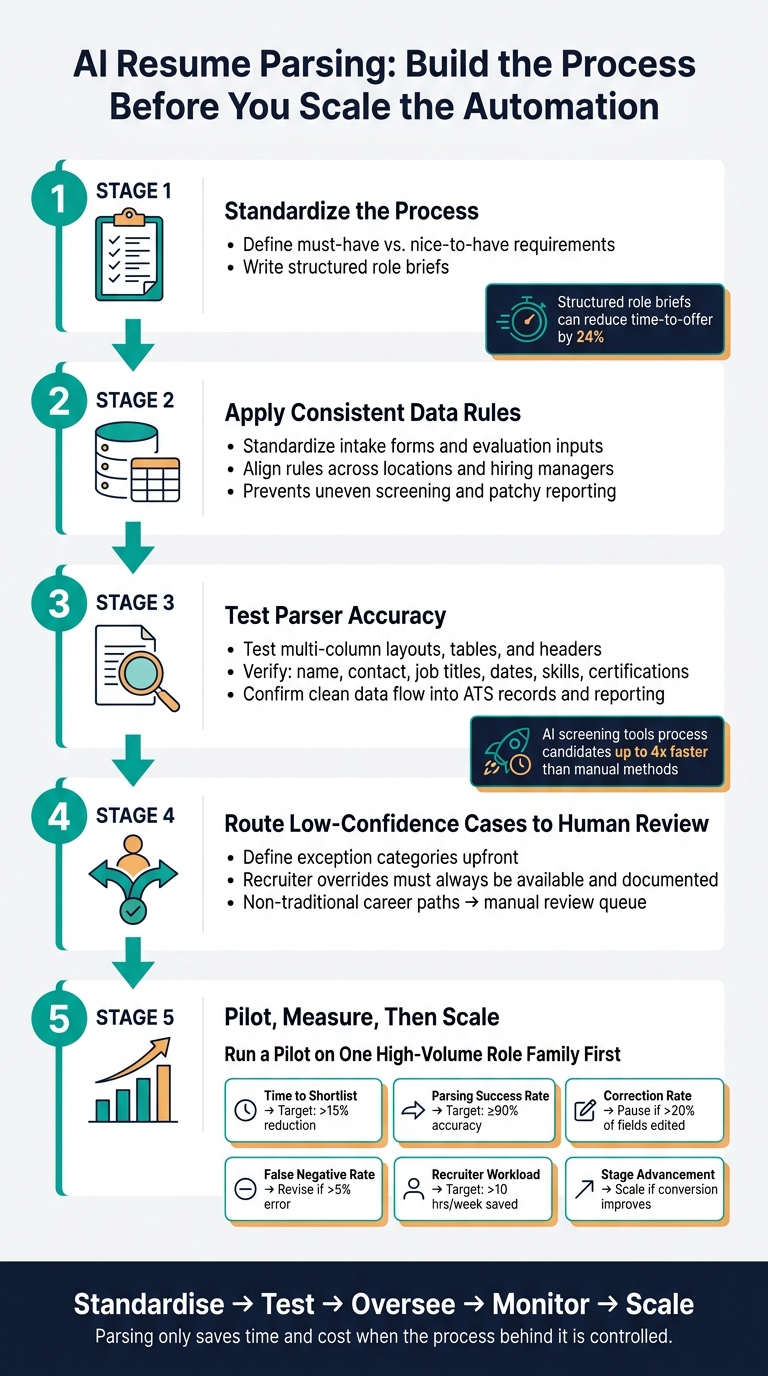
AI Resume Parsing Setup: 5-Step Process for High-Volume Hiring
How AI Resume Parsing Works
sbb-itb-a23bd6a
Build a solid hiring process before turning on automation
AI resume parsing will scale whatever process you already have. If your hiring process is messy or inconsistent, automation won’t fix it. It will just make the problem bigger.
That is why the groundwork matters. Start with the job definition, because the parser can only match against the rules you set. If those rules are vague, mixed up, or uneven from one role to the next, you will get uneven results at scale.
Standardize job requirements and knockout criteria
Set screening criteria before the role goes live. Be clear about what is a knockout requirement and what is simply a nice-to-have. Then define, in plain terms, what "qualified" means for that role.
This matters more than many teams think. When knockout criteria and preference signals get lumped together, the parser can screen out people who should still be in the running. That shrinks your talent pool for the wrong reason and slows hiring later.
A structured role brief gives the system a cleaner set of rules to work from. It also helps your team stay aligned from intake to offer. Structured role briefs can reduce time-to-offer by 24% [1], which has a direct impact on hiring speed and team capacity.
Once the criteria are locked, the next step is just as important: make the data consistent too.
Apply consistent data rules across roles and teams
Use one data standard across roles, teams, and locations. If intake forms, evaluation rules, or hiring inputs vary by team, the parsed data becomes less reliable. That usually leads to uneven screening, patchy reporting, and extra manual checks later.
Think of it like this: if every team labels and scores data differently, your parser is reading a different language every time. That creates noise when what you need is clean signal.
Structured inputs help keep parsed data steady as hiring volume grows. For CEOs, CFOs, and talent leaders, that means better visibility, less admin drag, and fewer process gaps when hiring ramps up. Access our hiring resources for more tools to support your team.
Then you need clear ownership, because standards don’t hold on their own.
Assign clear ownership for configuration, exceptions, and oversight
Give one person ownership of configuration, one person ownership of exception handling, and one person responsibility for calibration over time. If nobody owns these areas, errors sit in the system for too long and edge cases pile up.
Misconfigurations are costly. A small rules issue can affect dozens, or even hundreds, of applicants before anyone spots it. That means wasted recruiter time, slower shortlists, and weaker hiring outcomes.
You also need regular checks after hiring decisions are made. Review post-hire outcomes to make sure the parser is filtering for the right signals, not just the easiest ones to measure. If the system is rejecting people who go on to perform well in similar roles, that is a process issue, not just a tooling issue.
Assess parser performance and design a human-governed workflow
Once your process is set up and ownership is clear, the next step is straightforward: is the parser doing the job you need it to do? At scale, small parsing mistakes turn into expensive downstream problems. Test before go-live, and keep people in control of hiring decisions.
Test field-level accuracy and ATS integration
With your criteria in place, check that the parser pulls the right data and stores it in the right place. U.S. job seekers use all sorts of resume formats, so test multi-column layouts, tables, and headers. Those less standard layouts are often where data gets lost. When that happens, you see it fast: incomplete ATS records, weaker search results, and reporting you can’t trust.
Test each field on its own. That includes name, contact details, job titles, employment dates, skills, and certifications. After that, confirm the parsed data moves cleanly into ATS search, candidate records, and reporting. If the handoff fails anywhere, you get data silos and manual re-entry, which defeats the point of automation.
Evaluate these before go-live:
| Evaluation Criteria | What to Verify | Why It Matters |
|---|---|---|
| Format Coverage | Ability to parse multi-column layouts, tables, and headers | Prevents data loss from modern, nonstandard resume designs |
| Field-Level Accuracy | Precision of extraction for dates, job titles, and skills | Ensures searchability and reporting accuracy in the ATS |
| Confidence Scoring | Ability to flag uncertain extractions | Triggers manual recruiter review for low-confidence edge cases |
| ATS Integration | Clean data flow into candidate records and search | Prevents manual data re-entry and ensures a single source of truth |
| Bulk-Processing Capacity | Processing speed for hundreds of resumes simultaneously | Needed to handle application spikes in high-volume roles |
| Auditability | Tracking of extraction logic and manual overrides | Needed for compliance and monitoring for algorithmic bias |
| Privacy Controls | PII handling and data protection during parsing | Supports compliance with CCPA and other U.S. data rules |
| Human-Review Workflow | Ease of recruiter override and correction options | Keeps quality control in place and leaves room for human judgment on edge cases |
Route low-confidence cases to recruiter review
Once parsing is working at the right level, decide what happens when the system isn’t sure. Not every resume will parse cleanly. Duplicate applications, missing fields, failed uploads, and unclear extractions all need a clear review path.
Send low-confidence cases to a recruiter queue, not to automated rejection. Define your exception categories upfront. If a key field comes back with a low-confidence score, that candidate should move straight to recruiter review. The same goes for people with less standard career paths, where the parser may not map experience properly.
Recruiter overrides should always be available, and each override should be documented. That gives you an audit trail and helps you spot repeat failure points in the system. If the same issue keeps showing up, you know where to fix the workflow. And don’t use unexplained AI scores as the only reason to reject someone. If a human can’t review the underlying data and see why a candidate was filtered out, you’ve got a process risk on your hands.
Map each hiring stage to automation and human responsibility
Next, assign each hiring stage to automation or human review. AI-powered screening tools can process candidates up to 4x faster than manual methods [1], but speed only matters if the right candidates are moving forward.
The table below shows each stage in the hiring workflow, the automated action, the human owner, and when review should kick in:
| Hiring Stage | Automated Action | Human Owner | Escalation/Review Condition |
|---|---|---|---|
| Upload & Parse | Field extraction and format validation | System Admin | Failed upload or unsupported file type |
| Data Validation | Duplicate check and confidence scoring | Recruiter | Low-confidence score or potential duplicate record |
| Rule Application | Ranking against defined role criteria | Recruiter | Edge cases or non-traditional backgrounds |
| Recruiter Review | Scored summaries surfaced for human evaluation | Recruiter | Discrepancy between AI rank and human judgment |
| Scheduling | Self-booking via live calendar sync | Recruiter | No availability or accommodation needed |
| Disposition | Automated status updates | Recruiter | High-potential candidate flagged for manual review |
| Reporting | Accuracy and volume metrics generated | Talent Ops | High exception rates or drop in shortlist quality |
Watch reporting closely. If exception rates are climbing or shortlist quality is slipping, stop and recalibrate before pushing more volume through the process. Reporting should tell you whether the workflow is ready to handle more hiring demand, or whether it needs work first. For organizations facing sudden growth, a flexible hiring model can provide the necessary support to manage these workflows effectively. Track time-to-shortlist, not just time-to-hire, so you can catch parsing problems early.
Control fairness, privacy, and scale with measurable checks
Monitor for bias, accessibility gaps, and data protection issues
Once parsing is live, the next step is to keep fairness, privacy, and scale under control. That means putting checks in place you can measure, review, and act on.
Start with quarterly adverse-impact reviews. You need to know if certain groups are being filtered out at higher rates. If they are, that’s not just a process issue. It can become a hiring quality issue, a compliance issue, and a cost issue.
Each screening criterion should map directly to the job. Don’t rely on keywords alone, especially the kind that show up more often on keyword-stuffed resumes. Strong applicants often describe the same work in different language. If your parser only rewards one type of phrasing, you’ll miss good people and slow the shortlist down.
Accessibility needs the same level of attention. Some applicants will hit friction in a fully automated process. Build in a manual application path, then audit that path at least twice a year. If it exists but doesn’t work well, it won’t protect your process when volume goes up.
On the data side, keep access tight. Use role-based access controls, limit access by role, set deletion schedules, and log every configuration change and override. If someone asks why a candidate was screened in or out, you should be able to trace it fast.
| Risk | Control | Owner | Review Frequency | Escalation Action |
|---|---|---|---|---|
| Parsing Errors | Field-level accuracy testing & recruiter review of low-confidence cases | HR Ops / Tech Lead | Monthly | Pause automation for specific fields |
| Biased Criteria | Adverse-impact review & standardized intake criteria validation | DEI Lead | Quarterly | Revise job-related criteria & scorecards |
| Inaccessible Workflows | Accessibility gap audits & manual application paths | UX/Compliance | Twice a year | Implement alternative application methods |
| Unauthorized Data Use | Role-based access controls & encryption | Data Privacy Officer | Annually | Revoke access & audit data logs |
| Excessive Retention | Automated data deletion & correction protocols | Legal/Compliance | Monthly | Purge non-compliant records |
| Opaque Decisions | Documentation of configuration changes & recruiter overrides | Hiring Manager | Per role | Re-calibrate AI scoring logic |
Run a pilot on high-volume roles before broader rollout
Once those controls are set, test them on one high-volume role family before you roll anything out more broadly. This keeps risk contained and gives you a cleaner read on performance.
The point of the pilot isn’t just to see whether the parser works. It’s to test whether your fairness, privacy, and accessibility checks hold up under day-to-day hiring pressure.
Before the pilot starts, record your baseline for:
- time to shortlist
- recruiter hours
- parsing success
- correction rate
- false negatives
- stage advancement
Without a baseline, you can’t show whether the system is saving time, cutting admin, or improving hiring outcomes.
Use a scorecard to decide whether to scale, revise, or pause
Use the pilot to set the baseline your scorecard will measure against. Then apply fixed rules for whether to scale, revise, or pause. That matters because once hiring teams see early time savings, it’s easy to push ahead before the process is ready.
| Metric | Definition | Measurement Method | Target Direction | Decision Rule |
|---|---|---|---|---|
| Time to Shortlist | Days to qualified shortlist | ATS timestamp data | Decrease | Continue if >15% reduction |
| Parsing Success Rate | % of resumes parsed without manual correction | Audit of 100-resume sample | Increase | Revise if <90% accuracy |
| Correction Rate | Frequency of recruiter edits to parsed fields | Recruiter feedback logs | Decrease | Pause if >20% of fields edited |
| False Negative Rate | Qualified candidates incorrectly filtered out | Manual review of rejected pool | Decrease | Revise criteria if >5% error |
| Recruiter Workload | Hours spent on manual screening and data entry | Self-reported time tracking | Decrease | Continue if >10 hours/week saved |
| Stage Advancement | % of AI-shortlisted candidates reaching final rounds | Pipeline conversion data | Increase | Scale if conversion improves |
Time to shortlist is usually the clearest early signal. It shows whether the parser is surfacing the right people fast enough to matter.
But speed on its own isn’t enough. If the correction rate goes above 20%, or false negatives go above 5%, stop and fix the criteria before sending more volume through. Otherwise, you risk trading recruiter admin for downstream hiring problems, and that gets expensive fast.
Conclusion: Turn AI parsing into a scalable hiring advantage
AI resume parsing makes your hiring process stronger, or exposes where it’s weak. That’s why structure comes first and automation comes after. That’s the benchmark this guide has built around.
Once those controls are in place, parsing stops being a standalone tool and starts working as part of your hiring infrastructure. Standardise, test, oversee, monitor, then scale your hiring.
If you need to put that structure in place fast, Rent a Recruiter embeds experienced recruiters directly into your team to build structured, human-governed hiring at volume.
Rent a Recruiter can help build that structure.
FAQs
What should we set up before using AI resume parsing?
Before you switch on AI resume parsing, get the basics right first: clean data, clear hiring processes, and firm governance.
If that sounds a bit unglamorous, it is. But this is the part that decides whether AI saves your team time or creates a bigger mess to clean up later.
Start by auditing your workflow. Look at how candidates move through your process today, where data gets added, where it gets lost, and where hiring teams make decisions. Then define your must-have and preferred criteria for each role. If those rules are vague, the output will be vague too.
Next, standardize the data going into the system. That means candidate records, job titles, skills, and locations should follow the same format across your hiring process. If one team tags a role as "Software Engineer", another as "Developer", and another as "SWE", AI can miss matches or sort people the wrong way. The same goes for skills and location data. Bad inputs lead to bad hiring shortlists.
You’ll also want a clear inventory of every AI tool in use. Know what each one does, who owns it, and where it sits in the hiring process. Assign one owner to each tool so accountability is clear. Without that, issues drift, and small process gaps turn into hiring risk.
Human oversight matters here too. AI can support screening, ranking, and admin work, but people should still make hiring decisions. Set that rule early. Put a block on autonomous AI rejections, and make sure recruiters or hiring managers review outcomes before candidates are moved out of process.
It also helps to map skill synonyms before rollout. A system may not treat related terms as the same unless you tell it to. For example, skill variations, shorthand, and role-specific language can affect match quality more than most teams expect.
Before a full launch, pilot the system on a small group of roles. That gives you space to test outputs, spot weak data, and fix process issues without disrupting your whole hiring function. A short pilot can save months of rework later.
How do we avoid rejecting qualified candidates by mistake?
Use AI resume parsing as a filtering aid, not the final decision-maker.
That matters for one reason: good hiring teams miss strong people when they rely on rigid matching. If your ATS only looks for exact keywords or job titles, you’ll screen out candidates who can do the work but describe their experience differently.
Instead, map equivalent wording and focus on must-have skills and core competencies. A SaaS Account Executive might show up as a Business Development Manager. A Security Engineer might have worked under an Infrastructure title. The label matters less than the capability.
Structured, skills-based scorecards help keep that process tight. They give your team a clear way to assess fit against the role, rather than relying on title bias or keyword luck.
A few rules help:
- No auto-rejects
- Require human review for edge cases
- Require human review before any rejection is final
- Score against skills, not just titles or phrasing
This is where hiring quality and efficiency meet. You save time at the top of funnel, but you still keep control over who moves forward and who gets ruled out.
You should also audit ATS output on a regular basis. Look at who the system is surfacing, who it is pushing down the list, and whether those choices line up with interview quality and hiring outcomes. If they don’t, adjust the thresholds, review your synonym mapping, and tighten the scorecard.
The goal isn’t to let AI decide who gets hired. It’s to help your team review faster without screening out the people you actually want to meet.
Which metrics show if resume parsing is actually working?
Track speed, funnel quality, and accuracy.
Focus on metrics that show whether your process is moving faster, filtering better, and helping your team make sound decisions:
- Days from application to first contact
- Screening-to-interview conversion and overall pipeline conversion
- False positive rate and AI-human reviewer agreement
- Screening hours saved, time-to-fill, time-to-hire, cost-per-hire, and offer acceptance rate
Also keep a close eye on how many shortlisted candidates actually move forward. If that number is low, your screening process may be surfacing people who look good on paper but do not hold up in the next stage. That creates extra work, slows hiring, and adds cost you do not need.