AI can give your recruiting team more capacity, but hours saved do not automatically mean lower costs or better hires. We recommend starting with scheduling, candidate updates, and reporting, using AI-powered recruitment tools then measuring time saved against software, setup, and review costs.
A 2025 recruiter survey reported savings of about 20% of the workweek among those using or testing generative AI. That is self-reported, not a guaranteed result for your business.
For a scaling tech company, we would focus on three checks:
- Time: Does automation reduce admin after checks and corrections?
- Cost: Does it reduce spending or help your team handle more roles?
- Hiring outcomes: Do shortlist quality and communication stay on track?
Our starting point is a <u>60-day pilot</u> with a named recruiter accountable for the workflow. Compare results with your baseline, keep people in charge of hiring decisions, and expand only when the numbers support it.
Research on Recruiter Time and Hiring Speed
Sourcing, Skills Matching, and Résumé Screening
Bullhorn’s GRID 2025 Industry Trends Report surveyed more than 1,500 recruitment professionals globally. AI-screening users were more likely to place candidates in under 20 days.[2][3] But the sample mainly covers staffing businesses, so U.S. tech SMEs should treat this as a signal, not a guarantee.
For your business, the test is specific: which tasks help recruiters reach a qualified shortlist sooner?
| Workflow stage | Automated task | Reported benefit or use | Evidence type | Evidence limitations | Applicability to tech SMEs |
|---|---|---|---|---|---|
| Sourcing | Search candidate databases | Estimated 4.5 hours weekly could be saved on searching[2][3] | Industry survey estimate | Estimated, not independently observed; staffing-sector sample | Test against engineering skill sources and niche talent pools, with recruiter checks. |
| Skills matching | Match résumé and profile data to job requirements | Faster identification of potentially relevant skills | Self-reported use | Matches may not measure engineering capability | Use structured skill criteria and recruiter checks. |
| Résumé screening | Rank applications for review | 32.1% of AI-using employers reported screening résumés[1][4] | Employer survey | Adoption does not prove time savings or selection quality | Use AI for triage only until accuracy and fairness are proven. |
| Job-ad creation | Draft job ads | 73.0% of AI-using employers used AI to write job ads[1][4] | Employer survey | Measures adoption, not hours saved or applicant quality | Keep people responsible for technical requirements and checks for exclusionary language. |
For software, engineering, data, and cybersecurity roles, track time to shortlist alongside interview progression and hiring-manager agreement. A faster shortlist alone does not show whether the right people made it through.
Review low-ranked applications for missed technical evidence, unfamiliar job titles, career paths outside the usual routes, and other details the system may filter out too aggressively.
Scheduling, Candidate Updates, and Reporting
iHire found that drafting and sending candidate messages was the most common AI use among AI-using employers.[1][4]
Check whether scheduling, reminders, and status updates save your team time. Use calendar records, ATS timestamps, and recruiter time logs rather than relying on estimates alone.
Time Savings vs. Cost Savings
| Outcome | What to measure | What it does not prove |
|---|---|---|
| Recovered recruiter hours | Net hours per requisition, including review and corrections | That payroll spending fell |
| Hiring-speed change | Days from approved requisition to shortlist, interview, and accepted offer | That selection quality improved |
| Added requisition capacity | Active roles per recruiter at a consistent service level | That every additional role will be filled |
| Financial savings | Verified reductions in overtime, external fees, or additional staffing costs | That faster hiring generated revenue |
Calculate cost per hire by adding recruiter labor, hiring-manager review, AI software, implementation, integration, training, quality/bias review, and other hiring costs, then dividing the total by completed hires.
Use the same cost categories for each role type so your team can compare similar tech hires. Also record costs tied to unfilled roles and declined offers.
Recovered hours may go toward better candidate engagement rather than lower spending. Do not count the same hours as both cash savings and added capacity. Track communication consistency and workflow visibility alongside those hours to check whether the time saved comes at a service cost.
sbb-itb-a23bd6a
Research on Communication and Hiring Visibility
Candidate Communication and Consistent Workflows
Time saved should not come at the expense of consistent communication. Automated messaging can give recruiters more time for screening and hiring-manager coordination.
iHire’s 2025 State of Online Recruiting surveyed 1,421 U.S. job seekers and 529 employers across 57 industries. Among employers using AI, drafting candidate emails and texts was the most common use at 68.6%, followed by sending candidate messages at 49.6%. Candidates listed employer ghosting as a top frustration, while employers also reported candidate drop-off.[1][4]
Use automation for acknowledgments, updates, reminders, and scheduling. The survey does not prove that automation reduces ghosting.
Set measurable service standards: acknowledge applications within one business day, send scheduling links within two business days, share interview feedback within 48 hours, and notify rejected candidates after approval.
Track first-response time, update coverage, and median and 90th-percentile delays at each stage. This helps you separate recruiter delays from hiring-manager delays. Agree on job-related criteria, rating definitions, and decision deadlines with managers so hiring decisions do not stall.
Assessments, Rankings, and Hiring Dashboards
Once communication is standardized, dashboards can show where hiring still slows down. Stage aging, conversion rates, workload distribution, and bottlenecks give SMEs visibility into the process without requiring AI. Dashboards show workflow health, not hiring quality.
Reviewers need access to original evidence, not just scores or summaries. They remain responsible for judgment and decision deadlines.
| AI-supported action | Required human review | KPI | Principal risk |
|---|---|---|---|
| Rank résumés | Check job-related evidence in a sample of lower-ranked applications | Qualified-candidate yield | Bias in past hiring data can exclude qualified applicants |
| Summarize assessment responses | Compare summaries with original responses | Summary accuracy | Incorrect or oversimplified summaries |
| Recommend interview questions | Check job relevance, consistency, accessibility, and legal appropriateness | Candidate complaints | Irrelevant or discriminatory questions |
| Predict candidate responsiveness | Review predictions to prioritize outreach, not reject applicants | Response rate | Unreliable behavioral assumptions |
| Flag inconsistent interviewer ratings | Discuss original evidence with the panel | Rating consistency | Forced agreement |
| Identify funnel bottlenecks | Check operational context | Stage aging | Incomplete data |
Research Gaps for Tech SMEs
The evidence offers a starting point, but research specific to tech SMEs remains limited. The iHire study provides a U.S. benchmark, but it does not isolate tech SMEs, employer size, or outcomes before and after automation.[1][4]
For your business, unanswered questions include accuracy in assessing niche technical skills, integration costs compared with administrative savings, and whether lean teams have enough data to monitor bias reliably.
Future studies should report sample size, employer size, role types, automation scope, comparison groups, implementation costs, and workflow outcomes. Engagement, retention, and post-hire performance should stay separate from recruitment workflow measures.
How to Run a Measurable AI Pilot
How to Run a 60-Day AI Recruitment Pilot
Once you’ve measured where AI saves time and improves visibility, test those gains in a tightly scoped pilot.
Start With Administrative Tasks
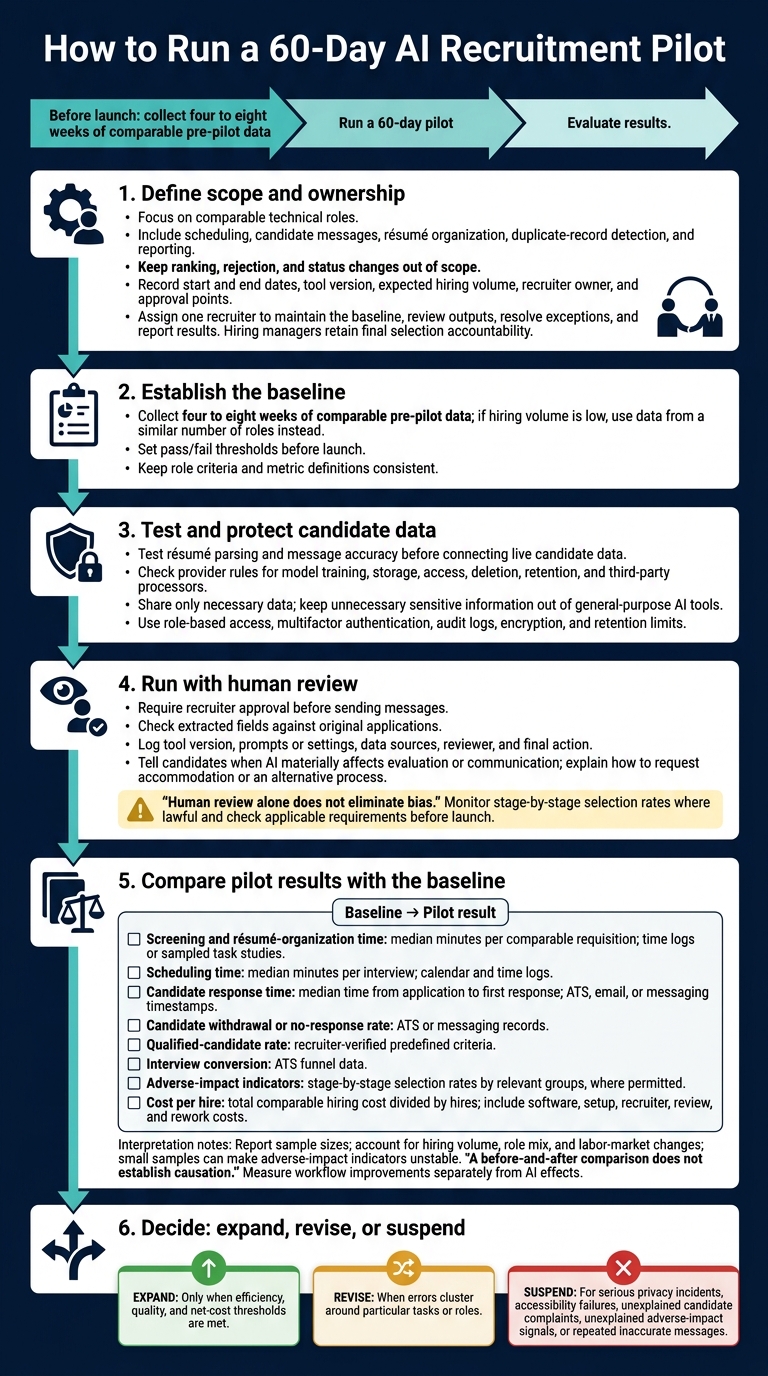
Run a 60-day pilot covering scheduling, candidate messages, résumé organization, duplicate-record detection, and reporting for comparable technical roles.
Record the start and end dates, tool version, expected hiring volume, recruiter owner, and approval points. Keep ranking, rejection, and status changes out of scope.
Test résumé parsing and message accuracy before connecting live candidate data. Administrative tasks can still expose private information or introduce errors.
Set Human Review and Data Controls
Require recruiter approval before sending messages. Check whether the provider uses candidate data to train models, along with its rules for storage, access, deletion, retention, and third-party processors.
Share only the data needed for the task. Keep unnecessary sensitive information out of general-purpose AI tools. Use role-based access, multifactor authentication, audit logs, encryption, and retention limits. Check extracted fields against the original applications.
Log the tool version, prompts or settings, data sources, reviewer, and final action so you can trace decisions and investigate errors.
Tell candidates when AI materially affects evaluation or communication. Provide clear instructions for requesting a reasonable accommodation or an alternative process.
Human review alone does not eliminate bias. Reviewers can repeat flawed criteria or place too much trust in automated recommendations. Monitor selection rates at each stage and investigate gaps where lawful. Check federal, state, and local requirements before launch. This guidance covers running a pilot, not legal advice.
Use baseline data to check whether the pilot saves time without reducing hiring quality.
Compare Pilot Results With a Hiring Baseline
Collect four to eight weeks of comparable pre-pilot data. If hiring volume is low, use data from a similar number of roles instead. Set pass/fail thresholds before launch, and keep role criteria and metric definitions consistent throughout.
| Metric | Baseline | Pilot result | Measurement method | Interpretation limits |
|---|---|---|---|---|
| Screening and résumé-organization time | Baseline median minutes per comparable requisition | Pilot median minutes per comparable requisition | Time logs or sampled task studies | Role complexity and application volume can affect time |
| Scheduling time | Baseline median minutes per interview | Pilot median minutes per interview | Calendar and time logs | Interview type and calendar complexity matter |
| Candidate response time | Baseline median time from application to first response | Pilot median time | ATS, email, or messaging timestamps | Weekends, holidays, and hiring volume can affect timing |
| Candidate withdrawal or no-response rate | Baseline rate | Pilot rate | ATS or messaging records | Changes may reflect workload, timing, or candidate mix |
| Qualified-candidate rate | Baseline rate | Pilot rate | Recruiter-verified predefined criteria | Definitions must stay consistent |
| Interview conversion | Baseline conversion rate | Pilot conversion rate | ATS funnel data | Changes may reflect sourcing mix or labor-market conditions |
| Adverse-impact indicators | Baseline selection rates by relevant groups | Pilot selection rates | Stage-by-stage demographic analysis where permitted | Small samples can be unstable |
| Cost per hire | Baseline total comparable hiring cost divided by hires | Pilot cost per hire | Include software, setup, recruiter, review, and rework costs | Hiring volume and role difficulty can materially change the result |
Report sample sizes and account for hiring volume, role mix, and labor-market changes. A before-and-after comparison does not establish causation.
- Expand only when the pilot meets efficiency, quality, and net-cost thresholds.
- Revise when errors cluster around particular tasks or roles.
- Suspend for serious privacy incidents, accessibility failures, unexplained candidate complaints, unexplained adverse-impact signals, or repeated inaccurate messages.
Assign one owner to keep control, review, and reporting in one place.
Give a Recruiter Ownership of the Workflow
A funding round, product launch, or new engineering initiative can leave a small or medium-sized enterprise (SME) short of recruiting capacity, even with automation.
Assign one recruiter to own the workflow, maintain the baseline, review outputs, resolve exceptions, and report results. Hiring managers retain final selection accountability. Measure workflow improvements separately from AI effects so you can distinguish process gains from the tool’s contribution.
Conclusion: Measure Results and Keep Hiring Accountable
Research points to workflow improvements, not proof of better hires. A 2025 review of 49 peer-reviewed studies found productivity gains from automated sourcing, résumé parsing, and screening.[7] AI also improved updates, coordination, and pipeline visibility.[6]
Measure time saved, cost saved, hiring quality, and candidate experience separately. Evidence specific to U.S. tech SMEs remains limited, so use broader findings to guide your tests, not set target numbers.[5][7]
Start with a controlled pilot focused on administrative tasks. Keep a named recruiter accountable and retain human review. Scale only when results beat your baseline without unacceptable costs or candidate risks. Track operational, financial, quality, candidate, and fairness outcomes separately, or rate your recruitment process to identify specific gaps.
Rent a Recruiter places experienced recruiters inside your team to manage hiring end-to-end and build a recruitment function that can scale. Book a Call to discuss your hiring needs.
FAQs
Is AI recruitment worthwhile if we hire infrequently?
Yes, if you use AI to cut time spent on hiring admin, such as scheduling interviews, screening resumes, and drafting job descriptions. Even if you hire infrequently, these tools can free your team to assess culture fit and engage with candidates.
AI should support your team’s judgment, not replace it. Start with a structured, repeatable hiring process. AI works best when people lead the decisions and the workflow is clearly defined.
How can we test AI accuracy for niche technical roles?
Run a 30- to 90-day pilot across a small group of active roles. Keep manual screening running alongside AI screening so you can compare shortlists and spot candidates the AI missed. Use structured, skills-based scorecards that weight core competencies and must-have skills.
Ask trained reviewers to score candidates independently, then compare their ratings with AI recommendations. Resolve differences and document the evidence behind each assessment. Keep every final decision under human oversight.
Which AI recruiting costs are easy to overlook?
SMEs often miss the internal labor costs of setup, configuration, and maintenance. Even when a vendor offers free setup, your HR, IT, and hiring teams may spend 20 to 60 hours configuring workflows, integrating systems, and testing. That adds salary costs and can delay hiring.
Correcting transcripts, checking summaries, and auditing systems also take time. Unless you measure that work, it becomes hidden overhead, not a proven efficiency gain.