One remote employee can create state tax obligations, even without a company office. We recommend checking the work location and duties before you finalise an offer, then assigning owners for any required setup. This helps you budget for the hire’s full cost and reduce avoidable start-date delays.
For your next new-state hire, we suggest three checks:
- Confirm the facts: Where will the employee work, what will they do, and will they travel?
- Price the commitment: Ask finance and tax advisers to assess taxes, registrations, filing costs, and deadlines separately.
- Keep ownership clear: Record the decision and review it when locations, duties, or state rules change.
Tax nexus is only the starting point. We explain how to turn that review into <u>a clear hiring approval process</u>, without treating every remote role as the same tax risk.
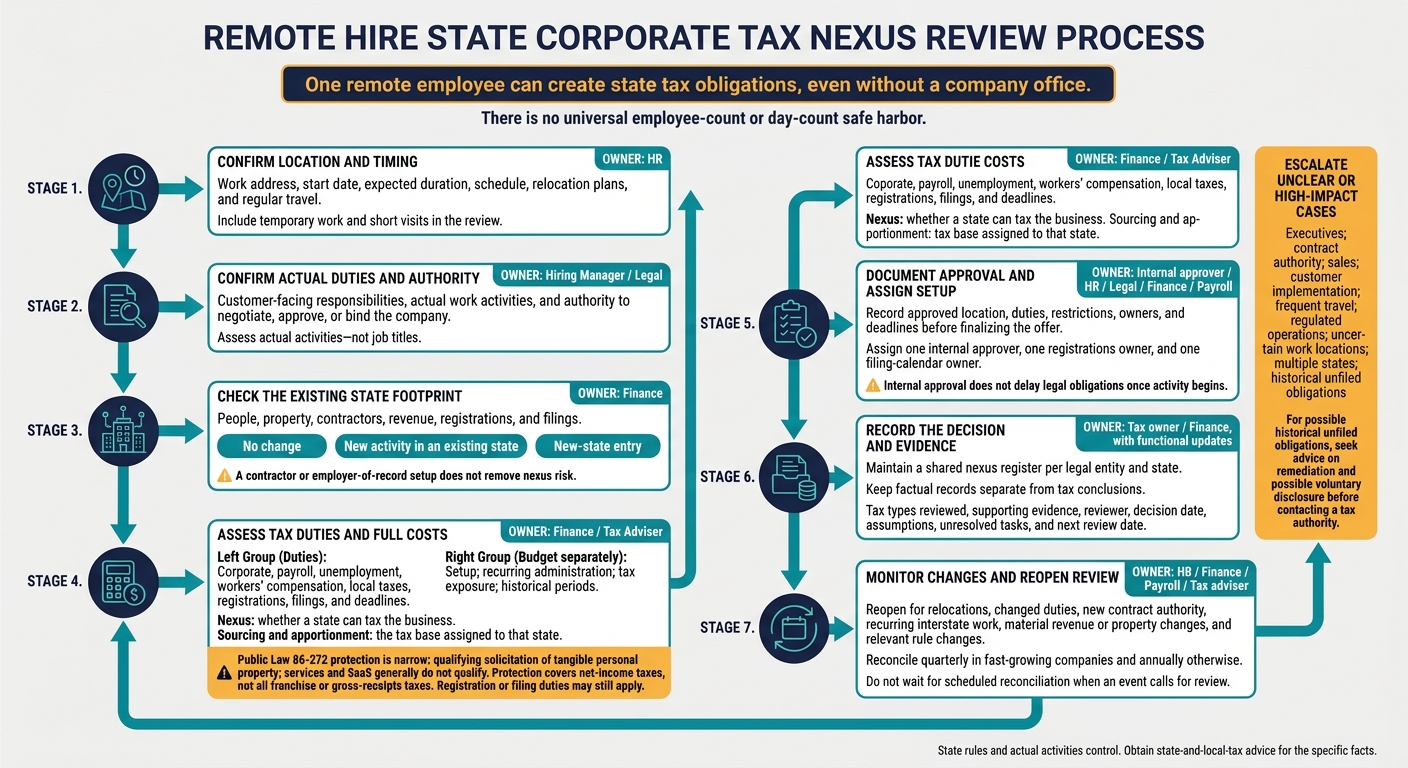
Remote Hiring: State Tax Nexus Review Workflow
Multi-State Taxes: Nexus, Apportionment, and the Remote Work Revolution
sbb-itb-a23bd6a
How Employee Activities Affect Nexus
Record the employee’s actual duties, work state, and travel pattern before approving the arrangement. Temporary work and short visits still need review. These details help determine whether the employee creates nexus.
Sales, Service, Development, and Management Roles
One employee can be enough. There is no universal employee-count or day-count safe harbor.[3][6] Ask the hiring manager to confirm what the employee does, rather than relying on their job title.
Track travel days and the purpose of each trip. Customer visits, training, and management meetings can create contacts with additional states that need review.
Remote Employee Activity Matrix
| Activity | Nexus relevance | Review questions | Supporting records |
|---|---|---|---|
| Sales solicitation | May establish in-state business activity; limited federal protection may apply only to tangible personal property when statutory conditions are met | Does the employee solicit orders, follow up with prospects, or maintain customer relationships? | Job description, territory plan, CRM records, order-routing records |
| Contract negotiation or approval | Often carries greater risk than simply transmitting orders | Can the employee negotiate terms, approve pricing, or bind the company? | Delegation policy, approval matrix, contracts |
| Customer support | Technical support usually falls outside protected solicitation | Does the employee troubleshoot, configure accounts, or train customers? | Support tickets, support logs, service schedules |
| Service delivery | In-state implementation or consulting can establish business activity | Where are services performed, including during travel? | Statements of work, project records, travel logs |
| Software development | Internal coding can create presence without customer contact | Where is development performed, and is company equipment stored there? | Payroll records, equipment register, work-location records |
| Management | Authority over business operations can establish business presence | Does the employee control staff, budgets, or vendors? | Organization chart, approval records, meeting logs |
| Administrative support | The facts and state rules control; no role is automatically exempt | Is the work ancillary, or does it support revenue-generating operations? | Time allocation, policies, workflow records |
| Company equipment or inventory | In-state property may independently affect nexus | What company property is stored or used in the state? | Asset register, shipping records, leases |
Limited federal protection may apply to some roles, but only when the employee’s activities stay within narrow limits.
What Public Law 86-272 Protects
Protection depends on actual activities, not job titles. Activities entirely ancillary to qualifying solicitation may qualify.
Installation, repairs, technical support, software development, inventory handling, and other independent business functions can fall outside that protection. Services and SaaS generally do not qualify.
Have a state-and-local-tax specialist check current interpretations, litigation, and guidance, particularly for online support and regular telecommuting. Confirm each tax obligation separately: the protection covers net-income taxes, not all franchise or gross-receipts taxes. Registration or filing duties may still apply.[1][2][4][5]
If nexus exists, finance must then assess apportionment.
Nexus vs. Income Sourcing and Apportionment
Nexus determines whether a state can tax your business. Sourcing and apportionment determine the tax base assigned to that state.
Wages and equipment can affect payroll and property factors where those factors apply. Many states emphasize sales, using market-based sourcing to assign service or SaaS receipts based on customer location or where the benefit is received.
A new hire does not make all company income taxable in that state. Your finance team must calculate the apportioned share under the applicable state rules.
Review New-State Hires Before Approval
Use the nexus rules above as a go/no-go review before finalizing any new-state hire.
Confirm Work Location, Duties, and State Ties
Make work-location review a required approval step. HR collects the work address, start date, expected duration, schedule, relocation plans, and regular travel.
The manager confirms duties, customer-facing responsibilities, and authority to bind the company. Finance checks the company’s existing state footprint and classifies the request as no change, new activity in an existing state, or a new-state entry.
A contractor or employer-of-record setup does not remove nexus risk.
Assess Tax Duties, Costs, and Approval Conditions
Finance and tax advisers should identify corporate, payroll, unemployment, workers’ compensation, and local tax duties. They should also check registration and filing requirements, sourcing rules, and any applicable threshold or statutory protection.
Budget separately for setup, recurring administration, tax exposure, and historical periods. No universal fee or threshold applies.
Before approval, record the approved location, duties, restrictions, owners, and deadlines. Internal approval does not delay legal obligations once activity begins.
Use the checklist below to assign owners, deadlines, and escalation points.
New-State Hiring Review Checklist
| Review question | Owner | Evidence | Outcome | Escalation trigger |
|---|---|---|---|---|
| Where will the employee physically work, and when will activity begin? | HR | Signed offer, work address, start date, relocation plan | Location confirmed | Multiple work states or uncertain address |
| Will the employee travel or work temporarily elsewhere? | HR / Manager | Travel policy, expected travel schedule | Travel controls recorded | Frequent interstate travel |
| What duties will the employee perform? | Hiring manager | Job description, responsibility matrix | Activities categorized | Sales, implementation, management, or regulated work |
| Can the employee negotiate, accept, or sign contracts? | Legal / Manager | Delegation policy, contract authority matrix | Authority approved or restricted | Any authority to bind the company |
| Does the company already have people, property, contractors, revenue, registrations, or filings in the state? | Finance | Nexus register, payroll records, ledger, tax returns | Footprint identified | First activity or inconsistent records |
| Could the activity be protected by Public Law 86-272? | Tax adviser | Role analysis, state guidance, MTC materials | Protection documented or rejected | Services, software, digital activity, or mixed duties |
| What registrations, returns, estimated payments, and payroll accounts may be required? | Tax / Payroll | State instructions, registration checklist | Duties and deadlines assigned | Unclear rule or material exposure |
| What are the setup, recurring, and possible back-filing costs? | Finance | Adviser estimate, prior filings, exposure model | Budget and reserve approved | Material liability or unknown lookback |
| Are approval conditions communicated to the manager and employee? | HR / Legal | Written approval, policy acknowledgment | Conditions accepted | Employee cannot comply with restrictions |
| When will the conclusion be reviewed again? | Finance / Tax | Decision log, calendar reminder | Review date scheduled | Law, duties, location, or revenue changes |
Refer Unclear or High-Impact Cases to Advisers
Require specialist review for executives, contract authority, sales, customer implementation, frequent travel, regulated operations, uncertain work locations, multiple states, or historical unfiled obligations.
If earlier activity may have triggered unfiled obligations, get advice on remediation and possible voluntary disclosure before contacting a tax authority.[7]
Record the reviewer and their qualifications, facts, reasoning, sources, decision date, assumptions, and next review date.
Hypothetical Example: Hiring a SaaS Developer
For a SaaS company’s first developer in State X, HR records the work location, start date, and travel plans → the manager confirms internal development duties without sales or contract authority → finance checks the existing state footprint → the adviser assesses nexus, statutory protection, filing requirements, and apportionment → legal reviews restrictions, finance assigns tax tasks, payroll completes setup, and HR issues location approval. Customer-facing duties or regular interstate travel trigger another review.
Carry the approved facts and deadlines into the nexus register.
Keep Records and Assign Review Owners
After approval, record the facts in a shared register. Reopen the review when those facts change so hiring decisions stay aligned with your tax and filing obligations.
Maintain a State Nexus Register
Keep one shared register per legal entity and state, with a record for each worker, location change, and review event.
Track employee and contractor locations, start dates, moves, temporary work, travel, duties, revenue connections, and property. Include state registrations, payroll accounts, returns, notices, payments, and filing deadlines.
Keep factual records separate from tax conclusions. Each conclusion should state the tax types reviewed, supporting evidence, reviewer, decision date, assumptions, unresolved tasks, and next review date. Retain earlier versions so later updates do not erase the facts behind past approvals.
Minimum Evidence by Risk Area
| Risk area | Minimum evidence to retain | Owner |
|---|---|---|
| Location | Work-location attestation, HRIS record, relocation notice, dated travel or expense reports | HR/recruiting |
| Activities | Job description, manager certification, customer-facing duties, contract-authority policy, delegated authority | Hiring manager/legal |
| Revenue | Customer contracts, invoices, sourcing workpapers, state revenue analysis | Finance |
| Property | Lease, asset register, equipment assignment, inventory or office-use records | Finance/facilities |
| Payroll | Payroll reports, withholding and unemployment registrations, tax deposits, filed employment returns | Payroll |
| Filing history | Returns, payment confirmations, notices, registration certificates, dated official guidance | Tax/finance |
| Review conclusion | Nexus decision, tax types considered, reviewer, date, assumptions, open issues, next review date | Tax owner/adviser |
Have tax and legal advisers approve a written retention schedule. The IRS generally requires you to retain employment-tax records for at least four years after the tax becomes due or is paid, whichever is later.[8][9]
That rule does not cover every nexus file. Your schedule must also account for state limitation periods, unfiled returns, audits, and legal holds. Store personal addresses and payroll files separately, with role-based access, version history, backups, and export controls.[10][11]
Define HR, Finance, Payroll, and Adviser Roles
The register works only if each function updates its fields on time. Assign one internal approver, one registrations owner, and one filing-calendar owner. HR, finance, payroll, and advisers must keep the hire compliant after approval. External advice does not transfer responsibility for completing the work.
Use one intake form and decision tree linked to the register. Route requests based on existing versus new state ties, physical presence, economic-nexus thresholds, affected tax types, and temporary versus permanent work.
Before reusing research, confirm that the entity, activities, facts, and guidance still match. Set internal response targets, such as intake within one business day and fact collection within three business days. These targets help keep approvals moving, but they do not replace legal deadlines.
Set Review Triggers and Track Open Tasks
Use the register to flag changes that require another nexus review. Reopen reviews for relocations, changed duties, new contract authority, recurring interstate work, material revenue or property changes, and relevant rule changes.
Reconcile the register quarterly in fast-growing companies and annually otherwise. Compare HRIS, payroll, travel, contractor, revenue, asset, and filing records. Do not wait for a scheduled reconciliation when an event calls for a review.
Track median approval time, open reviews by owner, upcoming filings, unresolved registrations, and unapproved work locations. Every exception needs a named owner, a due date, and evidence of completion. A “closed” status alone is not enough.
Conclusion: Make Location Review Part of Hiring Approval
Complete the location review before the offer goes out. Require a written nexus conclusion and review approval before finalizing any offer.
Treat location review as a budget line within hiring approval, not just a tax check. This keeps setup and compliance costs on the same approval path.
Build the Review Into Every Offer
Before your next new-state hire, assign clear ownership for nexus review, required registrations, and filing deadlines. Reopen the review whenever the facts or rules change.
If your team lacks a repeatable intake process, Rent a Recruiter can help standardize role requirements and location intake so hiring approvals move faster.
FAQs
Does tax nexus end when my remote employee leaves?
Not necessarily. Tax nexus may continue after a remote employee leaves. You may still need to file final payroll reports, pay outstanding taxes, or deregister your business with local tax authorities.
Your obligations depend on the applicable laws and what the employee did during their employment. Consult a tax advisor to confirm you’ve met all reporting and closure requirements.
Can my company owe state taxes while losing money?
Yes. Your company can owe state taxes even when it’s losing money. Hiring a remote employee can create a taxable business presence, known as nexus, in the state where they work. Those tax obligations can apply regardless of your company’s overall profitability.
An employee performing services in a state can trigger registration and filing requirements. That means your business may still face state taxes, payroll-related duties, and compliance costs during periods of financial loss.
What if my employee moves without telling me?
Confirm the employee’s actual location immediately so you can assess corporate tax, payroll, and legal exposure, including potential liabilities, penalties, and interest.
Review the tax residency and treaty rules that apply. Consider adjusting the employee’s duties or limiting their time in that jurisdiction to reduce risk.
To prevent this from happening again, put a written relocation policy in place that requires HR or finance approval before an employee moves. Make regular employee location checks part of your standard business controls.