If you are hiring with partial market data, you are likely wasting time, overpaying on salary, or missing talent pools your rivals are already using.
I’d sum this up simply: the right workforce tracking tool helps you answer three commercial questions fast. Where are rivals hiring? What skills are they betting on? How much internal work will it take to turn that data into hires? That matters when 74% of HR leaders say they do not have the data needed for workforce decisions, and teams using people analytics are 5x more likely to make better hiring calls.
If I were choosing between these tools, I’d look at them like this:
- Some tools are best for broad market signals
- Some are better for talent-pool and movement data
- Some are easier for lean teams to use without extra analyst time
- All of them still need execution if you want hires, not just dashboards
For CEOs, CFOs, HR leaders, and Talent Leaders at scaling companies, the main issue is not data volume. It is time to action. If your team cannot turn market signals into talent acquisition strategies, pay decisions, and filled roles, the tool becomes overhead. To avoid this, you can rate your recruitment process to identify where data gaps are stalling your growth.
Quick comparison
| Tool type | Best use | Main limit | Best fit |
|---|---|---|---|
| Talent intelligence platforms | Track talent flow, feeder employers, workforce shifts | More internal analysis needed | Teams with hiring ops or people analytics support |
| Labour market data platforms | Track demand, locations, skills, salary pressure | Less context on internal workforce moves | Planning-heavy teams |
| Job signal tools | Spot hiring spikes, new teams, location moves | No employee movement layer | Lean teams that want simple alerts |
| Embedded recruitment providers | Turn market signals into hiring output | Requires outside delivery support | Scaling firms that need execution, not just data |
My view is simple. The best option depends on whether you need depth, speed, or less internal effort. Below, I break down the six tool types in plain English so you can judge which route fits your hiring plan as you scale, budget, and team capacity.
sbb-itb-a23bd6a
1. Eightfold Talent Intelligence
For competitor workforce tracking, the main signals are candidate availability, demand, salary ranges, time-to-hire, and competitor hiring data [1]. Eightfold stands out when you need one joined-up market view, not just a narrow feed of hiring activity.
Data Coverage
Eightfold brings these indicators together into a broader view of labor market movement [1].
For hiring leaders, that matters because scattered data slows decisions. A single view makes it easier to spot pressure in the market, judge where competition is heating up, and decide where to put budget and recruiter time.
Refresh Speed
Dashboards and reports update in real time, which helps teams track changes as they happen [1].
If you’re hiring in SaaS, IT, Fintech, or Engineering, timing matters. A live view can help you react before rising salary pressure or talent shortages start dragging out time-to-hire.
Movement Granularity
Talent flow mapping tracks 12 months of movement, showing where employees came from and where they went [1]. It can also map priority roles and surface critical talent pools [1].
That gives you a clearer picture of how talent moves across your market. Instead of guessing where competitors are finding people, you can see patterns that shape sourcing plans, location choices, and hiring spend.
SME Hiring Fit
For SMEs, the upside is simple: one view of the signals shaping hiring priorities.
That can save time, cut back on fragmented research, and help you make sharper hiring calls with less internal effort. For teams needing extra capacity, on-demand recruitment can provide the necessary support.
That also makes the next tools easier to compare on search depth, sourcing visibility, and market coverage.
2. SeekOut People Insights
Where Eightfold gives you the broad market view, SeekOut goes deeper into the talent pools behind competitor hiring. SeekOut People Insights narrows that view by function, seniority, and skill set. That matters when competitor movement is more useful than broad labour market coverage.
For hiring leaders in SaaS, Technology, IT, Fintech, Engineering, Security, Insurance, and Professional Services, that kind of focus can save time. Instead of scanning the whole market, you can zero in on the parts that affect your hiring plan most.
Data Coverage
SeekOut offers granular segmentation by job function, seniority, and niche skills. It also includes compensation benchmarking for targeted talent pools.
That gives you a tighter view of the market around a role. If you’re hiring for a hard-to-fill position, you can compare pay levels, spot skill clusters, and focus your search on the employer groups most tied to that talent.
Movement Granularity
SeekOut supports talent flow mapping over a 12-month period, showing feeder employers and destination employers [1]. That makes it useful for spotting which competitors are losing talent and which employers are attracting the same candidates.
In practice, this helps you make sharper hiring calls. You can see where talent is coming from, where it’s going, and which employers sit closest to your target pool. That can shape sourcing, compensation decisions, and employer branding and market positioning, especially when speed matters.
SME Hiring Fit
For niche or location-specific hiring, it helps recruiting teams target the employers and talent pools most relevant to the role.
That narrower view is often a better fit for teams that don’t need broad workforce analytics across the whole market. If your goal is to hire in a tight segment, not track every market trend, SeekOut gives you a more focused lens.
3. Visier People Analytics and Talent Acquisition Insights
Visier comes at this from a different direction. Instead of focusing mainly on external talent pools, it tracks the full employment lifecycle, including hires, promotions, transfers, role changes, and exits. That gives you a clearer view of how competitor workforces shift over time.
Earlier tools tend to focus on who is hiring. Visier adds the internal movement layer. That matters if you want to know whether a competitor is growing through net-new hiring, moving people around internally, or losing talent in key teams.
Data Coverage
Visier covers hires, promotions, transfers, role changes, and exits, including both voluntary and involuntary departures. That range helps you separate hiring growth from internal changes inside competitor organisations.
In practice, this means you can look past open roles and headline headcount moves. You can trace what is happening inside competitor businesses and spot whether movement is coming from expansion, internal mobility, or attrition.
Movement Granularity
Visier adds event-level movement detail. It does more than show headcount changes. It breaks movement down by event type, so you can tell the difference between hiring, internal mobility, and different types of departures.
That level of detail is useful when you’re deciding which roles, locations, or competitors to target. If one business is losing people in a certain function while another is filling roles through internal moves, your hiring plan can shift fast, and with better judgment.
SME Hiring Fit
For high-growth SMEs seeking talent acquisition services, Visier is strongest when you need event-level workforce movement across competitors, not just headcount snapshots. You get more context, not just more data.
That internal view helps explain why competitor workforces are shifting, not just where they are hiring. For CEOs, CFOs, and talent leaders, that can lead to sharper market mapping, better timing, and less wasted spend on outreach in the wrong areas.
4. TalentNeuron Labor Market Intelligence
Building on event-level workforce movement, TalentNeuron tracks competitor hiring at market scale. It pulls from job postings, government reports, salary surveys, and candidate profiles to show how competitor workforces are shifting across roles, locations, and skill sets.
For hiring leaders, that matters because you’re not just looking at who moved jobs. You’re looking at where demand is building, where rivals are putting headcount, and where hiring pressure is likely to hit next.
Data Coverage
The platform aggregates data from 40,000+ sources across more than 200 unique markets, covering roughly 96% of global GDP.[4][8] Its skills library spans 65,000+ skills and nearly 4,000 standardized role definitions, which lets teams track competitor hiring activity at a role-by-role level.[2][7][8][9]
That scale gives you a much broader market view than internal hiring data alone. If you’re hiring in SaaS, Technology, Fintech, Engineering, or Professional Services, this can help you spot pressure points before they show up as missed hires, longer time-to-fill, or higher salary demands.
Refresh Speed
TalentNeuron processes around 3 million job postings daily across 33 languages, feeding a 40+ terabyte data lake with more than two decades of historical labor market data.[2][7][9]
In plain terms, that means you can track competitor hiring velocity as it changes, instead of relying on old market snapshots. For CFOs and talent leaders, that kind of visibility helps with workforce planning, budget control, and timing. If a competitor suddenly ramps up hiring for engineers in a key market, you see the pattern sooner.
Movement Granularity
The Competitor Analysis module surfaces which companies are consistently hiring talent away from you, which industries are feeding your competitors’ pipelines, and how demand for specific roles and skills is shifting over time.[3][12][13] It also tracks organizational shifts, such as competitors consolidating management layers or reallocating headcount to engineering.[5]
That makes the tool useful if you need more than surface-level market data. You can start to see not just who is hiring, but how their workforce mix is changing. That’s useful when you’re deciding whether to push compensation, change hiring locations, or shift recruiter focus toward harder-hit talent pools.
SME Hiring Fit
TalentNeuron is enterprise-focused, with custom pricing and meaningful implementation effort that requires analytics maturity to use effectively.[6][10][11] Mid-sized teams with a dedicated people analytics function may find it viable, but for smaller teams, this level of intelligence often needs hands-on support to turn data into hiring action.
That’s the gap many scaling companies run into. Market insight is helpful, but it only pays off if someone turns it into pipeline, outreach, and filled roles. In those cases, an embedded recruiter can help translate market signals into hiring moves, without leaving the data sitting in a dashboard.
5. JobsPikr
JobsPikr gives you raw job posting data from career pages and job boards. That matters when you want the signal itself, not a polished dashboard layered on top.
If your team wants to track where competitors are hiring, how often roles appear, and which markets are heating up, this kind of data can be very useful. You get a clearer view of hiring demand before it shows up in market reports or internal benchmarks.
Data Coverage
JobsPikr aggregates millions of job postings, which helps teams monitor competitor openings, target locations, and posting volume over time.
For CEOs, CFOs, and talent leaders, that means a better read on where rivals are placing hiring bets. If a competitor starts posting heavily in a new city or function, you can spot the pattern early and adjust your hiring plan before costs climb.
Refresh Speed
Data updates near real-time to daily, so competitor hiring signals stay current.
That speed matters. Old data is easy to ignore because the market has already moved on. Fresh posting data gives you a more current picture of hiring pressure, location shifts, and demand changes across key roles.
Movement Granularity
JobsPikr does not track employee movement. Instead, it tracks hiring signals through job posting patterns, including:
- New openings
- Title changes
- Location shifts
- Hiring spikes
For competitor tracking, that still gives you a useful early-warning view. You may not see employee-level movement, but you can see where hiring pressure is building and where a competitor is ramping up.
SME Hiring Fit
For high-growth SMEs, JobsPikr works well because it provides accessible raw data without the need for a large HR team.
Smaller teams can use it to track competitor hiring activity and respond faster when demand shifts. That can help you protect hiring budgets, focus recruiter time where it counts, and avoid reacting too late when the market gets tighter.
Teams that want a lightweight source of hiring signals often start here before moving to deeper competitive intelligence tools.
6. HireSnipe Competitive Hiring Intelligence
HireSnipe takes a narrow, practical approach to competitive hiring intelligence. It is built around one core use case: seeing what your competitors are hiring for right now. For lean talent teams, that single focus can make it easier to put into day-to-day hiring decisions.
Data Coverage
Where JobsPikr gives you raw job posting data, HireSnipe turns those signals into alerts. It monitors public hiring signals through web scraping on public pages and within robots.txt rules. [14][17] Because it uses public sources only, the data collection model stays low risk.
From there, HireSnipe builds structured views of inferred business moves, like a new product team or a move into a new market. [14] That means you can spot expansion, new functions, and location shifts before they appear in headcount data. For hiring leaders, that can save time and help you act earlier.
Coverage depends on your plan:
- Free Starter tier tracks up to 2 competitors
- Professional plan is $79/month and tracks up to 10 competitors
- Business plan is $179/month and tracks up to 25 competitors [16]
Refresh Speed
HireSnipe monitors competitor job postings on a continuous basis, with alerts triggered when new roles go live, when a team starts scaling, or when hiring volume jumps. [14] If your team does not want constant notifications, you can switch to daily or weekly digest alerts. [15]
That flexibility matters. Some teams want instant signals so they can move on sourcing fast. Others want a cleaner view they can review during weekly hiring meetings.
Movement Granularity
HireSnipe does not track individual employee movement. Instead, it tracks hiring signals at the role, department, and location level, with AI surfacing patterns hidden inside raw postings. [14]
Here’s where that gets useful. A steady rise in machine learning engineer roles tied to a certain tech stack can point to a competitor’s product investment before any public announcement. For companies identifying these shifts, embedded IT recruitment can help scale technical teams quickly to maintain a competitive edge. [14] For talent leaders, that can shape sourcing focus, pay discussions, and broader workforce planning. [14][15]
In plain terms, you are not just seeing open jobs. You are seeing where a competitor may be placing its bets.
SME Hiring Fit
The free tier and simple pricing make HireSnipe easy for SMEs that are new to competitive hiring intelligence. [16] Smaller teams can track a couple of direct competitors at no cost, test whether the signals help, and move up only when the return is clear.
For scaling companies, that matters. You can add market signals into structured hiring plans without extra analyst overhead. In practice, that makes it easier to turn outside movement into better sourcing choices, sharper prioritization, and less wasted hiring effort.
How Each Tool Supports Recruiting Strategy
These six tools don’t support recruiting strategy in the same way.
Some help you spot talent movement. Others help you plan what to hire, where to hire, and what it will cost. That difference matters. If you’re tracking competitors, the point isn’t just to collect data. It’s to know whether a signal helps with sourcing, compensation, or expansion planning.
Use talent intelligence to trace where talent comes from and where it goes. Use labour market intelligence to assess role viability, pay levels, and location demand.
The table below shows where each category fits in the hiring process.
| Category | Best For | Execution Burden |
|---|---|---|
| Talent intelligence | Talent flow mapping, feeder employers, and workforce shifts | High, insights need internal ownership to turn into hiring action |
| Labor market intelligence | Hiring momentum, role demand, and market pressure | Medium, useful for planning, but still requires execution |
| Embedded recruiting services | Acting on market signals and executing hiring strategy | High, experts run as part of the team |
For teams that need help turning market signals into hiring action, Rent a Recruiter provides embedded recruiters who run hiring end-to-end.
The next question is which platform delivers the strongest balance of insight, speed, and usability.
Pros and Cons by Platform
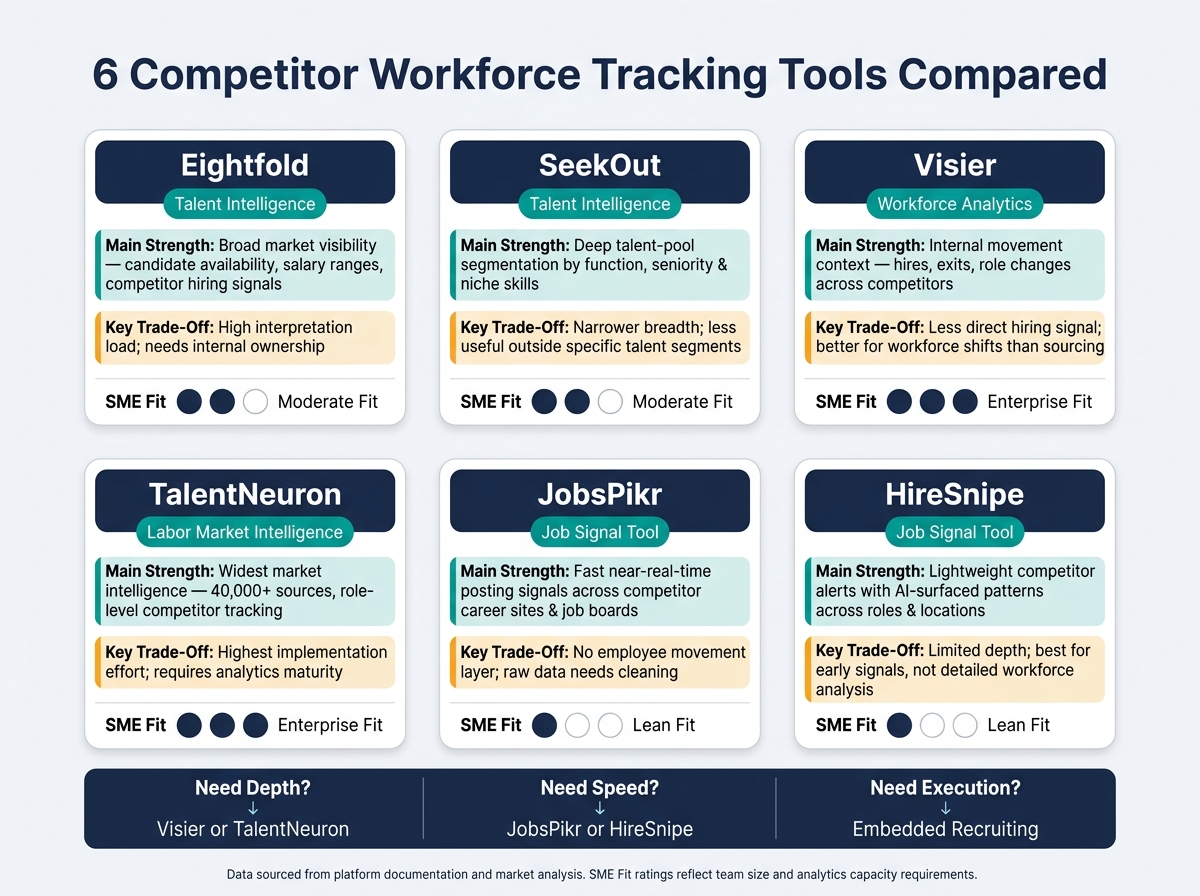
6 Competitor Workforce Tracking Tools Compared: Depth, Speed & SME Fit
The main difference isn’t whether these tools produce data. It’s how much work your team has to do before that data turns into a hiring decision.
For lean recruiting teams, that matters a lot.
If a platform gives you lots of signals but your team still has to sort, interpret, and translate them into action, the value can stall. On the other hand, a simpler tool may be easier to use, but it might leave gaps in market view or workforce detail.
Here’s the core trade-off with each platform:
| Platform | Main Strength | Key Trade-Off |
|---|---|---|
| Eightfold | Broad market visibility across candidate availability, salary ranges, and competitor hiring signals | High interpretation load; insights need internal ownership to become hiring action |
| SeekOut | Deeper talent-pool segmentation by function, seniority, and niche skills | Narrower market breadth; less useful outside specific talent segments |
| Visier | Stronger internal movement context, including hires, exits, and role changes across competitors | Less direct hiring signal; better for understanding workforce shifts than driving sourcing |
| TalentNeuron | Widest market intelligence, with 40,000+ sources and role-level competitor tracking | Highest implementation effort; requires analytics maturity to use effectively |
| JobsPikr | Fast, near-real-time posting signals across competitor career sites and job boards | No employee movement layer; raw data needs cleaning before it informs hiring decisions |
| HireSnipe | Lightweight competitor alerts with AI-surfaced patterns across roles, departments, and locations | Limited depth; useful for early signals, not detailed workforce analysis |
A platform only matters if your team can turn signals into hiring action.
That’s the commercial test. Will it help you move faster, plan headcount with more confidence, and spend less time debating what the market data means? If not, even a strong data source can become just another dashboard.
Conclusion
No single tool fits every use case. Across these six platforms, the trade-off comes down to breadth, speed, or depth of workforce movement data. Your choice should match what you need most: broad labor market visibility, fast competitor hiring signals, or a closer view of how talent is moving across the market.
The real difference is not the amount of data. It’s how fast your team can turn that data into hiring decisions.
For high-growth SMEs in technology, SaaS, fintech, and engineering, that’s usually where things slow down. Market intelligence sounds great on paper. But it only pays off when it leads to hires, saved time, or lower hiring costs.
That’s where execution support matters. An embedded recruiter helps close the gap by running hiring end-to-end inside your business. Instead of leaving insights sitting in dashboards, you turn them into action, pipeline movement, and filled roles.
In practice, market intelligence works best when it shortens the distance between signal and hire. The strongest hiring outcomes come when insight is matched with fractional recruiting capacity.
FAQs
Which tool type is best for a lean hiring team?
For a lean hiring team, embedded recruitment services are often the best fit.
You get an experienced recruiter working inside your team, managing hiring end to end. That means less admin, less back-and-forth, and less pressure on your internal team. You stay in control of the process without adding more headcount or trying to manage bulky software.
For scaling companies, this model works well because it ties hiring support directly to business needs. You save time, cut cost, and keep full visibility over hiring outcomes. In many cases, companies save over 80 hours per month and reduce hiring costs by up to 70% compared with traditional recruitment agency models.
How do I turn workforce data into actual hires?
Use workforce data to forecast hiring needs based on current headcount, past hiring patterns, and attrition. Then maintain a live talent pool that matches those forecasts, and review it on a set cadence.
That gives you a clearer view of upcoming demand before hiring turns into a fire drill. You can plan earlier, spend smarter, and keep hiring teams focused on roles that matter most.
Track a closed-loop funnel with clear stages, including source-to-interview, submittal acceptance, source-to-offer, offer acceptance, and 90-day retention.
This matters because it shows you where hiring is slowing down, where quality is dropping, and which channels are worth more budget. If something is not converting, you can fix it fast. If something is working, you can scale it with more confidence.
When do I need talent flow data vs. job posting data?
Use job posting data to read a competitor’s next move before they announce it. Hiring patterns often point to product launches, team buildouts, market entry, or process changes 6 to 12 months ahead of public news.
That gives you time to act. You can adjust workforce plans, budget for hard-to-fill roles, and move before the market gets tighter.
Use talent flow data to see where pressure is building in your talent market. It shows where competitors hire from, where people go after they leave, and whether attrition points to poaching risk or a near-term chance to hire strong people.
For CEOs, CFOs, and HR leaders, that matters because it turns hiring data into commercial signal, not just HR reporting. You’re not just watching who is hiring. You’re seeing where demand is moving, where talent is leaking, and where you can step in first.