Choose the CRM your team will use every day, not the one with the longest feature list. If recruiters fall back to spreadsheets, you lose time, data quality, and control, fast.
If you are hiring at pace in SaaS, fintech, IT, engineering, security, insurance, or professional services, the right setup can cut admin, shorten time-to-fill, and help your team handle more roles without adding headcount. The wrong one does the opposite. It adds double entry, weak reporting, and extra cost that shows up later in setup, training, and data fixes.
Before you buy, I would keep the decision tied to five checks:
- Map your hiring workflow first, inbound, outbound, or both
- Name the bottleneck, follow-up, reporting, tracking, or team handoffs
- Check daily-use features, not demo filler
- Test integrations and data flow with your own records in a 30 to 60 day pilot
- Review total cost, including setup, training, migration, and API access, which can add 30% to 40% on top of seat fees
A good recruitment CRM should help you save time, lower wasted spend, and give leadership a cleaner view of hiring performance. The guide below walks through how to make that call without getting distracted by sales demos or feature noise.
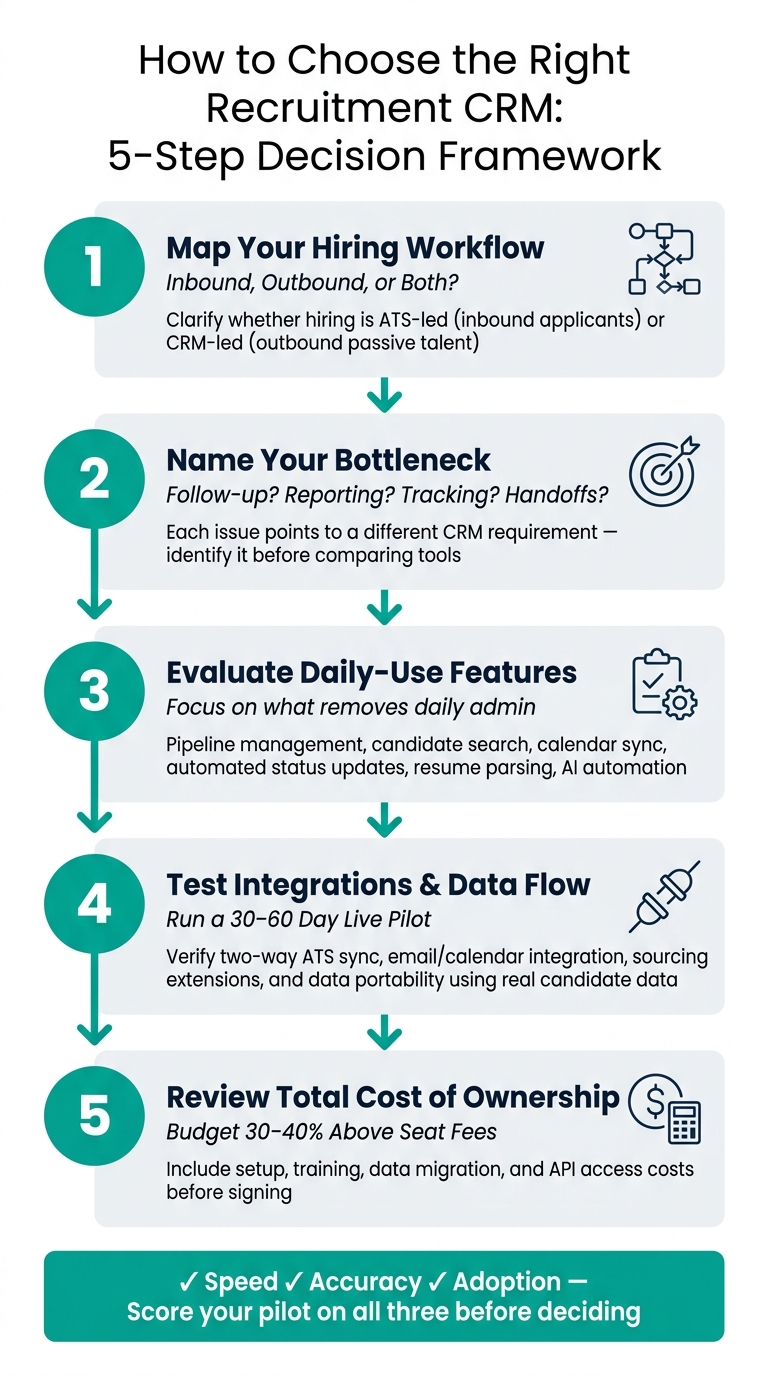
How to Choose the Right Recruitment CRM: 5-Step Decision Framework
Define your hiring workflow before comparing tools
Before you compare platforms, map how hiring works today. Not how it should work in theory, but how it runs inside your team right now.
That map becomes your filter. It stops you from buying software based on feature lists, sales demos, or nice-looking dashboards that don’t fix the problem slowing hiring down.
Clarify whether the CRM will support inbound hiring, outbound sourcing, or both
This choice shapes everything.
Inbound hiring is usually more ATS-led. It revolves around active applicants, role-based pipelines, and a single requisition cycle.
Outbound sourcing is more CRM-led. It focuses on passive talent, recruiter follow-up, and longer-term relationship building.
If you don’t pin this down early, you’ll end up judging tools against the wrong use case. The CRM needs to support the way your team hires first, not the way the vendor wants to sell it.
For most scaling teams, that means one system must handle both applicants and passive candidates without pushing data into separate tools. If your team has to jump between systems to see pipeline history, outreach activity, or candidate status, admin time climbs and visibility drops.
Identify the main bottleneck the CRM needs to fix
Before you look at features, name the problem.
Is candidate tracking messy? Are follow-ups being missed? Is recruiter coordination uneven? Are status updates taking too much time to pull together?
Each issue points to a different requirement. A team struggling with follow-up may need stronger sequencing and reminders. A team dealing with reporting delays may need cleaner pipeline structure and shared data.
Start with the bottleneck, then judge each tool by whether it fixes it.
Build role-specific hiring pipelines so recruiters follow the same process for each position. That gives you more consistency, less confusion, and better reporting across the team.
Match requirements to team size, hiring volume, and growth stage
The right system should fit today’s team and next year’s workload.
A smaller team using on-demand recruitment may only need:
- Basic pipeline tracking
- Email and calendar sync
- Clear visibility across open roles
A larger team may need more control, including automated parsing, role-based pipelines, centralized records, and permission settings that keep recruiters, hiring managers, and leadership working from the same information.
If hiring volume is likely to grow over the next 12 months, choose a CRM that can handle that increase without forcing a rebuild later. Swapping systems mid-growth costs time, slows delivery, and creates extra work your team didn’t plan for.
Once your workflow is clear, compare only the features tied to the bottleneck you need to solve.
sbb-itb-a23bd6a
Check the features your team will actually use
Compare features based on one thing: what daily work they remove.
That keeps the decision grounded in business impact. If a feature doesn’t cut admin, speed up hiring, or make handoffs cleaner, it shouldn’t carry much weight. Use your workflow map to judge which features deal with the bottleneck fastest.
Prioritize core workflow features
The features that matter most sit inside high-frequency work: centralized candidate search and filtering, pipeline stage management, comments and mentions, calendar syncing, and automated status updates. If sourcing is part of your process, look for multi-job-board posting and browser extensions that allow one-click candidate capture.[2]
Resume parsing is a sensible place to start. Test it across common file types and messy layouts. Ignore claims of perfect accuracy.
Then look past parsing and into day-to-day execution. How well does the CRM handle candidate communication and team coordination? Can hiring managers leave feedback on the candidate profile itself? Can recruiters mention colleagues and update statuses without jumping between tools?
Those small points of friction don’t look dramatic in a demo. Across a full hiring cycle, though, they waste hours. For longer hiring cycles, the CRM should keep every candidate interaction in one record. If you hire across very different role types, check that the system supports role-specific blueprints or pipelines so your team follows a steady process.[2]
Your shortlist should be built around features like these, the ones your team will use every day.
Assess AI and automation depth with realistic expectations
Use automation where it saves time straight away, such as scheduling, calendar sync, and stage-based emails. Test more advanced AI with your own data before you give it much weight.
Features like candidate match scores, sentiment analysis, and predictive next-step suggestions can help. But there’s a catch. They depend on clean data and steady use. If your team’s inputs are patchy, the output won’t be much use either.
Start with a blunt question: does this automation remove the bottleneck you found earlier?
If it doesn’t save time in practice, it’s not a priority.
Test usability and adoption risk early
A CRM only pays off if your team uses it. The clearest sign adoption has failed is when recruiters quietly go back to private spreadsheets to track what the system was meant to handle.[1]
In the demo, measure how fast users can do the basics:
- add a candidate
- move a candidate to a new stage
- log a touchpoint
If those tasks take too many clicks or feel awkward, adoption will slow down. And when adoption drops, reporting gets messy, recruiter admin creeps back in, and hiring leaders lose visibility.
Also ask what implementation and training will cost. Teams that spend too little here often see weaker adoption.[1]
Next, verify data flow, integrations, and implementation effort. The next check is whether those features fit your existing stack and data flow.
Verify integrations, data flow, and implementation effort
Test whether the CRM fits neatly into your hiring stack and cuts out manual admin. If data does not move cleanly between tools, every feature you liked earlier turns into extra work.
Confirm compatibility with your hiring stack
The integrations that matter most are the ones your team touches every day: your ATS, HRIS, email, calendar, sourcing tools, and reporting tools. When those links are weak, teams drift straight back to spreadsheets.
Don’t judge integrations by whether they appear on a feature list. Judge them by how far they go. A CRM might say it has an "ATS integration", but that can mean little more than a one-way push. What you need is true two-way sync, where a stage change in the CRM updates the ATS automatically, and the ATS sends the same update back, with no exports and no chasing people to keep records aligned. If that link breaks, you get double entry, slower recruiter adoption, and less trust in the system due to a lack of alignment.
Use this table to check the core parts of your stack:
| Criterion | Why it matters | What to verify | Red flags |
|---|---|---|---|
| ATS Two-Way Sync | Prevents data silos and double entry | Change a stage in the CRM; check if the ATS updates instantly | "Export to ATS" buttons or manual CSV uploads |
| Email/Calendar | Recruiter efficiency and visibility | Send an email from Gmail; check if it’s logged in the CRM profile | Requirement to BCC a specific system address |
| Sourcing Extension | Speed of pipeline building | Import a profile from LinkedIn Recruiter; check for duplicate detection | Extension requires manual field mapping for every profile |
| Data Portability | Avoids vendor lock-in | Review contract for API access and bulk export formats | High fees for data extraction or proprietary formats |
Run these checks using your own data during a 30 to 60 day pilot. That’s the point where weak integrations show up, not in a polished demo.
Plan data migration and cleanup before purchase
Once you’ve checked the integrations, look at whether your current data can move across cleanly. Data migration is the riskiest part of rollout, and poor cleanup is where most rollouts go off track. [1]
Give one person clear ownership of the process. That person should handle deduplication, consent review, custom field mapping, and decisions on which historical notes should move over. Clean fields and clear ownership rules help keep workflows steady after launch.
Implementation timelines depend on scale. Small-team rollouts can take hours to weeks, while mid-market deployments often take 3 to 6 months. [1][3] The cost picture matters too. Implementation, training, and custom integrations usually add 30% to 40% to total cost of ownership on top of the monthly per-user fee. [1]
Ask the vendor to spell out exactly what onboarding covers, what costs extra, and what your team will still need to do in-house. That one conversation can save you time, budget, and a messy go-live.
Compare reporting, security, total cost, and run a live pilot
Review reporting, permissions, and total cost of ownership
Once the CRM fits your workflow and tech stack, this is where the final decision gets made.
At this stage, reporting, security, cost, and pilot results matter more than a polished demo. After integrations are signed off, judge the CRM on control, reporting depth, and how it performs in day-to-day hiring. Put simply, focus on what the system can track without sending your team back to spreadsheets.
Start with reporting. You need clear visibility into stage-to-stage conversion, source performance, recruiter activity, and time-to-fill without manual exports. The system should also track time-to-shortlist and time-to-fill in real time.[1]
Security needs the same level of scrutiny. Check role-based access, audit logs, and the security standards your team expects. You should be able to confirm that record views, edits, and exports are logged, timestamped, and limited by user role.
On cost, go back to the total cost of ownership breakdown from the previous section. Before you sign, make sure the quote includes migration, training, and API access. A low monthly fee can look good at first glance, then hit your budget later with setup or support charges.
| Criterion | Why it matters | What to verify | Red flags |
|---|---|---|---|
| Funnel Conversion | Shows where candidates drop off | Can it track ratios between stages and candidate-to-placement conversion rates? | Only shows total numbers without stage-to-stage velocity |
| Source Performance | Helps you spend better on hiring channels | Does it track source effectiveness and campaign success for placed candidates? | Manual tagging required; no automated source tracking |
| Permission Controls | Protects candidate data and hiring manager access | Can you restrict access by role? | All users default to admin; no view-only mode |
| Audit History | Supports compliance and internal accountability | Is there a timestamped log of every record view, edit, or export? | No visibility into data exports or deletions |
| Total Cost (TCO) | Stops budget surprises after year one | Does the quote include migration, training, and API access? | Low seat price paired with mandatory implementation or support fees |
Use a scorecard and a real pilot to evaluate shortlisted options
Use the scorecard to cut the list down, then test your final options in a live setting.
Once you’re down to two or three systems, score each one against the factors that matter most to your business: reporting quality, security, implementation effort, total cost, and how well the system works under live hiring pressure.
Then run a 30 to 60 day pilot on one live requisition using real candidate data.[1] Don’t run a watered-down test. Use the same roles, steps, and data your team will rely on after launch.
During the pilot, track:
- Clicks
- Speed
- Task completion
Then score the pilot on speed, accuracy, and adoption. If your team struggles to use it in a live hiring process, that tells you more than any sales call will.
Conclusion: choose the CRM your team can adopt and grow with
Choose the CRM your team will use consistently, measure with confidence, and still rely on as hiring volume grows.
FAQs
Do I need a recruitment CRM, an ATS, or both?
Use an ATS when you’re hiring across multiple roles and need one system to run the process day to day.
That usually means managing applications, moving people through pipeline stages, handling screening, setting up interviews, and giving your team clear visibility into what’s happening.
Use a recruitment CRM when the bigger need is candidate relationship management. That includes tagging talent pools, setting follow-ups, and re-engaging people you’ve already spoken to.
For many scaling teams, the best setup is both. The ATS runs pipeline operations. The CRM supports ongoing relationships and outreach.
Why does that matter? Because these tools solve different hiring problems. One helps you manage active demand. The other helps you build a warmer pipeline, cut sourcing time, and avoid starting from zero every time a new role opens.
How long should a CRM pilot last before deciding?
Plan for a 90-day pilot after launch. That gives you a fair window to measure results against the baseline from your previous 5 to 10 hires and see whether the model is saving time, cutting cost, or improving hiring output.
Before you sign, ask for two things:
- A week-by-week implementation plan so you can see how setup, delivery, and reporting will work in practice
- A live demo using an ambiguous role brief to test how the provider handles unclear hiring requirements and to spot any functionality gaps before the contract is finalised
This matters more than most teams think. A polished sales demo can look fine on the surface. But once hiring starts, weak process, poor reporting, or tool limitations can slow your team down and push costs back up.
What hidden CRM costs should I budget for?
Look past the monthly subscription fee. The headline price rarely tells the full story.
Hidden costs often show up in a few places:
- Seat-based pricing that climbs as your team grows
- Paying for features you don’t use
- Integration costs with your current HR systems
- Internal time spent on data entry and reporting
You should also check the contract terms around data ownership and data exports. This matters more than many teams think.
If you lose access to historical candidate data, the long-term cost can be high. It can slow future hiring, weaken reporting, and leave you stuck rebuilding records you already paid to collect.