Most SMEs do not need more recruitment software. You need a system that cuts delay, controls spend, and shows where hiring is getting stuck.
If your hiring team is still chasing approvals in email, re-entering candidate data, or waiting days for interview feedback, the problem is usually not lack of tools. It is poor setup. A better recruitment system starts with clear pipeline stages, tight approval flows, simple automation, clean reporting, and controlled data access.
Here is the short version:
- Rate and map your hiring process first, from requisition to onboarding handoff
- Set up only the features that remove friction, not every add-on your platform offers
- Prioritise approval controls, pipeline stages, scheduling, scorecards, and reporting
- Track business metrics that matter, like time-to-fill, cost per hire, stage ageing, and offer acceptance
- Roll features out in phases, so your team uses the system properly instead of working around it
The commercial case is straightforward. SHRM reported median time-to-fill at around 39 days to 45 days, depending on role type and benchmark source cited in the article. Gem also found hiring teams ran 42% more interviews per hire than in 2021. That means wasted steps now cost more than they used to.
If you want recruitment tech that helps you hire with more control, lower admin, and better visibility, this is what to focus on.
Map Your Hiring Process Before You Customize Any Features
Before you configure anything, map how hiring actually works inside your business.
That matters more than most teams think. If you skip this step, you end up shaping the system around assumptions, not how people hire day to day. The result is usually the same: more admin, messy handoffs, and delays that software was supposed to fix.
Start with your most common role and trace it from requisition through to the onboarding handoff. Look at each stage: approval, posting, screening, interviewing, offer, and HR handoff. The goal is simple. You want to spot where work stalls, where ownership is blurred, and where your system needs to support the process.
Document stages, owners, and required actions
For each stage, record five things:
- the decision or output that stage must produce
- who owns it
- what information they need to begin
- what action they must take
- how fast it should be completed
Assign each stage to one owner only. Shared ownership sounds fine on paper, but in practice it often hides delays. When everyone owns it, no one owns it.
Once you’ve mapped that out, a workflow assessment table turns friction into a clear system requirement:
| Hiring stage | Current friction | Required capability | Owner | Success metric |
|---|---|---|---|---|
| Requisition approval | Requests arrive by email with missing budget details | Required intake fields, approval routing, status tracking | Hiring manager, finance | 95% of requests approved or returned within 3 business days |
| Candidate screening | Notes duplicated across spreadsheets and email | Central candidate record, screening form, outcome reasons | Recruiter | 100% of screened candidates have a recorded outcome |
| Interview scheduling | Coordinating calendars causes avoidable delays | Calendar integration, self-scheduling, automated reminders | Recruiter | Median time from screen to interview below two business days |
| Interview feedback | Feedback is late and inconsistent | Structured scorecards, required fields, deadline reminders | Interviewers | 90% of feedback submitted within 24 hours |
| Offer approval | Compensation approvals lack visibility | Configurable offer workflow, approval thresholds | Recruiter, finance, executive approver | All offers approved before being sent |
| Onboarding handoff | New-hire details are re-entered manually | HRIS or onboarding integration, handoff checklist | HR or people operations | No missing required fields at handoff |
Once the workflow is clear, your feature shortlist usually becomes a lot easier to define.
Separate must-have requirements from nice-to-have tools
Not every pain point needs a software fix on day one.
A better way to sort requirements is to look at three things: how often the problem happens, how much time or hiring risk it creates, and whether hiring volume is likely to grow soon. That gives you a cleaner view of what needs to be configured now and what can wait.
Must-haves are the features that affect almost every hire. That usually includes requisition approval controls, a configurable pipeline, a central candidate record, interview scheduling, structured feedback, offer approval, basic reporting, and data export.
Nice-to-haves can come later. Advanced AI matching, complex automation branches, and highly specialised analytics may sound attractive, but they only pay off when a current bottleneck justifies the setup time and cost.
The pressure on hiring teams is already climbing. Gem’s 2025 recruiting benchmarks found that hiring teams conducted 42% more interviews per hire than in 2021, up from 14 to 20, and average time to hire increased 24%, from 33 to 41 days.[1] That kind of coordination load turns scheduling integration and scorecard reminders into must-have workflow controls for a growing SME, not optional extras.
If your hiring volume is still low, you can defer advanced features until a clear bottleneck shows up. Let your actual hiring pattern drive the decision, not headcount plans or internal ambition.
Use this map to rank the features that remove the biggest delays.
sbb-itb-a23bd6a
Key Recruitment Tech Features SMEs Should Prioritize
Use your process map to pick features that cut delay, make ownership clear, and keep data clean with an embedded recruitment service. Focus on three areas: pipeline and requisition control, admin reduction through automation and integrations, and reporting that helps you act faster.
Start with pipeline and requisition controls. Then add automation and reporting on top.
Configurable pipelines and requisition controls
Set up stages around actual decision points: application review, screen, interview, assessment, offer, hired. Keep the stage count tight. Too many stages add admin, teams stop updating them, and your reporting becomes hard to trust.
Before any role goes live, require department, hiring manager, location, employment type, compensation range in US dollars, headcount, and target start date. Put sign-off in place before publishing. Lock any change to compensation or headcount behind an authorised review. That stops unauthorised hiring and gives you a cleaner view of vacancy costs against approved budgets.
Standardise candidate records around the fields your recruiters use day to day:
- Resume
- Location or remote eligibility
- Salary expectations
- Source
- Stage history
- Interview notes
- Communications
Add searchable filters for skills, experience level, location, availability, and employment type. Build structured scorecards with the same competencies and rating scale for every candidate assessed for the same role. Require a specific rejection reason, such as minimum qualification not met, skills mismatch, compensation misalignment, or role filled, instead of relying on free-text notes alone. That keeps decisions tied to evidence and gives you cleaner funnel data when something starts slipping.
For talent pools, define who belongs there based on future hiring value. That might include screened engineering candidates, former finalists, employee referrals, or people open to a certain location or remote setup. Give each pool an owner, a permitted outreach purpose, and review dates. Let one candidate record link to more than one requisition without duplicating data. Then track pool quality through response rate, qualified-candidate rate, interviews generated, hires, and time saved versus sourcing from scratch.
Once the workflow is clear, automate the repeatable tasks that slow it down.
Automation, collaboration, and integrations that cut admin work
Use automation for coordination, not judgment. Start with high-volume, low-risk tasks: posting approved jobs to selected boards and your careers site, sending application acknowledgments, sharing interview instructions, scheduling interviews through shared calendars, reminding interviewers about overdue feedback, routing offers for approval, and passing accepted candidates into onboarding.
| Automation use case | Admin benefit | Human safeguard | Execution risk |
|---|---|---|---|
| Application acknowledgment | Confirms receipt immediately; reduces repetitive email | Review template for accuracy, accessibility, and candidate expectations | Incorrect job details or misleading timelines |
| Interview self-scheduling | Removes back-and-forth calendar coordination | Recruiter defines eligible interviewers, duration, buffers, and time zones | Double-booking or unsuitable interviewer assignment |
| Overdue-feedback reminders | Improves interview turnaround and pipeline visibility | Escalate repeated delays to the hiring manager or recruiter | Reminder fatigue and ignored notifications |
| Standardized email templates | Improves consistency and saves drafting time | Allow personalization; require review for sensitive messages | Generic or inappropriate communication |
Keep a human checkpoint before any rejection, offer approval, or automated screening outcome that could materially affect a candidate.
Collaboration tools should make accountability visible. Assign interviewers, share structured feedback forms, log decisions, and use role-based permissions so hiring managers can assess candidates without seeing unrelated compensation or employee data.
For integrations, map each connection before you build it. Common links include Microsoft 365 or Google Workspace for email and calendars, video interview tools, HRIS and payroll for employee creation, assessments, background-check providers, job boards, and identity and access management systems. For each one, define the data moved, the trigger, the owner, and what happens when it fails. Confirm security and access rules before go-live.
| Existing system | Data moved | Transfer direction | Trigger | Owner | Failure handling |
|---|---|---|---|---|---|
| Google Workspace / Microsoft 365 | Calendar availability, interview invites | Bidirectional | Interview stage reached | Recruiter | Manual reschedule notification |
| HRIS / payroll | Approved employee record | ATS → HRIS | Offer accepted | HR operations | Error queue with manual retry |
| Background-check provider | Candidate consent, identity fields | ATS → vendor → ATS | Pre-offer or post-offer trigger | Recruiter | Status alert, manual follow-up |
| Assessment platform | Invite sent, results returned | ATS ↔ assessment tool | Defined pipeline stage | Recruiter | Retry logic, manual override |
Only send the fields the receiving system needs. Define one source of truth for each field. Then measure success by error rate, reconciliation time, duplicate-record rate, and hours of manual re-entry removed. That’s where the time savings show up.
After the process is running cleanly, reporting shows you where it still breaks.
Reporting, dashboards, and data controls for better decisions
Build dashboards around decisions, not just activity. Set up views for requisition aging, time-to-fill, pipeline conversion, source performance, interview turnaround time, offer acceptance, recruiter workload, and cost per hire. Segment by role family, seniority, location, department, source, and recruiter so averages do not hide bottlenecks.
Define time-to-fill as approved requisition to accepted offer or start date, and stick to one definition. SHRM’s 2026 recruiting benchmark reports a median time-to-fill of 39 calendar days for nonexecutive positions [2], but use outside benchmarks as context only. Your role mix and process definitions will differ.
Cost per hire should include all defined internal costs: recruiter time, hiring-manager interview time, advertising, software, assessments, background checks, and any agency fees. If you leave those out, the number looks lower than the hiring bill you’re paying.
| Metric name | Formula | Data source | Reporting owner | Review frequency | Management action |
|---|---|---|---|---|---|
| Requisition aging | Current date − requisition approval date | Requisition records | Talent leader | Weekly | Escalate blocked approvals, sourcing gaps, or slow decisions |
| Time-to-fill | Accepted-offer date − requisition approval date | Requisition and offer records | Recruiting operations | Monthly | Adjust process targets, staffing, or sourcing strategy |
| Pipeline conversion | Candidates reaching stage ÷ candidates entering prior stage | Stage history | Recruiting manager | Biweekly | Investigate screening, interview, or assessment bottlenecks |
| Source performance | Hires from source ÷ qualified candidates from source | Candidate source and hiring records | Recruiting manager | Monthly or quarterly | Increase investment in sources that produce qualified hires |
| Interview turnaround time | Feedback submission time − interview completion time | Calendar and feedback records | Hiring manager | Weekly | Coach or replace late reviewers |
| Offer acceptance rate | Accepted offers ÷ total offers | Offer records | HR or recruiting leader | Monthly | Review compensation, speed, candidate experience, and expectations |
| Recruiter workload | Open requisitions or active candidates per recruiter | Requisition and pipeline records | Talent leader | Weekly | Rebalance work or add temporary capacity |
| Cost per hire | Total internal and external recruiting costs ÷ hires | Finance, recruiting, and vendor records | Finance and talent leaders | Monthly or quarterly | Compare channels, vendors, and staffing models |
| Candidate withdrawal rate | Withdrawn candidates ÷ candidates in defined funnel stage | Stage and disposition records | Recruiting operations | Monthly | Identify delays, poor communication, or misaligned expectations |
For data controls, set role-based access so each person, recruiter, hiring manager, interviewer, executive, HR, finance, or vendor, sees only the fields needed for their role. Turn on audit trails for requisition approvals, scorecard changes, stage moves, compensation edits, offer approvals, exports, and access changes.
Set retention rules by candidate status and applicable U.S. legal requirements, including access, correction, deletion where applicable, and legal holds. If the platform uses artificial intelligence for screening, ranking, or drafting decisions, require records on the tool’s purpose, inputs, validation, human oversight, and bias testing. Vendor claims alone are not enough.
Before purchase, confirm that encryption, authentication, breach notification, data residency, and deletion features match your security and compliance requirements.
How to Sequence Customization for Growth Without Overbuilding
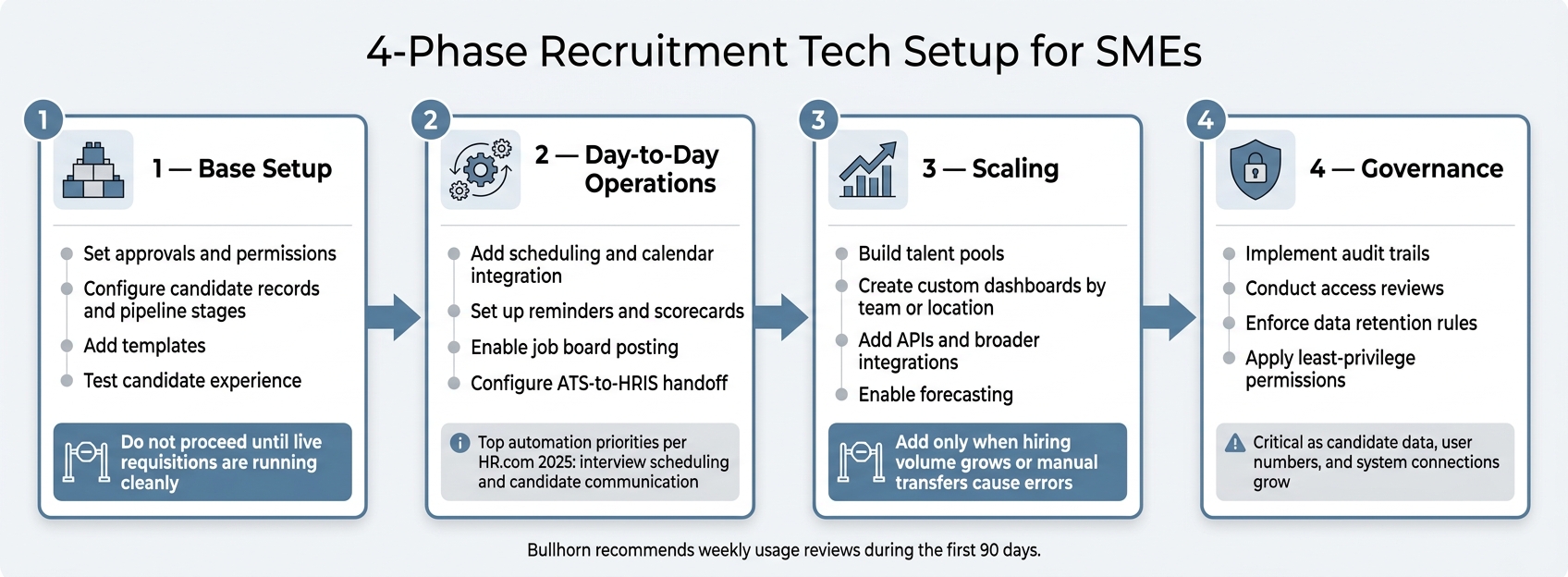
4-Phase Recruitment Tech Setup for SMEs
Once your must-have features are clear, the next job is simple in theory and easy to get wrong in practice: roll them out in the right order.
Most SMEs hit the same wall. They either set up too little and end up with a system nobody trusts (you can rate your recruitment health to identify these gaps early), or they set up too much and create a platform so cluttered that no one uses it properly. The fix is sequencing. Build in layers, and do not add the next layer until the last one is working in live hiring.
Build in 4 phases: base setup, day-to-day operations, scaling, and governance
SHRM describes successful HR tech transformation as a four-phase process, Analyze, Build, Execute, and Embed, which backs the broader idea of sequencing discovery, configuration, rollout, and continued adoption, instead of treating implementation like a one-off setup [5].
Phase 1, Base setup creates the core hiring record. This is where you set approvals, permissions, and baseline reporting. Add templates and test the candidate experience before launch. If this layer is not working across live requisitions, nothing else should be added yet.
Phase 2, Day-to-day operations cuts repetitive coordination work from the hiring process you already run. Add scheduling, reminders, templates, scorecards, job board posting, and ATS-to-HRIS handoff. HR.com’s 2025 research puts interview scheduling and candidate communication at the top of automation priorities [3]. That makes these features a sensible place to start if you want to cut admin time.
Phase 3, Scaling comes into play when hiring volume grows, multiple teams are involved, or manual transfers start causing friction. Talent pools, custom dashboards by team or location, APIs, forecasting, and broader integrations make sense when you have several recruiters, repeat hiring campaigns, or manual data movement between systems that is causing errors. Add these too early, and you get more complexity without a clear payback.
Phase 4, Governance puts formal controls around audit trails, access reviews, data retention rules, and security. This stage often gets pushed back, but it matters more as candidate data, user numbers, and system connections grow. Least-privilege access, routine permission reviews, and set retention timelines help protect the business when something goes wrong.
Bullhorn recommends weekly usage reviews during the first 90 days [4].
The next step is deciding which features are worth building now, and which can wait.
Use a prioritization table to weigh feature value against effort
High value does not always mean first. Some features save money or time only after the basics are stable. Use the table below to decide what to build now, based on effort, dependencies, hiring volume, and the risk of leaving it out.
| Capability | Business value | Implementation effort | Dependency | Hiring-volume threshold | Risk if omitted |
|---|---|---|---|---|---|
| Candidate records and standardized pipeline | High: one source of truth | Low to medium | Process map and field definitions | Any recurring hiring | Lost candidates, inconsistent status data |
| Requisition approvals and permissions | High: clarifies ownership and controls access | Low to medium | Agreed approval model | More than one hiring stakeholder | Unauthorized hiring, unclear accountability |
| Templates and scorecards | High: cuts repetitive work, improves consistency | Low | Standard role and evaluation criteria | Several similar hires annually | Slower work, inconsistent decisions |
| Scheduling and calendar integration | High when interviews are frequent | Medium | Accurate stages and interviewer roles | Multiple interviews per month | Scheduling delays, administrative burden |
| HRIS handoff | Medium to high: cuts duplicate entry | Medium | Defined offer-to-onboarding process | Regular hiring and onboarding | Data-entry errors, delayed employee setup |
| Talent pools and custom dashboards | Medium to high at scale | Medium to high | Clean historical data, stable workflows | Recurring or multi-team hiring | Repeated sourcing work, limited visibility |
| APIs and broad integrations | High only when manual transfers are material | High | Stable data model, technical ownership | Multiple connected systems | Integration cost without sufficient return |
| Audit trails, retention, and access reviews | High for sensitive or growing operations | Medium | Defined data owner and policy | Any system storing candidate data | Privacy, security, and compliance exposure |
This table helps you avoid a common mistake: treating every feature like it has to go live at once. If a capability depends on clean data, stable workflows, or technical ownership, pushing it in too early can slow hiring instead of improving it.
When hiring demand spikes, an embedded recruiting partner like Rent a Recruiter can keep delivery moving while your system matures.
Conclusion: Turn Recruitment Tech Into a Scalable Hiring System
Once your core features are in place, the next job is simple: keep only what improves hiring results.
That’s where many teams get stuck. They buy a system with lots of features, then end up shaping their hiring process around the software. In practice, it should be the other way around. Recruitment tech works best when it fits how you hire, not how a vendor thinks you should.
The SMEs that get the most from their systems tend to follow the same pattern. They map their actual hiring process and strategy. They set up pipelines and approvals with clear ownership. They automate repetitive admin. Then they build reporting around the metrics that matter to the business.
The point is straightforward: configure only what helps you hire faster, more consistently, and with better visibility.
Well-configured systems can materially improve hiring efficiency.
A simple rule helps here: keep a feature if it improves a defined hiring outcome. If it adds friction without improving speed, quality, control, or team adoption, strip it back or remove it.
A scalable recruitment system is not the one with the most functionality. It’s the one that helps your team make better hiring decisions, again and again, as hiring volume and complexity grow.
If your team doesn’t have the internal capacity to manage that setup, Rent a Recruiter can embed experienced recruiters into your team and run hiring end to end.
When every feature has a clear job, the system stays simple enough for your team to use and strong enough to scale. The goal is a repeatable hiring system that scales.
FAQs
How do I know which recruitment features to set up first?
Start by pinpointing the main bottleneck in your hiring process. Go after the features that cut the most manual work first, like candidate search, calendar syncing, and status updates.
This matters because manual hiring admin eats time fast. If your team is stuck chasing interview slots, updating spreadsheets, or digging through inboxes, you’re paying for effort that doesn’t move hiring forward.
Before you add any tech, tighten up the process itself. Standardize each hiring stage and make ownership clear. Who owns sourcing? Who moves candidates through interviews? Who signs off at offer stage? If that isn’t clear, more tools won’t fix the problem, they’ll just add noise.
Then put a core ATS in place that connects with your email and calendar tools. That gives you one source of truth for pipeline tracking and reporting, so you can see what’s moving, what’s stuck, and where time is being lost.
What metrics should an SME track to improve hiring?
SMEs should track metrics that show hiring speed, cost, and quality.
Start with your last 5 to 10 hires as a baseline. That gives you a clear view of what hiring looks like today, before you try to fix it. From there, monitor time-to-fill, time-to-hire, and cost-per-hire in USD.
You should also track pipeline conversion rates, time-in-stage, offer acceptance rate, source-of-hire, 90-day attrition, and 12-month retention.
These numbers tell you where hiring slows down, whether your offer is strong enough, which channels are pulling their weight, and whether new hires stay long enough to justify the spend. For CEOs, CFOs, and talent leaders, that means better control over cost, hiring pace, and long-term hiring results.
When should we add more automation or integrations?
Add more automation and integrations only after your hiring workflow is clear, written down, and repeatable. If you skip that step, you don’t fix the process, you just make the same problems happen faster.
Start with your core systems: ATS, CRM, and calendar. Get those working together first. When data moves cleanly between them, you cut admin time, reduce manual errors, and give your team a better view of the hiring pipeline.
From there, bring in automation for repetitive, high-volume tasks, such as:
- Interview scheduling
- Resume screening
- Onboarding paperwork
That’s where automation starts to pay off. You save time, your team spends less effort on admin, and hiring moves with fewer delays.