If preboarding is manual, hiring volume will hit your team before headcount does.
I see the same pattern in scaling SaaS, Technology, IT, Fintech, Engineering, Security, Insurance, and Professional Services firms. More hires should mean more growth. Instead, HR, IT, payroll, and hiring managers get pulled into form chasing, access delays, and day-one issues. Preboarding automation cuts that admin load, saves around 2 to 3 hours per hire, and gives you a clearer path from accepted offer to day one.
For CEOs, CFOs, and People leaders, the business case is simple:
- Lower admin cost across HR, IT, payroll, and hiring teams
- Less lost time from manual follow-ups and repeat data entry
- Fewer day-one failures like missing access, kit, or payroll details
- Better early joiner confidence during the period when first impressions are being formed
- More hiring capacity without adding the same level of internal admin work
A rough example makes the point. If you save 2.5 hours per hire across 20 hires per month, that gives back 50 hours monthly. At $42 per hour, that is $2,100 per month or $25,200 per year in team time.
What matters is not just automation itself. It is the process behind it. You need:
- one trigger after offer acceptance
- one owner for each task
- one deadline for each handoff
- one rule for escalation when something slips
- secure systems for tax, payroll, and identity data
The goal is simple: let systems handle repeat admin, so your people can handle judgment, follow-up, and manager contact. That is where preboarding starts to support hiring output, not slow it down.
If your offer-to-start process feels patchy, rate your recruitment process to identify where to look first.
Where automation fits in the preboarding workflow
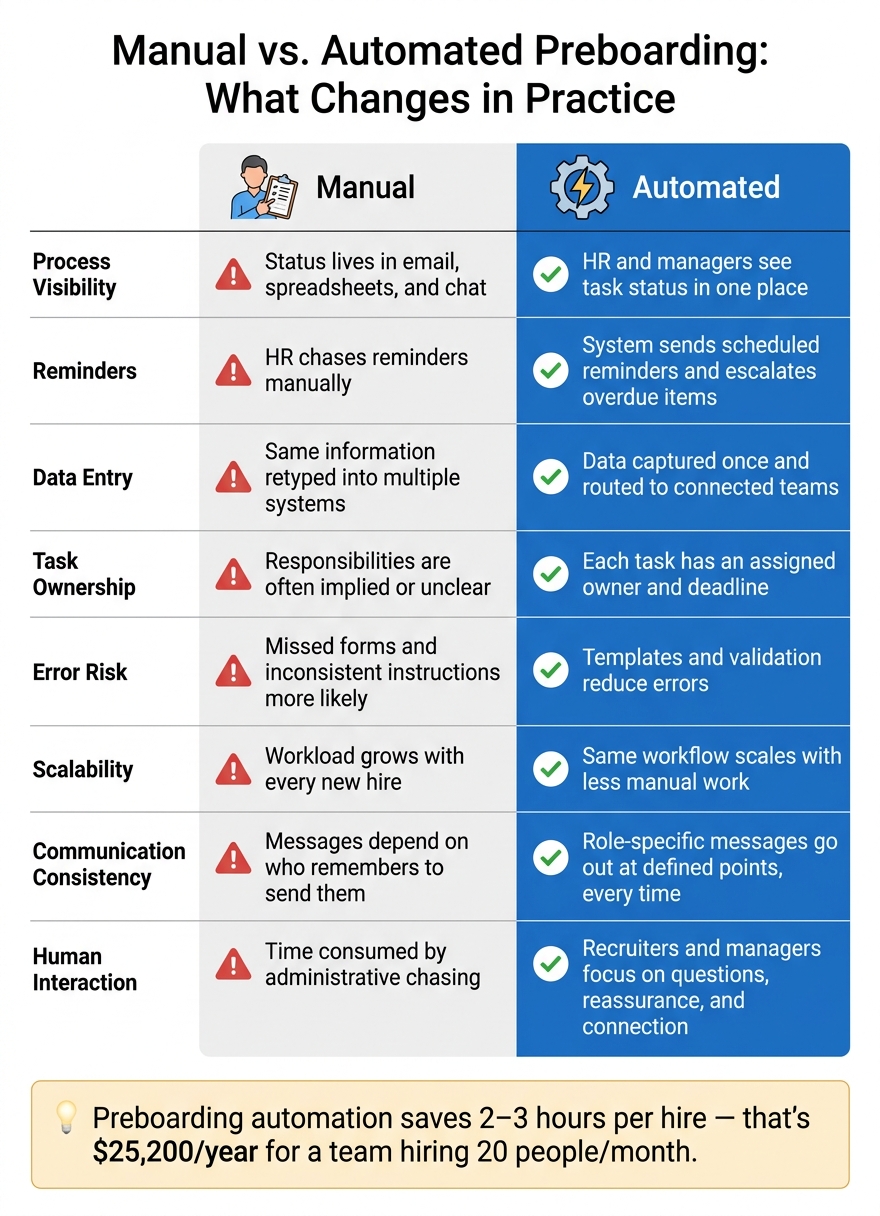
Manual vs. Automated Preboarding: Key Differences at a Glance
When manual handoffs start slowing preboarding, automation should take over the repeatable steps. It works best for coordination tasks that happen again and again: sending forms, routing requests, and chasing deadlines. The point is simple, cut admin work without stripping out the human side.
Preboarding tasks that can be automated without losing the human element
The right trigger is a signed offer and confirmed start date in your ATS or HR platform. One event can set the whole workflow in motion automatically: creating a preboarding record, sending a personalised welcome message, assigning tasks to HR, IT, and payroll, and notifying the hiring manager.[3]
From there, the rest can run in a set sequence without someone having to push each step manually.[4] That includes:
- forms and tax details
- policy acknowledgements
- benefits enrolment
- equipment and system access
- first-day scheduling
That does not mean people step back. The recruiter should still check in after acceptance to make sure the new hire has what they need. The hiring manager should still send a personal welcome and talk through expectations before day one.
That split matters. Automation handles coordination. People handle exceptions, reassurance, and trust-building. Research on onboarding shows employees are much more likely to rate the experience well when managers stay actively involved.[1]
You see that gap in day-to-day execution.
Every automated task should have one owner, one deadline, and one escalation rule. If a background check stalls or an IT ticket sits untouched, the system should alert the task owner first, then escalate to HR or the hiring manager after a set period. That stops delays from drifting for days without anyone noticing.
Sensitive data needs tighter control too. Social Security numbers, banking details, and tax forms should move through secure HR or payroll systems, not standard email or shared spreadsheets.[2]
Manual vs. automated preboarding: what changes in practice
This shift is not just about moving faster. It changes who owns each task, how progress is tracked, and how often things get missed.
| Area | Manual preboarding | Automated preboarding |
|---|---|---|
| Process visibility | Status lives in email, spreadsheets, and chat | HR and managers see task status in one place |
| Reminders | HR chases reminders manually | The system sends scheduled reminders and escalates overdue items |
| Data entry | The same information may be retyped into multiple systems | Data is captured once and routed to connected teams |
| Task ownership | Responsibilities are often implied or unclear | Each task has an assigned owner and deadline |
| Error risk | Missed forms and inconsistent instructions are more likely | Templates and validation reduce errors |
| Scalability | Workload grows with every new hire | The same workflow scales with less manual work |
| Communication consistency | Messages depend on who remembers to send them | Role-specific messages go out at defined points, every time |
| Human interaction | Time gets consumed by administrative chasing | Recruiters and managers focus on questions, reassurance, and connection |
sbb-itb-a23bd6a
The business case: time savings, fewer delays, and stronger early engagement
Cut admin workload and protect hiring capacity
Once your workflow is automated, the return shows up fast. Preboarding automation can save 2 to 3 hours per hire by removing follow-ups, manual data entry, and status chasing.[5][7]
The commercial case is simple. Use this formula: hours saved per hire × monthly hires × fully loaded hourly cost.
If you save 2.5 hours per hire across 20 hires per month, that gives you back 50 hours. At an internal HR cost of $42 per hour, that equals $2,100 per month, or $25,200 per year, in admin capacity.[6]
That time can go back into work that moves hiring forward:
- Sourcing
- Hiring manager support
- Compliance review
- Employee engagement
- Process improvement
For scaling companies, this is the point. You hire more people without adding more admin load.
Improve the new-hire experience before the first day
Time saved matters. But the first few weeks matter just as much.
According to BambooHR research, 70% of new hires decide whether a job is the right fit within the first month, and 29% make that decision within the first week.[8]
That means your preboarding process shapes opinion early, often before day one even starts.
A clear timeline helps. Right after acceptance, send a welcome message with a short task list. Keep it simple. One to two weeks before the start date, a manager check-in and a short team intro can remove a lot of uncertainty. Before day one, confirm equipment delivery, system access, and the first-day schedule.
Automation handles the timing. Your people add the human side.
That balance matters. Effective onboarding also supports engagement, 89% of employees who experienced it said it helped them feel very engaged.[9] Automation supports that result when it adds structure and consistency. It falls flat when used as a substitute for manager contact or team connection.
Metrics to track when measuring preboarding performance
Measure preboarding against a baseline. If you don’t know where you started, it’s hard to prove what changed.
A small set of metrics is usually enough:
| Metric | What it tells you |
|---|---|
| HR admin hours per hire | Whether automation is cutting coordination time |
| Average time to complete required forms | Whether new hires are finishing tasks on time |
| Preboarding completion rate before start date | Whether the process is being finished on schedule, by department and manager |
| % of hires with system access ready on day one | Whether IT handoffs are working |
| Follow-ups per hire | Whether the workflow runs on its own or still depends on chasing |
| Day-one readiness issues | Where the process breaks and why |
| New-hire readiness score | How prepared new hires feel before they start |
It’s also worth watching early attrition at 30, 60, and 90 days. Just don’t treat it as one headline number. Look at it by role, manager, and cohort so you can see what’s driving the pattern.
How to build a scalable preboarding process without overcomplicating it
Build a process that can handle change without falling apart when roles, work location, schedules, or start dates shift. A simple workflow protects HR capacity as hiring volume grows. Once your core tasks are automated, the next job is making sure the process can flex with role and location changes.
Map the workflow, assign owners, and separate required from optional steps
Before you touch any software, map what happens between offer acceptance and day one. Write down every step: offer confirmation, background checks, payroll and tax forms, benefits enrollment, equipment requests, account provisioning, manager prep, and first-day scheduling.
For each step, note:
- the trigger
- the deadline
- the owner
- any likely exceptions
If you automate a messy process, you just scale the mess.
Once the workflow is mapped, split it into three groups: required compliance (employment forms, work authorization, tax documentation), operational readiness (laptop delivery, system access, payroll setup), and engagement (welcome messages, team intros, optional reading). Automation should lock down the first two. Keep engagement steps optional.
That split makes automation easier and cuts extra handoffs.
You also need one process owner, usually in HR, People Operations, or Talent Operations, to keep the workflow up to date and sort out cross-functional issues. Then assign each task clearly. Recruiting starts the workflow. IT handles devices and access. Payroll manages compensation setup. The hiring manager confirms the first-week plan. The new hire completes the required forms. One task, one owner.
Build one core workflow for everyone, then layer in rules based on role type, location, work location and schedule, and start date. A remote software engineer may need a laptop shipment, VPN access, and repository permissions. An office-based sales hire may need a badge, desk, and in-person orientation. Use rules to route those steps instead of building separate manual checklists for every hire type.
Common mistakes to avoid when automating preboarding
Fix duplicate forms, rubber-stamp approvals, and unclear handoffs before you automate anything.
Another common mistake is sending too many messages. New hires don’t need ten separate emails from five teams. Pull communication into one place and give them a clear view of what’s still outstanding. That cuts confusion and saves follow-up time for HR and managers.
Exception handling matters too. Delayed background checks, changed start dates, missing documents, and shipping issues are all normal. A process that scales should pause or reroute tasks when those issues come up, instead of relying on someone to send a manual email and hope it gets sorted.
Privacy and security controls often get missed early. Use secure portals, role-based access, and clear retention rules. Security guidance points to data minimization, least-privilege access, encryption, multifactor authentication for privileged users, and documented vendor controls.[10][11][12]
Use the table below to map tasks, owners, metrics, and the points where a person still needs to step in. Automation handles routing. HR and managers still handle judgment, welcome, and exceptions.
| Preboarding task | Automation opportunity | Owner | Success metric | Human checkpoint |
|---|---|---|---|---|
| Send offer-acceptance and next-step instructions | Trigger a personalized task list when the offer is accepted | HR or recruiting | Workflow launched within 1 business day | HR confirms the employee understands next steps |
| Collect payroll and employment forms | Secure portal with reminders and completion tracking | Payroll or HR | Forms completed before payroll cutoff | Payroll reviews exceptions or missing information |
| Order and ship equipment | Create an IT ticket based on role and work location and schedule | IT | Equipment delivered and functional by day one | IT confirms the correct device and access level |
| Provision applications and permissions | Role-based access rules and approval routing | IT and hiring manager | Required access available on day one | Manager verifies least-privilege access |
| Prepare first-day schedule | Generate a calendar plan from role and location templates | Hiring manager | Schedule sent before the start date | Manager adds personal welcome time and team meetings |
| Send culture and team information | Schedule a limited series of targeted messages | HR or manager | Message open rate | Manager checks that information is relevant |
| Confirm readiness | Dashboard showing incomplete or overdue tasks | Process owner | % ready by day one | Process owner resolves blockers and escalates exceptions |
Start by testing one high-volume scenario, such as a domestic remote full-time hire. That gives you a clean way to spot weak points before you roll the workflow out across other role types. Once the common path works well and exceptions are handled cleanly, you can expand with a lot less friction.
Conclusion: Connect preboarding automation to broader hiring capacity
As hiring volume goes up, preboarding stops being a back-office admin job. It becomes part of your hiring capacity.
When you automate repeatable steps, you cut delays, improve visibility, and protect the team capacity needed to keep hiring on track. That matters more than most teams think. A slow or messy handoff between offer acceptance and day one can waste the time and money you already put into hiring.
The main gains are clear: time saved, consistency, visibility, and stronger early confidence. But those gains only count if you measure them.
Preboarding is the final handoff in hiring, not a separate HR task. If you want to know whether your hiring spend is turning into successful starts, track metrics like:
- accepted-offer-to-start rate
- paperwork completion time
- account readiness
- first-day readiness
Those numbers show you where friction sits, and whether your process is helping people start on time or quietly slowing everything down.
That only works if the wider hiring process is stable and owned. When hiring capacity is under pressure, an embedded recruiter keeps the offer-to-start handoff clean, so automation runs on accurate data instead of patchy inputs. Rent a Recruiter places experienced recruiters directly into your team to manage hiring end-to-end, with the structure and ownership preboarding automation needs.
If you’re not sure where the main constraint sits, start by mapping the steps from offer acceptance to day one and measure where delays happen. Book a Call to talk through whether the issue is workflow, capacity, or both.
FAQs
How do we know if preboarding should be automated first?
Prioritize automating preboarding when manual, repetitive admin work starts slowing things down before a new hire’s first day. You’ll usually spot it in the same places: chasing compliance paperwork, coordinating IT setup, or missing key milestone reviews.
The best place to start is with high-volume, low-judgment tasks such as tax forms, direct deposit, and IT requests. Those jobs eat up time, but they don’t need constant human input.
One word of caution: don’t automate a messy process. Standardize it first. If the workflow is inconsistent, automation just helps bad habits move faster.
What systems need to connect for preboarding automation to work?
For preboarding automation to work, your ATS or HRIS needs to sit at the center of the process and connect with:
- IT provisioning tools
- Project management software
- Document collection platforms
Once a candidate accepts an offer, the system should kick off the next steps straight away. That includes hardware and access setup, compliance forms, and manager check-ins.
This matters for one simple reason: manual handoffs slow hiring down. If HR is chasing IT, and managers are chasing HR, things slip. New hires show up on day one without the right kit, access, or paperwork in place. That costs time, creates friction, and leaves a poor first impression.
A shared dashboard gives HR, IT, and hiring managers one view of progress. You can see what’s done, what’s blocked, and where delays need action before the start date.
How can we automate preboarding without making it feel impersonal?
Use automation for repetitive admin tasks, and keep human interaction for the moments that matter most. Automate paperwork collection, system provisioning, and scheduling so your team spends less time on back-and-forth admin and more time getting new hires ready to perform.
Then make the experience feel personal. A warm welcome from the manager, a peer buddy, and live introductions help new starters feel expected, supported, and part of the team from day one.
That balance matters. Automation cuts admin time and keeps preboarding on track. Personal touchpoints build connection early, which helps protect against drop-off before start date.