Hiring accessible talent isn’t just the right thing to do; it’s a business imperative. Companies that ignore accessibility risk legal penalties, lost talent, and inefficiencies in their hiring processes. But with the right steps, you can create a process that’s fair, scalable, and compliant with the Americans with Disabilities Act (ADA).
Here’s what you need to know:
- Accessible job postings: Ensure compatibility with screen readers and assistive technologies, and clearly state how candidates can request accommodations.
- Standardized accommodations: Create a consistent process for handling requests at every stage, from applications to interviews.
- Training for hiring teams: Equip recruiters and managers to recognize bias, follow ADA guidelines, and recruit a diverse workforce based on skills, not assumptions.
- Accessible tools: Audit your assessments and interview platforms to remove barriers for candidates with disabilities.
- Continuous improvement: Regularly test your systems, track metrics like accommodation response times, and adjust to stay compliant with evolving standards.
The bottom line? Accessibility isn’t just about compliance; it’s about unlocking a larger talent pool and building a hiring process that works for everyone. If your hiring process feels overwhelming, Rent a Recruiter can help you embed accessibility into your recruitment strategy while keeping costs under control.
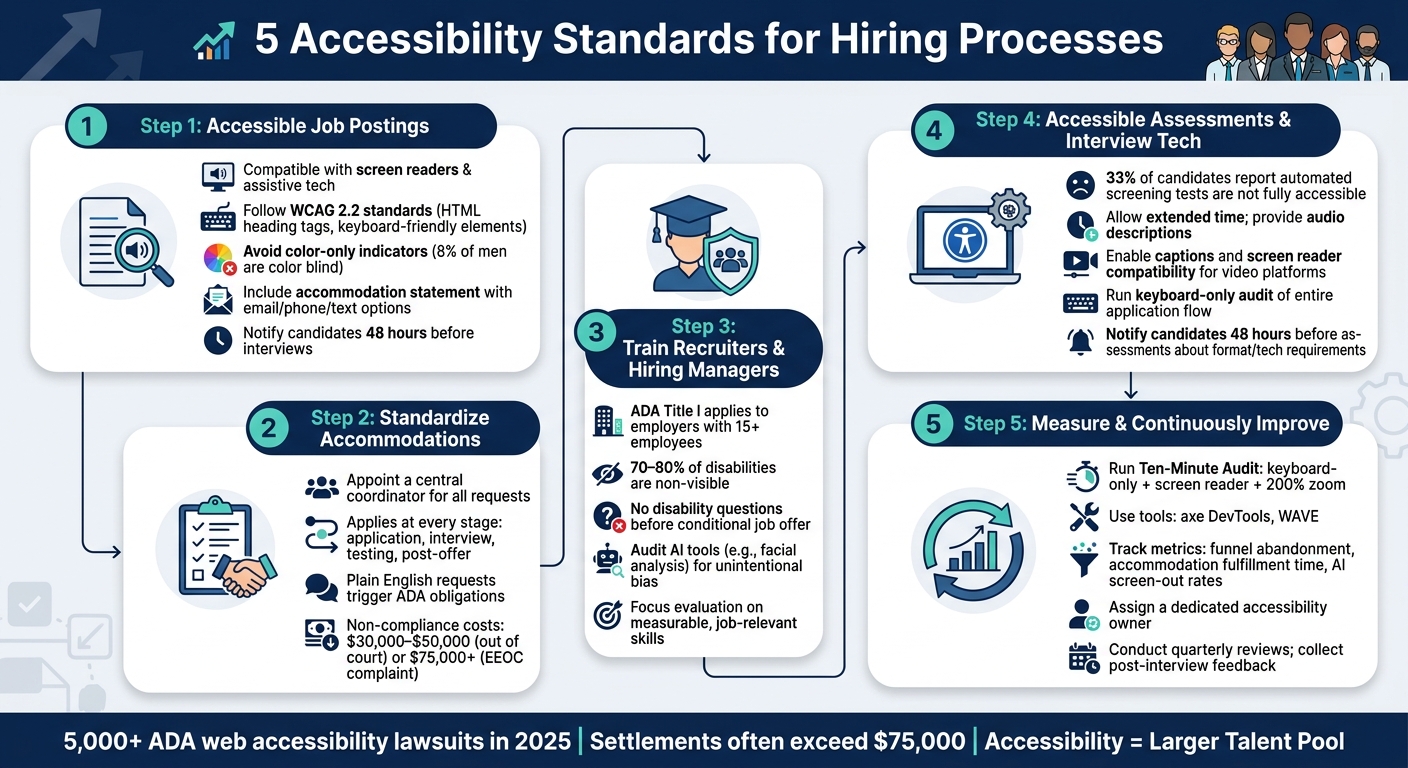
5 Accessibility Standards for Hiring Processes
Webinar | ADA’s Reasonable Accommodation: Compliance Tips for Employers
sbb-itb-a23bd6a
1. Create Accessible Job Postings and Application Channels
The job posting is often a candidate’s first interaction with your company, and it can unintentionally create barriers. If the posting isn’t compatible with screen readers or the application form can’t be navigated by keyboard, qualified candidates might be excluded before they even apply.
To ensure accessibility, all job descriptions, careers pages, and online forms should support assistive technologies like screen readers and voice recognition tools. Adhering to WCAG 2.2 standards is key: use proper HTML heading tags, link labels to form fields, and make sure all interactive elements are keyboard-friendly [7]. Avoid relying solely on color to indicate required fields, as approximately 8% of men are affected by color blindness [8]. These adjustments not only improve accessibility but also create a more efficient and scalable recruitment process as your hiring needs grow.
When writing job descriptions, focus on the essential functions of the role rather than rigid task methods [5][3]. For example, instead of stating "must be able to lift boxes to the top shelf", reframe it to emphasize the outcome, such as "responsible for organizing inventory." This small shift can prevent inadvertently excluding candidates who could perform the role with minor adjustments, broadening your talent pool.
Additionally, every job posting and careers page should include a clear accommodation statement, offering multiple contact options like email, phone, or text [1]. The EEOC highlights the importance of this:
"An employer must provide a reasonable accommodation to a qualified applicant with a disability that will enable the individual to have an equal opportunity to participate in the application process and to be considered for a job." [1]
Finally, notify candidates at least 48 hours before interviews or assessments [1]. This allows them sufficient time to request accommodations, reducing last-minute stress and ensuring a smoother process for everyone involved.
Standardizing these practices across your hiring journey is the next step.
2. Standardize Reasonable Accommodations Across the Hiring Journey
Consistency is key when it comes to accommodations throughout your hiring process. An uneven approach not only frustrates candidates but also opens the door to legal risks. To avoid these pitfalls, establish a clear, standardized process that applies to every stage of hiring.
Start by appointing a central coordinator to handle all accommodation requests, with a backup in place for continuity [9][11]. This ensures requests are managed efficiently and candidates receive consistent responses, preventing any issues from slipping through the cracks.
It’s important to act promptly, even if a candidate doesn’t use formal legal terms to make a request. The Equal Employment Opportunity Commission (EEOC) provides clear guidance:
"An individual may use ‘plain English’ and need not mention the ADA or use the phrase ‘reasonable accommodation’ when requesting an accommodation." [9]
For example, if a candidate mentions difficulty completing timed tests due to a medical condition, this is enough to trigger obligations under the Americans with Disabilities Act (ADA), even if they don’t submit a formal request.
The ADA outlines the need for accommodations in three key areas: access to the application process, the ability to perform essential job functions, and equal access to employment benefits and privileges [9]. Each stage requires its own evaluation, as the accommodations needed during an interview may differ entirely from those required on the job [11]. Keeping these assessments separate helps avoid assumptions that could lead to bias.
Standardizing accommodations isn’t just about compliance; it’s also a smart financial decision. An EEOC complaint can cost employers an average of $75,000 or more in legal fees [12]. Even resolving a charge without going to court typically costs between $30,000 and $50,000 [12]. By implementing a consistent process, you can avoid these costly scenarios. The table below highlights the compliance actions required at each hiring stage:
| Hiring Stage | Compliance Action |
|---|---|
| Job Posting | Include an EEO statement and provide a contact for accommodation requests |
| Application | Offer alternative formats (e.g., large print, audio) upon request; avoid disability-related questions |
| Interview | Ensure physical accessibility and provide interpreters or other aids as needed |
| Testing | Adjust the environment or format (e.g., private room, extended time) if requested |
| Post-Offer | Conduct medical exams only if required for all candidates in the same job category |
Confidentiality is another critical component. Keep all medical information strictly private, sharing only what’s necessary to implement the accommodation [10][11]. Medical records must be stored separately from application or personnel files to ensure compliance [5].
3. Train Recruiters and Hiring Managers on Accessible, Bias-Aware Practices
Even the best-designed accommodation process can fail without proper training for those implementing it. Recruiters and hiring managers need a solid understanding of the legal framework and practical skills to ensure fair treatment throughout the hiring process.
From a legal perspective, ADA Title I applies to all private employers with 15 or more employees and governs every hiring stage, from job postings to offers [5][13]. Managers must not ask about an applicant’s disability or its severity before a conditional job offer is made. As the EEOC states:
"The ADA does not require that an employer hire an applicant with a disability over other applicants because the person has a disability. The ADA only prohibits discrimination on the basis of disability." [5]
However, compliance alone doesn’t guarantee fairness. Addressing bias in candidate evaluation is equally important.
Since 70% to 80% of disabilities are non-visible, recruiters may not even realize a candidate has a disability [14]. Training should focus on identifying and mitigating biases like affinity bias, encouraging evaluation based on measurable, job-relevant skills rather than subjective factors such as appearance or eye contact. The Job Accommodation Network offers this reminder:
"Unless you are hiring someone to be a recruiter, the ability to interview well is not the primary skill set you are assessing." [1]
Additionally, AI and automated screening tools require careful oversight. For example, facial analysis software may unintentionally disadvantage candidates with speech impairments, autism, or other conditions that affect video-based communication [2][14]. The ADA is clear on this point: "An employer who chooses to use a hiring technology must ensure that its use does not cause unlawful discrimination on the basis of disability." [2] Recruiters and hiring managers should review every tool in their hiring process to ensure it doesn’t unfairly exclude qualified candidates.
The table below outlines the key training topics and their objectives:
| Training Topic | Key Learning Objective |
|---|---|
| Legal Compliance | Understanding ADA Title I/II and EEOC enforcement [5][13] |
| Accommodation Requests | Recognizing informal requests and initiating the interactive process [1] |
| Interview Etiquette | Avoiding prohibited medical questions; focusing on essential job functions [5] |
| Bias Awareness | Identifying affinity bias and using objective, competency-based criteria [4] |
| Technology Use | Ensuring AI and testing tools do not unfairly screen out qualified candidates [2] |
4. Design Accessible Assessments and Interview Technologies
Evaluation tools are just as important as face-to-face interactions in the hiring process. A Workplace Technology Study (WTS) found that about 33% of participants reported automated screening tests during the application process were not fully accessible [15]. That means one in three candidates could be excluded before their application even reaches a recruiter.
The Americans with Disabilities Act (ADA) highlights this issue clearly. As ADA.gov explains:
"Under the ADA, employers must ensure that any such tests or games measure only the relevant skills and abilities of an applicant, rather than reflecting the applicant’s impaired sensory, manual, or speaking skills that the tests do not seek to measure." [2]
This is especially relevant for gamified or timed assessments, which can unintentionally disadvantage candidates with dyslexia, motor impairments, or neurodivergent conditions. These tools may not reflect a lack of ability but instead expose candidates to barriers created by the format itself. To ensure fairness and comply with WCAG 2.2 standards, consider these practices:
- Allow extended time for assessments and include audio descriptions for visual elements.
- Use programmatically associated labels for all form fields rather than relying on placeholder text.
- Provide text-based error messages instead of relying solely on color-coded indicators.
- Ensure full keyboard navigation without "focus traps."
- For video interview platforms, enable captions and screen reader compatibility.
Running a keyboard-only audit of your application and assessment process is a simple but effective way to identify issues. If you can’t complete it without a mouse, there are likely accessibility barriers that need addressing.
Employers are also responsible for any third-party AI tools that might unlawfully exclude qualified candidates [2]. Before implementing AI-driven solutions – whether for analyzing video interviews, scoring resumes, or ranking applicants – ask developers if they considered accessibility during design and testing. The American Foundation for the Blind cautions:
"Recruitment and hiring processes should be accessible and equitable. Artificial Intelligence (AI) may act to reduce the opportunities for people with disabilities to be equitably considered for jobs they are qualified for." [15]
Additionally, notify candidates at least 48 hours before an assessment about the format and required technologies. This gives them time to adjust any assistive settings they may need. As the Job Accommodation Network puts it: "Building in accessibility can serve as a welcome mat for individuals with disabilities and also reduce the need for accommodations." [1]
Taking these steps not only ensures compliance but also creates a fairer, more inclusive hiring process while setting the stage for continuous improvement in accessibility.
5. Measure Accessibility and Continuously Improve Hiring Processes
Accessibility isn’t a one-and-done task. Updates to platforms, new content, and changes in standards – like the move from WCAG 2.1 to WCAG 2.2 – can cause your hiring process to slip out of compliance without anyone realizing it. As Apikuo Journal aptly states:
"A careers page is not accessible because someone says it is. It is accessible when candidates can understand the page, complete the form, request an accommodation, and move through the interview process without hidden barriers." [7]
To stay compliant, start by thoroughly testing your application process. A Ten-Minute Audit is a great place to begin: navigate the entire application flow using only a keyboard, an operating system screen reader (like VoiceOver on Mac or Narrator on Windows), and 200% browser zoom. If you encounter any navigation roadblocks, that’s a barrier. Pair this manual check with automated tools like axe DevTools or WAVE to catch large-scale technical issues. However, automated scans alone aren’t enough. The Department of Justice has made it clear that a clean automated report doesn’t guarantee accessibility [7].
Your audit results should feed directly into measurable performance metrics. For example, tracking funnel abandonment rates will highlight where disabled applicants drop off, while monitoring accommodation fulfillment times shows how quickly your team responds to requests. A form that takes more than 15 minutes to complete using a keyboard and screen reader is effectively inaccessible to many disabled candidates, even if the individual controls pass an audit [6].
| Metric | Insight Provided |
|---|---|
| Funnel abandonment by stage | Identifies where disabled candidates exit the process |
| Accommodation fulfillment time | Measures how quickly your team addresses requests |
| Time-to-complete (assistive tech) | Highlights whether forms are overly time-consuming for disabled users |
| AI screen-out rates by disability type | Reveals potential systemic bias in algorithms |
| Usage of alternate application paths | Shows if the primary application form is failing users |
The U.S. Department of Justice advises that "employers should examine hiring technologies before use, and regularly when in use, to assess whether they screen out individuals with disabilities who can perform the essential functions of the job." [2] This is especially relevant for AI-based tools like resume screeners and video interview platforms. Regularly check for bias in your algorithms and compare screen-out rates against historical data to spot trends.
To create lasting change, assign a dedicated owner for accessibility metrics and accommodation requests. Implement quarterly reviews, set up a direct email channel for candidates to report barriers, and use post-interview surveys to catch issues your audits might miss. With consistent ownership and regular reviews, accessibility evolves from a one-time initiative to an ongoing, reliable system.
Conclusion
Making hiring accessible isn’t just the right thing to do – it’s a smart business move. With over 5,000 ADA web accessibility lawsuits reported in 2025 and settlements often topping $75,000, the financial risks of non-compliance are clear [13]. But beyond avoiding penalties, accessibility reflects a company’s commitment to inclusivity and fairness.
When businesses align accessible job postings, standardized accommodations, trained hiring teams, accessible assessments, and ongoing measurement, they create a hiring process where every element supports and strengthens the others. As the Job Accommodation Network explains:
"Building in accessibility can serve as a welcome mat for individuals with disabilities and also reduce the need for accommodations." [1]
For high-growth SMEs, meeting these standards can feel overwhelming, especially when hiring at scale. That’s where Rent a Recruiter steps in. By embedding skilled recruiters directly into your team, Rent a Recruiter ensures accessibility standards are upheld while keeping your hiring process efficient and scalable. No inflated fees, no delays – just the structure and consistency your team needs.
Companies that embrace accessibility as an ongoing effort will not only reduce legal risks but also unlock access to talent pools others overlook. That’s how you build stronger teams and a more competitive edge.
FAQs
What’s the fastest way to check if our application is screen-reader and keyboard accessible?
Testing accessibility can be as simple as disconnecting your mouse and relying solely on your keyboard. Here’s how to do it:
- Use Tab and Shift + Tab to move forward and backward through interactive elements.
- Press Enter or Space to activate buttons, links, or other controls.
- Hit Escape to close modals or popups.
As you navigate, check for a few key things:
- Visible focus indicator: Ensure there’s a clear visual cue showing where you are on the page.
- Logical tab order: Navigation should follow a natural and intuitive sequence.
- No keyboard traps: You should never get stuck on an element without a way to move forward or back.
For screen reader testing, use built-in tools like VoiceOver on macOS or NVDA on Windows to review critical user flows. This helps ensure your site is functional and accessible for all users.
How should we handle an accommodation request that isn’t explicitly labeled as one?
If a candidate asks for a change without labeling it as an accommodation or referencing the ADA, look for any connection to a medical condition or impairment. If it’s not immediately clear, ask the candidate to clarify their needs and the reason behind the request. Rather than making assumptions, simply ask, "How can we support you?" This creates a welcoming space for open communication while respecting boundaries.
How can we tell if our AI screening tools are disadvantaging candidates with disabilities?
AI screening tools can unintentionally put candidates with disabilities at a disadvantage by focusing on traits that have little to do with job performance, such as speech patterns or typing speed. To avoid this, audit your tools to confirm they only evaluate skills directly tied to the role. Ask vendors for validation studies and documentation showing diversity in their training data. Also, ensure the platforms are accessible and provide accommodations like extended time or alternative formats. This helps prevent the exclusion of qualified candidates and creates a fairer hiring process.